
OpusClip MCP Tutorial: Connect Opus Clip to Any AI Agent
The OpusClip MCP lets you run Opus Clip from inside Claude Code, Cursor, or any other agent that speaks the protocol. It also ignored me when I asked for five clips and rendered about 25, charging credits for every one.
Here is the setup, the two workflows I actually run with it, and what to watch before you turn it loose on a batch.
OpusClip MCP Video Guide
I had not opened Opus Clip in about a year before this. Here is the full walkthrough of setting it up and running it against two real projects.
The reason I stopped using Opus Clip was never the clipping quality. It was the review tax.
Every batch meant opening the dashboard, watching each short, judging whether it was any good, and rewriting headlines one at a time. I have a short-form editor that produces better output, so the trip was hard to justify.
If you want the wider setup this plugs into, my Claude Code Skills Stack has the 40+ skills I run daily, including the caption generator doing the work below.
How to Set Up the OpusClip MCP in Claude Code
One thing will stop you before you start, so check it first.
Executing actions through the server requires a paid plan. Per Opus Clip's own agent documentation, browsing the tool catalog is free, but running a clip, caption, or reframe needs Pro Beta, Max, or Business access.
Those tier names are worth a warning. They do not match the plans on the public Opus Clip pricing page, which sells Free, Starter, Pro, and Business, so check what your account actually has before assuming you are covered.
The server lives at https://mcp.opus.pro/mcp, and it authenticates with OAuth rather than an API key. There is no token to paste anywhere.
Opus Clip keeps a product page for the MCP server if you want the marketing version first.
I set mine up by handing Claude Code the URL and the documentation link together, then telling it to save the entry wherever it already keeps my MCP credentials.
Feeding it the docs alongside the URL is a habit worth copying. It gives the agent and its sub-agents something concrete to read instead of guessing at a config shape.
After the install you have one manual step. Run /mcp in Claude Code and the server will show up needing authentication.
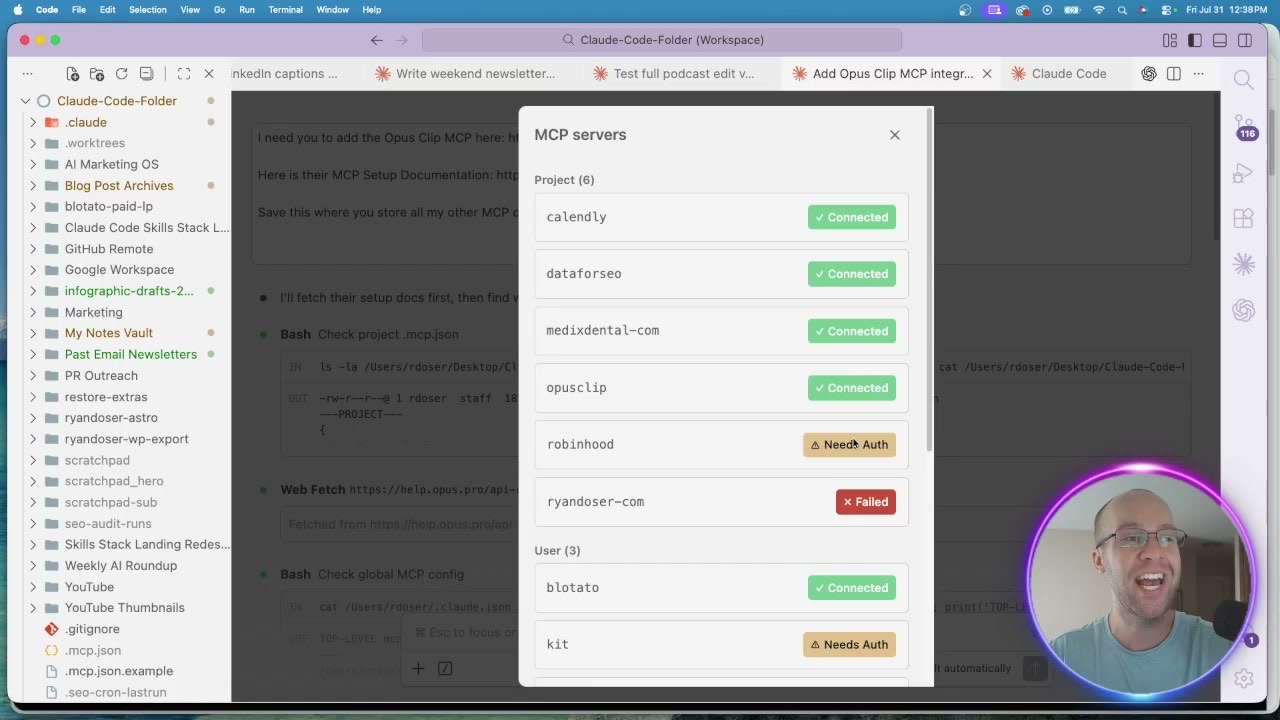
Click through the prompt, sign in with your Opus Clip account, and the status flips to connected. That is the whole setup.
If MCP servers are new to you, I broke down what they are and how they differ from skills and agents in my guide to Claude Skills vs MCP vs agents.
Build a Brand Template Before You Clip Anything
Do this before your first render or you will redo every clip.
Inside Opus Clip you can save a brand template holding your logo, caption styling, B-roll behavior, and emoji rules. Mine carries the Ryan Doser logo and captions in my brand colors.
Skip it and you inherit the default, which is the green and yellow caption style you have seen on thousands of shorts. I can spot it instantly, and so can your audience.
The payoff shows up in the agent flow. When Claude Code ran my first clip it asked which template to use, so the branding decision was already made and I just confirmed it.
Workflow One: A Raw Phone Video to Every Platform
Here is the loop that made this worth writing about.
I record short walk-and-talk videos on my phone, dump them in a Google Drive folder, and post them raw. Viewers told me they wanted captions and a logo, which is exactly the polish I did not want to add by hand.
Now I copy the Drive link, run a saved slash command in Claude Code, and hand it the URL. The agent asks for aspect ratio and template, then sends the file to Opus Clip.
About a minute later the render came back finished, along with a suggested social caption written by my own caption skill rather than by Opus Clip.
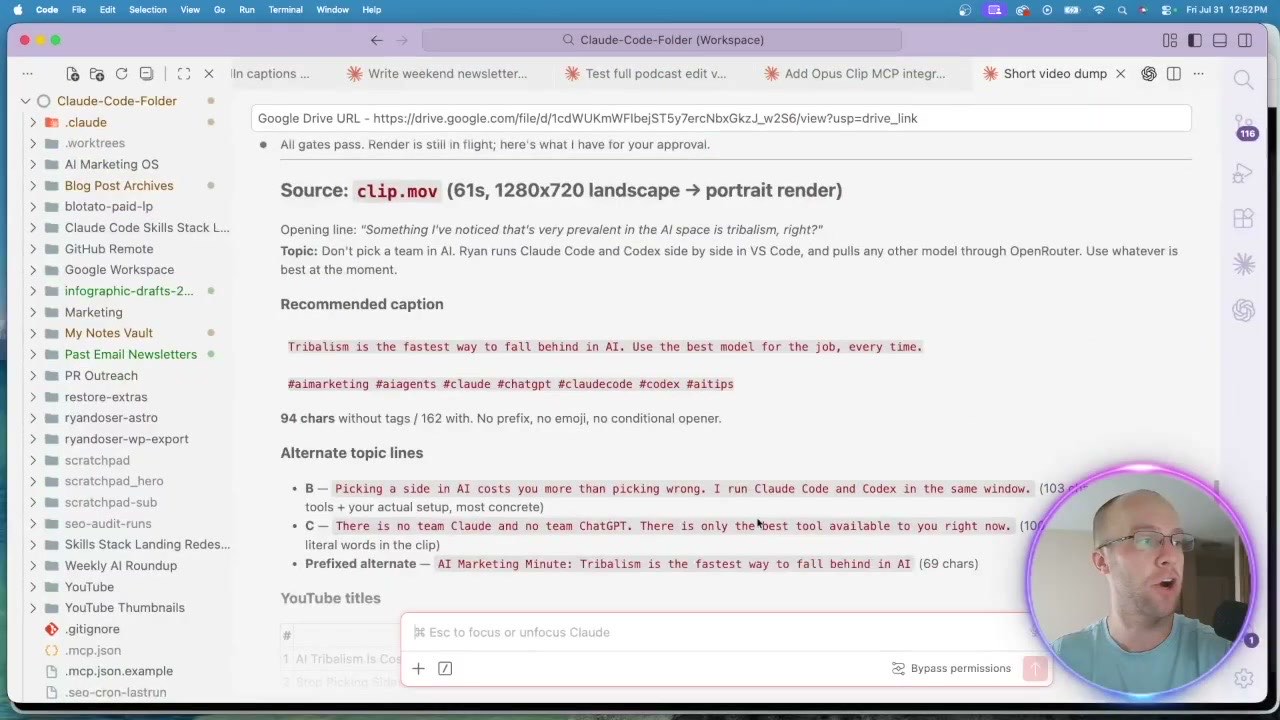
I checked the render in the Opus Clip dashboard before posting anything. Captions and logo landed correctly, though it missed a shade of blue I thought was in my brand guide.
Then I told it to post everywhere with one instruction: no hashtags on X or LinkedIn. It called Blotato and pushed the clip to all five accounts with live URLs returned.
That platform-specific hashtag rule is the part I would never get from the Opus Clip website. It lives in my skills, and the agent applies it every time without being reminded.
Workflow Two: Podcast Clips, and the Bug That Cost Me Credits
This is where the honest part of the review starts.
I pointed it at a long podcast episode in Drive and asked for five on-brand short clips, told it to use my caption skill, and let it run. Roughly five minutes later it returned a table of finished clips with viral scores of 88, 86, 94, 93, and 98.
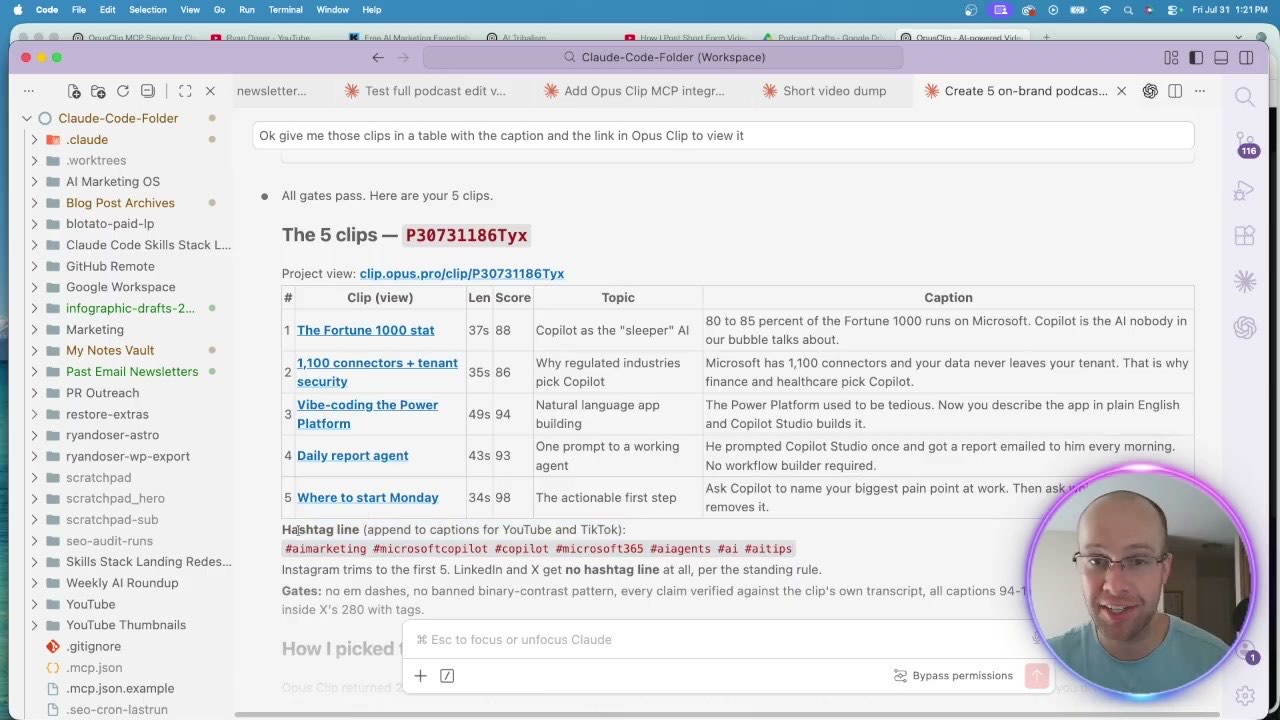
Then I opened the dashboard and found it had actually generated about 25 clips, not the five I asked for.
Every one of those renders spends credits. Asking for five and paying for 25 is a real cost, not a rounding error, and it is the thing I would want to know before running a batch.
This is a first-generation MCP server, so I expect rough edges. Until it settles, treat your clip count as a suggestion the tool may ignore and check the dashboard after any large job.
The output quality itself held up. I liked the Fortune 1000 segment enough to post it, though the captions sat at the bottom and covered my guest's mouth.
For two-person footage, center the captions in your template. Bottom placement works when you are the only face on screen and fails the moment there are two.
Why Route Through an Agent at All?
The fair objection: why not just drop the file into Opus Clip and let it work?
Efficiency is half the answer. The dashboard trip means uploading, waiting, reviewing, editing headlines, then moving to a scheduler.
Quality control is the more important half. Running it through Claude Code means my caption skill writes the copy, my hashtag rules apply per platform, and my brand template is enforced before I look at anything.
Opus Clip left alone writes its own captions in its own style. That is the difference between a clip that sounds like me and one that sounds like a tool.
It also keeps me in one window. Clipping, captioning, and scheduling all happen where my skills already live, which is the same argument I made for the rest of my MCP server stack.
Opus Clip also publishes a skills repository on GitHub if you would rather start from their prebuilt commands than write your own.
Ryan's Final Thoughts
The OpusClip MCP fixed the exact thing that made me quit the tool, which is the manual review and editing tax on every batch.
One gap is still open: the MCP has no tools for music, sound effects or B-roll. That is why my AI video editing workflow still sends shorts to a human editor.
It is not finished. It overshot my clip count and burned credits doing it, and caption placement still needs a human eye on two-person footage.
Even so, a tool I had abandoned is back in my rotation because an agent can now drive it. I am curious what the team ships next.
If that credit behavior put you off, I compared the field in Opus Clip alternatives, including why I still pay a human editor.
OpusClip MCP FAQs
What is the OpusClip MCP server?
It is a hosted Model Context Protocol server at https://mcp.opus.pro/mcp that lets AI agents control Opus Clip through natural language. Instead of uploading a video in the dashboard, you tell Claude Code, Cursor, or another MCP-compatible client to clip it. The agent creates the project, applies captions and reframing, and returns the finished clips with links.
Do I need a paid plan to use the OpusClip MCP?
Yes, to do anything useful. Connecting to the server and browsing its tool catalog is free, but executing actions like clipping, captioning, or reframing requires Pro Beta, Max, or Business access according to Opus Clip's documentation. Those names do not appear on the public Opus Clip pricing page, which lists Free, Starter, Pro, and Business, so confirm what your own account holds rather than trusting the tier label.
How do I connect the OpusClip MCP to Claude Code?
Add the server URL https://mcp.opus.pro/mcp as a streamable HTTP MCP server, then run /mcp in Claude Code. Opus Clip will appear with a status asking for authentication. Click it, complete the OAuth sign-in with your Opus Clip account, and the status changes to connected. There is no API key involved.
Does the OpusClip MCP respect how many clips you ask for?
Not reliably in my testing. I asked for five clips from a podcast episode and it generated roughly 25, all of which consumed credits. The five it reported back were correct and well scored, but the extras were rendered anyway. Check your dashboard after any batch job until this is fixed.
Can I post the clips automatically after they render?
Yes, but that is a separate connection. Opus Clip renders the clip, then I have Claude Code hand it to Blotato to schedule across platforms with per-platform caption rules. I walk through building that publishing side in my guide to social media automation tools, and if you would rather a tool watch a channel and mirror posts for you, I priced the trigger-based options separately.
Disclosure: some links in this post are affiliate links, specifically Opus Clip and Blotato. If you buy through them I may earn a commission at no extra cost to you. Blotato is also a client of mine. I only recommend tools I actually use, and the credit issue above is exactly what I found when I tested it. Full disclosure.