
AI Video Editing: I Tried Replacing My Editor. Here's What Broke
AI video editing got this podcast episode out without my human editor, with me directing and reviewing every step. Claude Code's rough cut was easy (21 seconds of flubs and dead air), but the intro took eight versions over two days before I'd publish it, and my editor still handles my shorts.
Watch Me Test AI Video Editing on a Real Episode
Aaron Makelky came back on AI Rabbit Holes on October 8, 2026, and we spent the whole episode on one question: how much of a video edit can you hand to AI right now?
I showed the Claude Code workflow that edits my podcast. Aaron showed how he edits his own videos with no editing app at all, just Claude running in a terminal.
Those editing skills follow the same rules as my Claude Code Skills Stack, the marketing skills I run every day: one narrow job per skill, tuned on my feedback after every run.
What changed this year is that editing apps started opening their doors to AI. Riverside and Descript both offer MCP servers now, and DaVinci Resolve 21.1 added a native one in September 2026.
What AI Video Editing Did on This Episode
AI video editing now handles my full episode, from rough cut to intro to packaging, and my editor keeps one job: short-form clips.
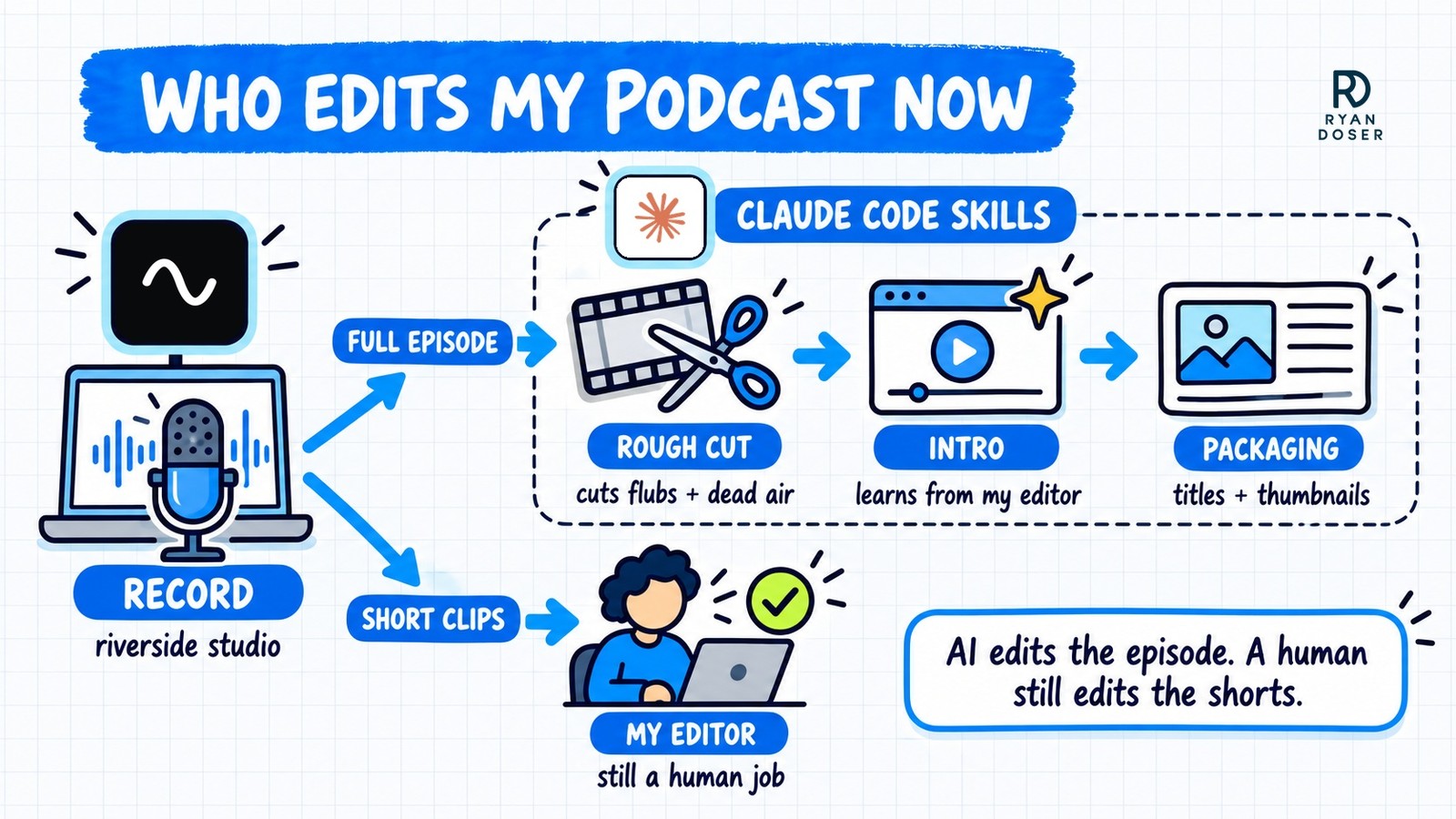
Everything still starts with a recording in Riverside. Aaron makes the same point: terminal editing tools can't record anything, so he still records in Riverside or Descript every day.
The rough cut: 21 seconds gone
Claude Code connects to Riverside through its MCP server, and my podcast editor skill reads the transcript and makes the cuts inside Riverside. On this episode it made four cuts and trimmed the dead air after the outro, taking the raw 36:09 down to 35:48.
Two of the cuts landed where I'd flagged a mistake out loud while recording, like "I'll need to cut that part out." The other two removed a restart after I lost my place in the slides and a quick "are you seeing this?" check during Aaron's screen share.
I review every cut before export, and this time I approved all four without changes.
That's a light touch on purpose. The skill trims flubs and long dead air, and it leaves the conversation alone.
The intro: eight versions in two days
The intro was the hard part. My podcast intro skill learned from every intro my editor has made for me, then picks the best lines from the episode and adds AI B-roll, text and sound effects.
The first version came back on October 8, and I rejected it as not ready for production. My notes on the next six rounds were mostly the same note: too much B-roll, show more of the two of us talking.
Version eight is the intro that opens the video above. It runs about 50 seconds, and its motion B-roll came from Google's Veo 3.1 Fast through OpenRouter (I covered that setup in my guide to generating AI video inside Claude Code).
On camera I called an earlier test "like 95% there." Two days of notes is what closed the last few percent.
Packaging: titles, description, thumbnails
Once the episode is uploaded, a packaging skill reads the transcript and drafts 10 YouTube titles, the description with every link we mentioned, and the tags. It also designs thumbnail options with official logos, and I pick the winners.
Where AI Video Editing Still Breaks
Most AI video editing demos skip the failures. I put mine on a slide.
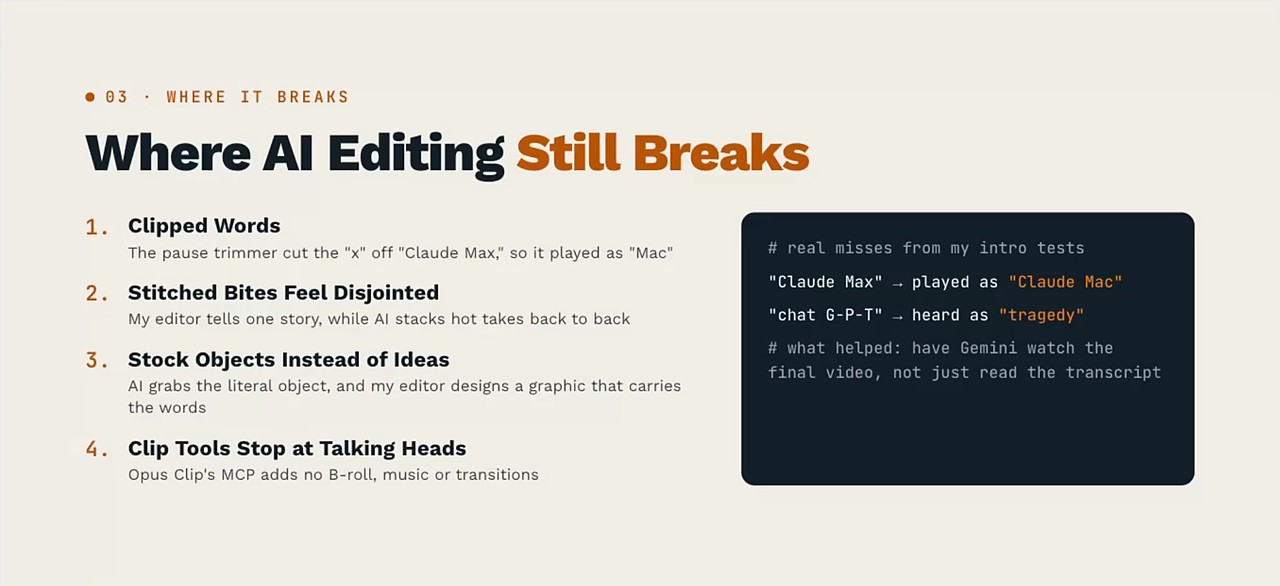
1. Clipped words
The pause trimmer cut the "x" off "Claude Max," so it played as "Claude Mac." In another test, "chat G-P-T" was heard as "tragedy."
A bleep in an earlier cut of this episode's intro also ate the "Q" in "IQ," because the transcript's word timing started a fraction of a second early. That got caught and fixed before the intro shipped.
What helped was having Gemini watch the final video to catch misses like these, not just read the transcript.
2. Stitched bites feel disjointed
My editor builds an intro that tells one story. AI tends to stack the hottest takes back to back, and the result plays like a highlight reel with no thread.
3. Stock objects instead of ideas
Same line from Aaron's ChatGPT Pro episode ("more air and fewer chips"), two edits.
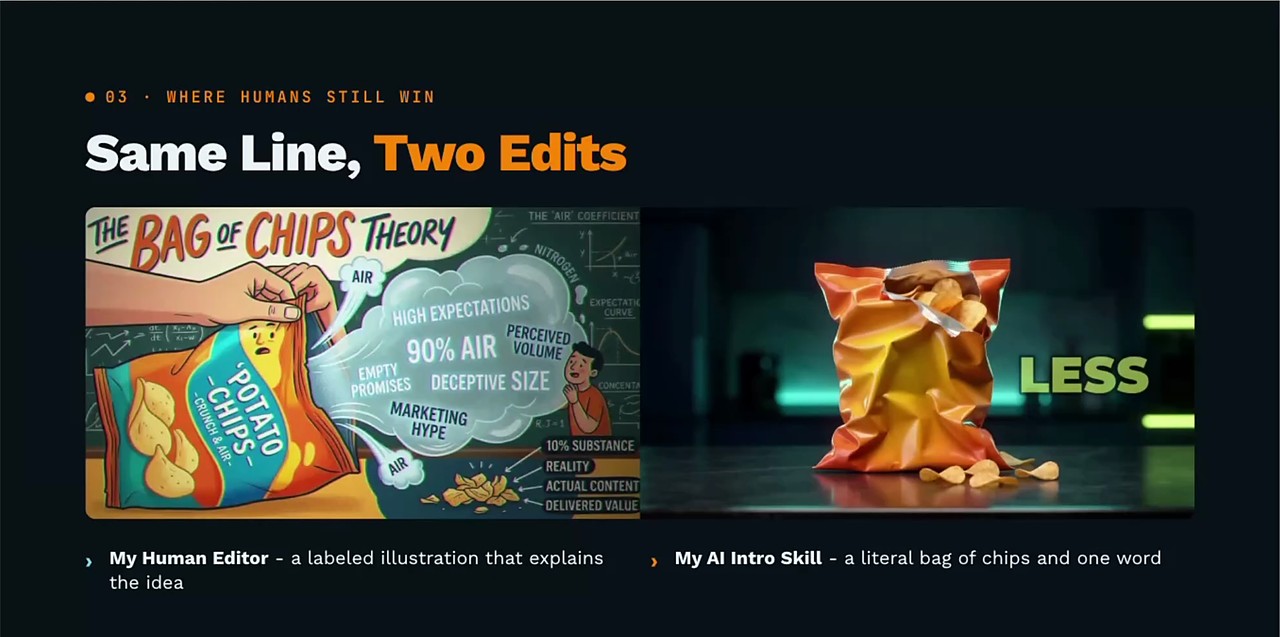
The AI grabbed the literal object. My editor designed a graphic that carries the meaning, and that's the taste gap viewers notice.
4. Clip tools stop at talking heads
This is why my editor still has the shorts.
The Opus Clip MCP can cut and caption clips on command, but it has no tools for music, sound effects or B-roll. I'd still have to open the app and finish every clip by hand.
I covered the setup side in my OpusClip MCP tutorial. If Opus Clip adds those to the MCP, I might subscribe again.
Beyond the four: rendering needs serious hardware
This one applies when the render happens on your own computer. From personal experience, if you try AI video editing on an underpowered laptop, it's going to sound like it's about to explode.
Aaron added that some of these tools need a Mac and won't run on a Linux cloud server.
He also warned that you need room for the raw video and plenty of RAM, so in his view a MacBook Air or a Chromebook won't cut it.
In my workflow, the rough cut happens inside Riverside's editor, so that step never touches my laptop. The intro is different: it renders on my own machine, and that's where the hardware matters.
How Aaron Does Claude Code Video Editing With No App
Aaron's version of AI video editing skips the editing app. He edits most of his videos in a terminal now.
His most-used tool is HyperFrames by HeyGen, a free, open-source framework that turns HTML into video, so Claude can write the captions, graphics and animations as code.
His point is that you don't need a $50-a-month video tool for Claude Code video editing. A prompt as simple as "use HyperFrames to edit this down into the best 10 social clips" gets him started.
For his clips, Aaron connects Claude Code to the same Riverside MCP and asks for 10 clips based on the transcript. He also uses Tesseract by Mirage, which had been out about two weeks when we recorded.
That's also his route around the gap that keeps my shorts with an editor: he skips clipping apps and has Claude finish the clips in the terminal. Two of his habits are worth stealing:
- He tries one new thing every episode. This week it was looped clips, where the last frame matches the first, on 3 of his 10.
- He gave Claude a brand guide for captions: below his chin, never over his face, a tool's logo when he names it, and the main speaker on top in two-person clips.
He even had Claude turn one of his edits into a walkthrough, using his own prompts. It's worth reading: how he one-shot a CarPlay video edit.
Turn Each Editing Job Into a Skill
Aaron said the line I'd put on a poster: "edit my video, make it good" is the new version of AI slop. With no direction, AI video editing gives you something that looks like everyone else's.
What works is one skill per job, like a cut skill and an intro skill, each fed examples of work you love. My intro skill only got good because it had my editor's past intros to study.
Then you improve it every run. Aaron's rule is to make each skill 1% to 5% better every time you use it, and he'd take that over waiting on next week's new model.
If you're starting from zero, start with the cuts. Let the skill take the long pauses and obvious mistakes, check its work, and keep a human on the creative until your notes catch up.
The same skill approach also turns one episode into a blog post and an email, which I covered in my Claude Code repurposing workflow.
Your Long-Form Recording Is Still the Main Course
Aaron's best analogy: generated media should be the salt and pepper on the meal. The meat and potatoes are still you, on camera, saying something worth hearing.
AI video editing got this full episode out the door without my editor. It still can't match the taste my editor brings to a 30-second clip, and it never recorded a single word for me.
So I'd tell any good editor the same thing I said on camera: if you use these tools, your value just went way up.
Record the conversation yourself and let skills handle the grunt work. Then spend the time you save on what you actually say.
AI Video Editing FAQs
Can AI replace a human video editor?
For a podcast rough cut and intro, it can, if you train the skill on your editor's past work and review every output. Across my runs it still clipped words and picked literal stock objects, and the Opus Clip MCP has no tools for music, sound effects or B-roll, so short-form clips stay with my human editor for now. My view on the episode: a skilled editor who uses these tools just became far more valuable.
How do you edit videos with Claude Code?
Connect Claude Code to your recording tool through an MCP server, like Riverside's, or point it at a local file and a code-based tool like HyperFrames. Then build a separate skill for each editing job, with examples of edits you like. Start with cutting silences and flubs, and approve each cut before you export.
Do you need a powerful computer for AI video editing?
Yes, if the rendering happens on your machine. Aaron's warning on the episode is that local rendering needs plenty of RAM and disk space, and some terminal-based tools require a Mac, so a Linux cloud server may not run them at all, and in his view a MacBook Air or Chromebook won't cut it. Cuts made inside a cloud editor like Riverside happen in the browser app, so only the local renders need the horsepower.
Why do AI-edited videos look like slop?
Often because the prompt gives no direction. Aaron's example, "edit my video, make it good," leaves the model to guess, so it reaches for literal stock visuals and generic hot-take stacking. A skill with a brand guide, examples from a good editor and notes from every past run moves the output toward your style, though my intro still took eight rounds.