
How to Use GitHub for Non-Coders (Best Free Repos)
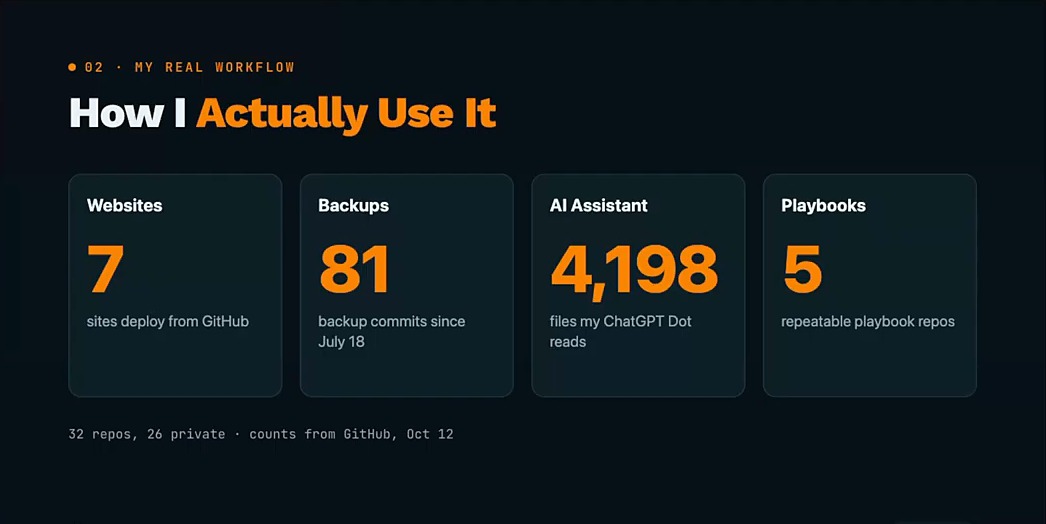
You can learn how to use GitHub without coding: you need three words (repo, commit, push) and one habit, letting your AI tools type the commands. I'm not a coder, and as of October 12 my GitHub account held 7 websites that deploy from it, 81 backup commits of my AI setup and a 4,198-file repo my ChatGPT assistant reads.
Watch How to Use GitHub as a Non-Coder
Aaron Makelky came back on AI Rabbit Holes, and we spent the whole episode on how to use GitHub when you'd never call yourself technical.
Aaron put the core idea in one line: your AI tools are probably going to end up using GitHub more than you do.
Some of what you keep on GitHub is worth selling, too. My Claude Code Skills Stack is the example I gave on the episode: marketing skills I built for my own work and turned into a product.
GitHub Explained With Tools You Already Use
For years I didn't touch GitHub. Even when someone told me to, my brain went straight to: I'm not technical, I'm not a coder, why do I need this?
I finally started using it last year. Here's how to use GitHub without the jargon, mapped to tools marketers already know.
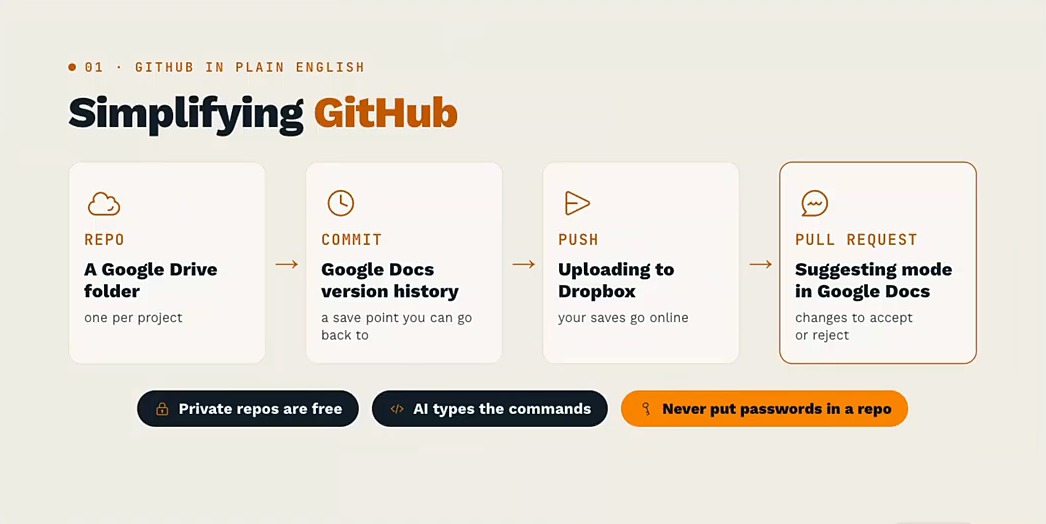
- Repo: a Google Drive folder, one per project.
- Commit: Google Docs version history, a save point you can go back to.
- Push: uploading to Dropbox, so your saves go online.
- Pull request: suggesting mode in Google Docs, changes you accept or reject.
You really only need repo, commit and push. Aaron's reason: GitHub sits under nearly every coding project, so Claude and ChatGPT already know it well, and you don't have to go deep into the weeds.
Two ground rules sit under everything else. GitHub's free plan includes unlimited private repositories (per its pricing page on October 15, 2026), and passwords or API keys never go in a repo.
How to Use GitHub: Your First Repo in 8 Steps
Backing up your AI setup comes first, because it teaches commits and pushes on files you actually care about.
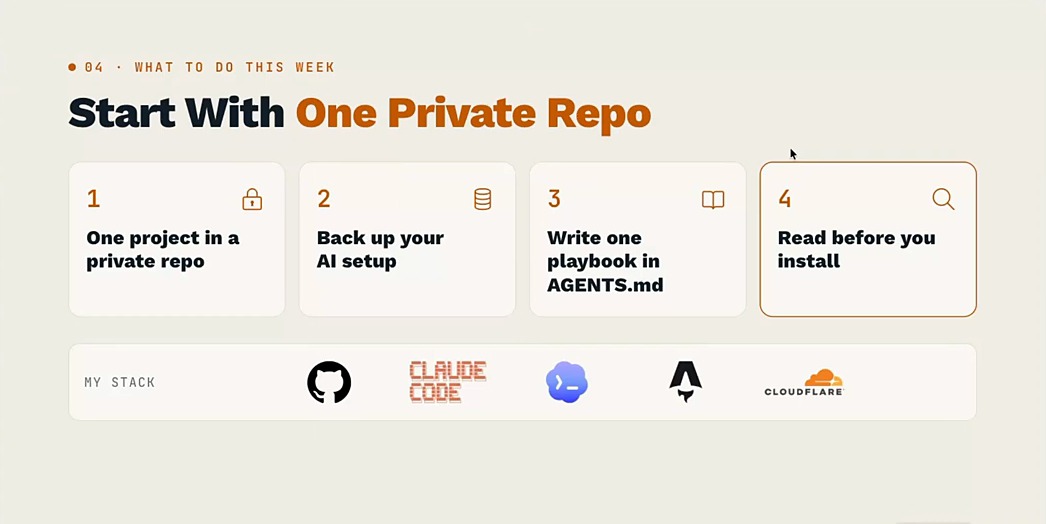
- Create a free account at github.com.
- Connect your AI tool once. In Claude Code or Codex, ask it to set up the GitHub command line tool and log you in. You'll enter a one-time code in your browser to approve it.
- Make your first private repo with a prompt like: "Create a private GitHub repo called ai-setup-backup, keep API keys and passwords out of it, then commit and push my skills and instruction files."
- Ask "what did you just do?" and open the repo on github.com. Each commit shows up there with what changed.
- Practice an undo before you need one. Change a file, then ask: "Show me my last five commits and put this file back the way it was in the previous one."
- Test the restore. On a second computer (or a fresh folder), ask: "Clone my private ai-setup-backup repo here and put my skills back where my AI tool expects them."
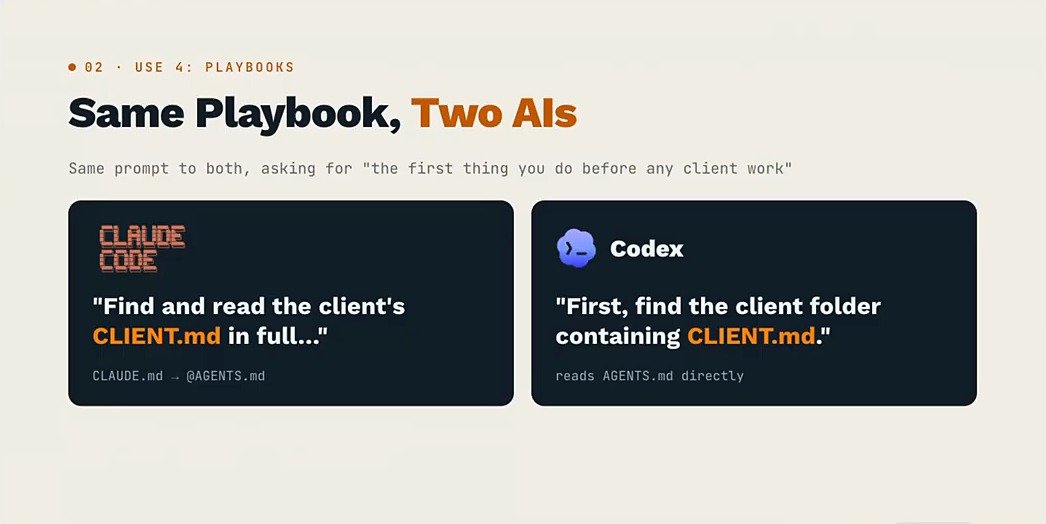
- Write one playbook in an AGENTS.md file. Codex reads it before doing any work, and Claude Code reads it directly or through an @AGENTS.md import, which is how my setup works.
- Build a simple landing page from a repo, then move up to a full site: Claude Code or Codex, GitHub, the Astro framework and Cloudflare.
If a step fails, paste the error into Claude Code or Codex and ask what to do next. Aaron's advice for this stage: don't be intimidated.
What GitHub Is Used For When You Don't Code
Here's how I use GitHub day to day, with counts pulled from my account on October 12.
Running real websites
Seven of my sites deploy from GitHub repos, including this one. Claude Code (or Codex) writes the content and code, GitHub stores the site's files, and Cloudflare serves the live site.
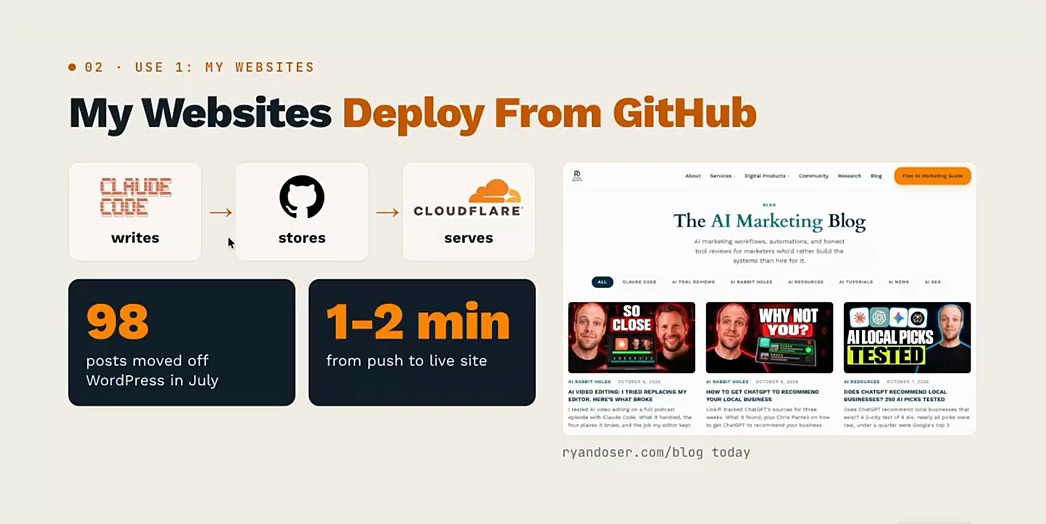
Speed is the win: updating every article from "September 2026" to "October 2026" takes agents a couple of minutes. The full case for leaving is in my post on the WordPress alternative I use now.
Aaron's test for any AI website builder is what happens when you cancel. In his words, cancel Lovable and there goes your website, unless your code also lives somewhere you own.
Lovable now offers two-way GitHub sync on all plans, so turn it on before you ever need it.
Giving your AI assistant a memory
My ChatGPT Dot (I named him Bodhi) reads from a private repo with almost 4,200 files. Every day he adds a markdown log to it: what he worked on, what he learned, and what to tackle tomorrow.
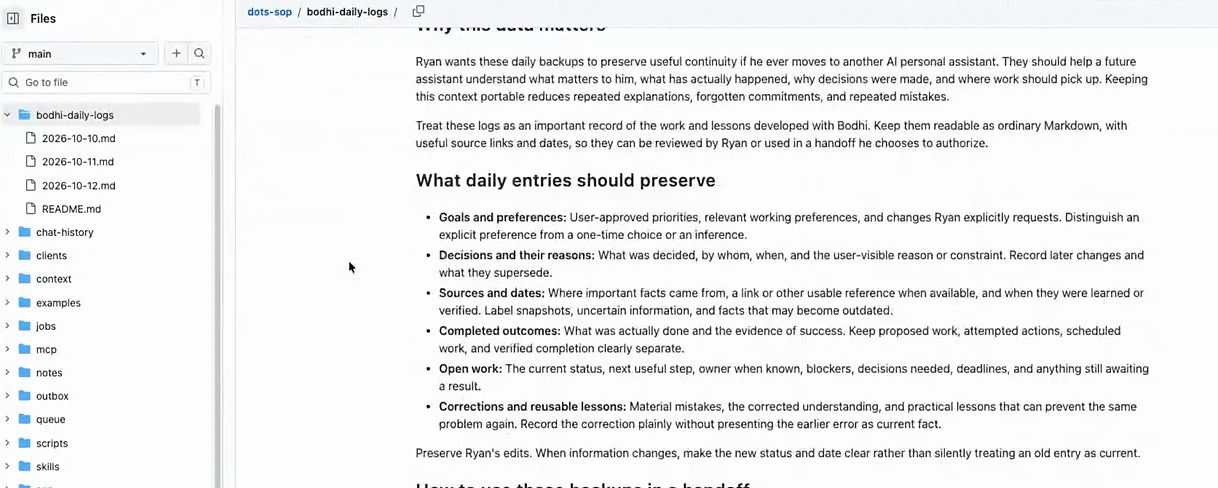
I didn't type that context in by hand. My VS Code setup, which already knows my workflows and skills, built the repo of high-priority tasks Bodhi works from.
One caution I raised: more context isn't always better. Pile in too much and you risk context rot, where the model gets overwhelmed and hallucinations creep in.
Backing up your AI setup
My local setup (systems, files, workflows) backs itself up to a private GitHub repo through a scheduled job I set to run once a day. If my computer ever crashed, the plan is to load the same setup on a new one and resume where I left off.
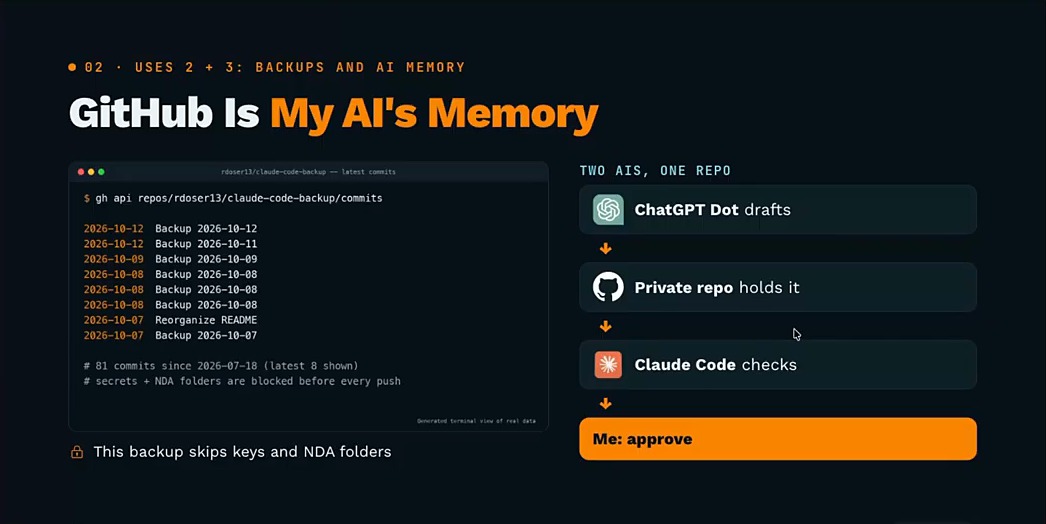
I used to back up to Google Drive. Here's how the two compare in my setup, with Aaron's experience marked:
| For my AI setup | GitHub | Google Drive |
|---|---|---|
| Backing up | A scheduled job commits changes for me | My backups took three or four hours each |
| Cost | My private repos sit on the free plan | Storage beyond the free 15 GB costs more as files stack up |
| AI tool access | Built for AI tools to read and write (Aaron's take) | Aaron's AI tools struggle with it, even to download videos |
| Going back | One commit saves changes across many files at once | Version history file by file, and older versions can expire |
| Large video files | A normal repo blocks single files over 100 MB | Stores them |
Aaron backs up Grok Bot the same way. A weekly automation maps every bot and automation he has into a GitHub repo, so he could rebuild the whole system somewhere else.
Reusable playbooks
I keep 5 playbook repos. One holds the SaaS SEO process I built for an eight-figure SaaS client, so the next SaaS client starts from what already works.
Those playbooks work across tools, too. Given the same prompt, Claude Code and Codex both opened the client's CLIENT.md file first.
Why a Repo Beats Any Single AI App
The companies behind ChatGPT Dots, Grok Bot and Meta's Muse are all incentivized to keep your context inside their apps. That's why switching assistants feels like starting over.
A private repo flips that. Your tools read and write one set of files you own, and the assistant on top gets easier to replace.
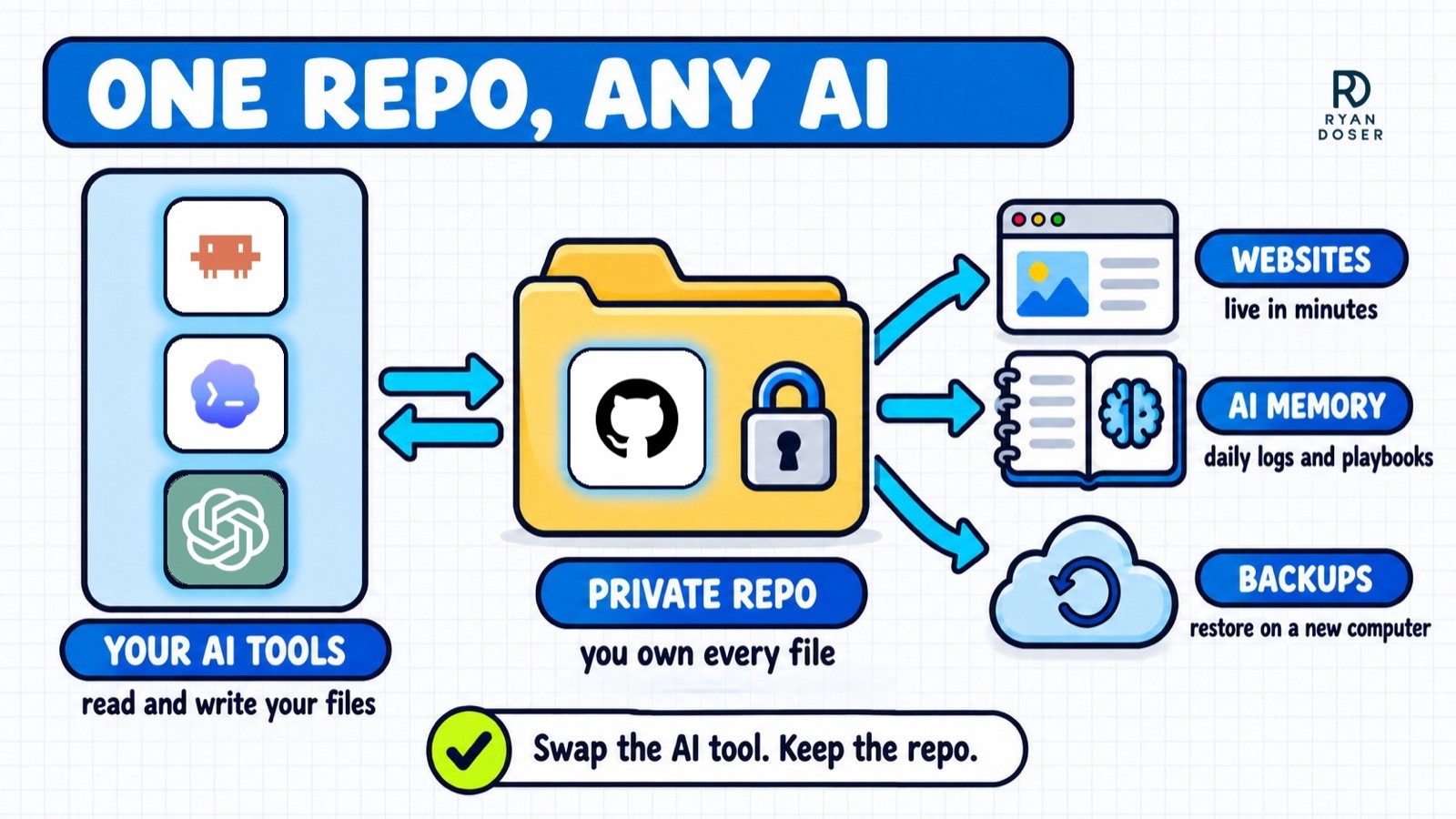
I already work this way with Claude Code and Codex, which share the same repos every day. A new personal assistant can read the same files, which is what makes switching less painful.
Aaron wrote up his version for non-technical colleagues in Your AI App Should Not Own Your Work. On the episode he called it his chief of staff repo: priorities, projects and skills he checks out each day and checks back in at night.
His article also shows one coding tool picking up a task where another left it, because both worked from the same repo.
5 Free GitHub Repos Worth Knowing
These are the five we covered, with Aaron's rule on how to use GitHub repos from other people first: he rarely uses one as-is. He forks it (makes his own copy) or builds his own version around the few parts he wants.
1. Anthropic Skills
Anthropic's official skills repository includes a skill-creator skill, a frontend-design skill I like for websites, and an MCP builder. It's also in my roundup of free Claude skill repos worth installing.
2. HyperFrames by HeyGen
HyperFrames is HeyGen's open-source framework for turning HTML into MP4 video, so Claude Code can build motion graphics and edits for you. It was Aaron's most-used tool in our AI video editing episode, and he pointed out HeyGen's Studio desktop app, which shows a timeline so you can watch what your AI is doing.
3. Google Workspace CLI
The Google Workspace CLI is how I connect Google Drive, Docs and Sheets to Claude Code and Codex, including folders of video clips. Its README says it isn't an officially supported Google product.
4. Google Search Console MCP
Suganthan Mohanadasan's Search Console MCP gives Claude Code your first-party search data, and its setup wizard defaults to read-only access. I covered it in my roundup of SEO MCP servers.
One correction to what I said on the recording: it can't pull Google's separate AI Overviews and AI Mode report, because that report has no API. The MCP does flag the longer, conversational queries in your regular data, which its README ties to AI follow-up questions.
5. Reverse Engineer Anything (REA)
REA uses AI agents to reverse engineer software, down to an app's native binaries. Mark Kashef posted a demo pairing it with an uncensored GLM 5.2 model and said he cloned Descript in a couple of hours.
Aaron's counterweight: free tools already cover about 90% of what people are cloning, and features like background removal took real teams years. His verdict: cloning is a side project to learn from.
Some public repos hide prompt injections, instructions aimed at your AI that can try to steal API keys. Read any repo before an agent installs it, using the four checks in the FAQ below.
Your AI Work Should Outlive Your AI Tools
Learning how to use GitHub as a non-coder is really a decision about where your work lives. Keep your websites, playbooks, backups and AI memory in files you own, and the next assistant you try starts from everything you've already built.
Start with one private repo and one backup this week.
How to Use GitHub FAQs
Is GitHub free to use?
For most non-coders, yes. GitHub's free plan includes unlimited public and private repositories, according to its pricing page on October 15, 2026. I haven't even looked at the paid plans, because the free tier is generous for code and images. Hosting the live site is a separate service with its own pricing.
Do I need to learn Git commands to use GitHub?
No. Three terms cover it: a repo is a project folder, a commit is a save point, and a push sends your saves online. Claude Code and Codex run the Git commands once you connect your GitHub account, and they'll explain any step in plain English. The real skill is deciding what belongs in the repo.
What are the disadvantages of using GitHub?
For non-coders, the vocabulary and the one-time setup are the first hurdles. A normal GitHub repo blocks files over 100 MB, so large videos stay out of your backups, and it isn't built for live co-editing the way Google Docs is. The biggest real risk is committing a password or API key by accident, which is why my backup skips keys on purpose.
Are public GitHub repos safe to use with AI?
Not automatically. Check when the repo was last updated, its license, its README and who owns it. Those checks lower the risk without removing it, because a malicious repo can carry instructions meant to make your AI leak API keys. Read it yourself before you let an agent install anything.