
Build vs Buy Software: Don't Replace Your SaaS With AI Yet
Build vs buy software decisions come down to opportunity cost: I pay $10 a month for Calendly, about $115 monthly for Kit and $99 for Skool Pro, and all three are staying even though AI could help me build my own versions. Aaron Makelky and I went through 17 software categories on AI Rabbit Holes, and my calls landed on buying or using an existing tool for 8, building for 7, and "it depends" for 2.
Watch Aaron and Me Work Through Build vs Buy Software
Aaron Makelky is back on AI Rabbit Holes for the question we both hit every day: build it with AI, or keep paying for it.
Neither of us comes from a coding background, so this is the non-developer version of the build vs buy software debate.
If you want to go deeper on building with Claude Code as a non-coder, my Claude Code Skills Stack has the marketing skills I run every week.
My Build vs Buy Verdict: Opportunity Cost Decides
SaaS is not dead. After 17 categories, I still get a return from paying for several SaaS products, even though today's models can clone a SaaS product in minutes.
Could I vibe code a Calendly? Absolutely, but my time is worth more than $10 a month, and building one means scheduling logic, integrations, bug fixes and tokens for a tool that already works.
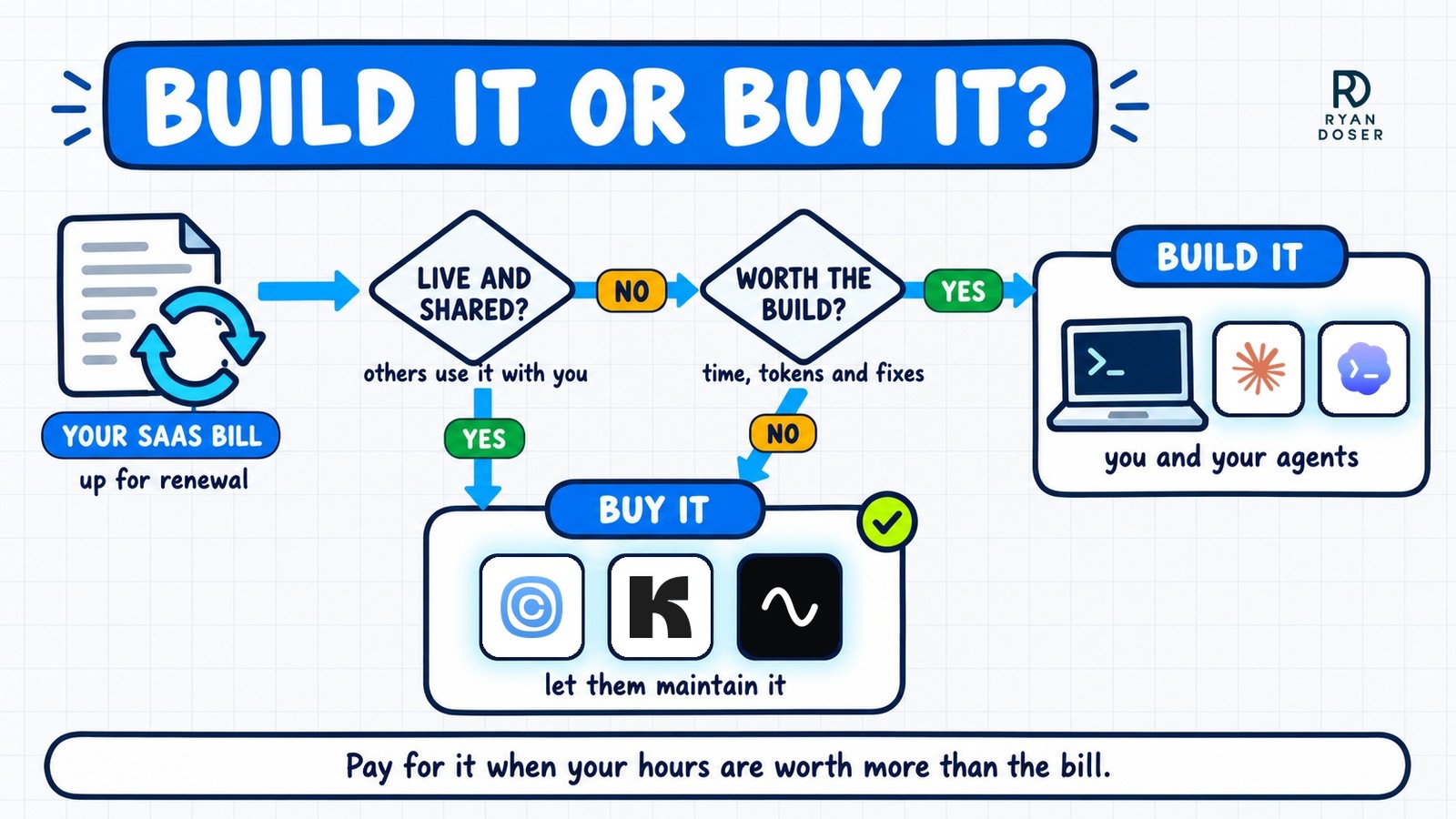
That is the build vs buy software question in one line: is building this worth your hours? If you say yes too fast, you're probably undervaluing your time.
The verdict comes with conditions. It is for my use case, a solo operator who is not a developer, and Aaron pushed back on a couple of my buys with free options.
Bigger companies sit in a different spot. Aaron's read is that a team already wired into HubSpot or Salesforce won't churn to save a few thousand dollars a month, and the vendors price that in.
The rule we kept landing on: buy software that other people use live with you or that pays for itself, and build the tools nobody but you and your AI agents touch when the build costs less than your hours.
The 3-Question Renewal Test
I run three questions before any AI subscription renews, and I first wrote them up in my Aug 29 newsletter. They set up the whole build vs buy software conversation with Aaron.
- Can my AI agent already do this? If Claude Code or Codex produces the same output, the paid tool is a duplicate.
- Is it a whole job, or just a button? Social media is a job. Background removal is a button.
- When did I last open it? A tool you haven't touched in three weeks already gave you its answer.
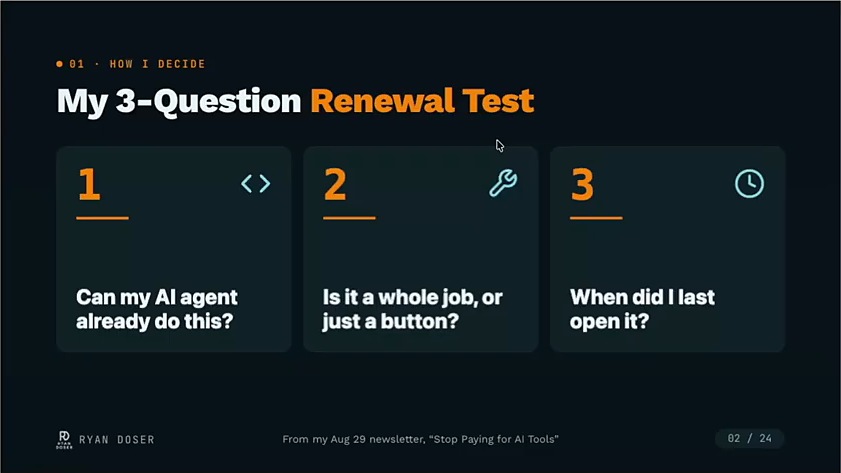
Aaron added a fourth question worth keeping: who uses this every day? A tool that only you and an AI agent use is far easier to build, because you stop caring about buttons, design and the human experience.
Our Build vs Buy Calls, Category by Category
Here is every build vs buy software call from the episode, with mine and Aaron's side by side.
| Category | My call | Aaron's take |
|---|---|---|
| AI website builders | Build (Cloudflare, GitHub, Astro and an AI coding agent) | Stop paying monthly to keep a finished site online |
| Scheduling apps | Buy (Calendly, $10 a month on the annual plan) | Cal.com's free plan does what most people need |
| CRMs | Buy for most businesses, a solo build can make sense | Simple databases for basic needs, keep an established team CRM |
| Email marketing | Buy (Kit pays for itself) | Buy, you're paying for deliverability |
| Course and website platforms | Keep Skool for a community, skip Kajabi | Build standalone sites yourself |
| Social media schedulers | Buy, if you post at scale and automate through MCP | Worth it if you can schedule without opening the web app and it saves time |
| Automation (Zapier, n8n, Make) | Build, enterprise teams excepted | "Five years ago, Zapier made sense. Today, it doesn't." |
| AI writing tools | Build with your own Claude or ChatGPT plan | Same models with a system prompt |
| AI SEO tools | Search Console first, cheaper data for your own site, Ahrefs when client work justifies it | Claude Code plus Search Console gets you started |
| AI image and video | API keys for my occasional use, SaaS may fit at scale | HeyGen or Krea when assembling it costs time |
| Design software | Build with ChatGPT Plus | Keep Figma for live collaboration |
| Video editing | Riverside for recording and editing | CapCut Pro on mobile, mostly free agent-driven tools on desktop |
| Podcast recording | Buy | Buy, it's live and collaborative |
| Notes and docs | Lean build, a private GitHub repo | Free Notion, Obsidian synced through GitHub |
| To-do and project management | Build solo, keep established team systems | Linear as a context layer for agents |
| Meeting recorders | Use a free option first | Build only when privacy demands it |
| Voice dictation | VoiceInk, paid once, on one Mac | Wispr Flow, for iPhone and Mac |
Email is the clearest buy on the list. I pay about $115 a month for Kit, and my list earns more than that, so for me it's a no-brainer.
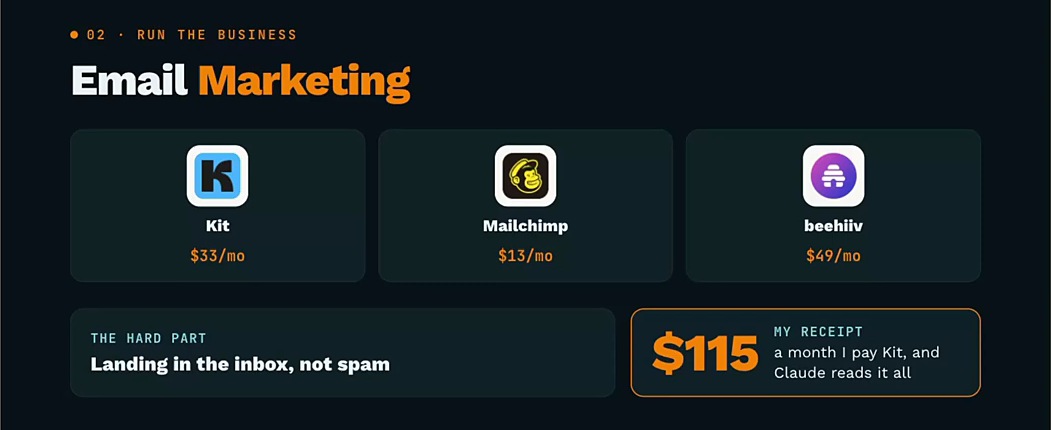
Aaron named what that money buys: deliverability. Kit and beehiiv employ people whose whole job is getting your email into the main inbox, and in his words, "saving 50 bucks a month to have no one read your emails is not a good ROI."
Skool stays for a different reason. I run my community on it, and Aaron pointed out that people join through the phone app, where most of them already belong to several other groups.
Podcast recording is the purest buy. Aaron's challenge was to imagine the two of us vibe coding a Riverside-style studio that records two people and streams live to LinkedIn and X, and his answer was to just pay the subscription.
Social schedulers earned conditional buys from both of us. Blotato is my client and the scheduler I use (I get it free, so I'm biased), and in my use case a scheduler earns its fee when posting at scale runs through MCP (the connector that lets an AI agent use another app) instead of copy and paste into a web calendar.
What We Would Build Instead
AI website builders were the easiest build vs buy software call. Aaron's warning was that people pay $20 to $50 a month to keep a finished site turned on, when owning the domain through Cloudflare runs about $7 to $10 a year, and we compared stacks on our Lovable episode.
I don't use Zapier, n8n or Make anymore, because scheduled tasks now live inside the Claude and ChatGPT desktop apps and VS Code. Enterprise teams are the exception, since they want boring, reliable automations, and I compare the two tools for that job in Zapier vs n8n.
AI writing tools are where I'm least diplomatic. In my opinion they're scams, because a $20 a month Claude Pro or ChatGPT Plus plan gives you more usage and the best models, which is why my AI writing tools roundup says to avoid most of them.
Design is a build for me too. I make all my YouTube thumbnails, featured images and diagrams with GPT Images 2.5 in a $20 ChatGPT Plus plan, though some professional fine edits still need a tool like Photoshop.
Aaron's best build story was Kajabi. Two people he knows were quoted about $2,400 for the base level, so he pointed Cursor at their site and had a near pixel-perfect clone in under an hour, minus the affiliate codes and part of the CRM.
Notes are a lean build. A private GitHub repo full of markdown files covers what I'd use a notes app for, and Aaron syncs his Obsidian vault through GitHub instead of paying for it.
One correction from the recording: I said syncing Obsidian costs $10 a month. As of October 2026, Obsidian Sync starts at $4 a month billed yearly, and $10 is its top plan billed monthly.
The AI-Friendly Test: Can Your Agent Use It?
The test that closed the episode is the one I'd run first. Aaron's version: check how AI-friendly a SaaS tool is making its product, and if there is no MCP letting you connect Claude to it, start planning a replacement, whether that's a different tool or your own build.
My version is harsher. If a SaaS company has no MCP, CLI or API integration, it's dead to me, and in 99% of cases I won't touch a tool that doesn't play nice with my AI system.
Aaron's good example is Cloudflare. His agents can do in a terminal anything he can do in Cloudflare's web app, including buying a domain without leaving Claude Code.
GitHub is the other one. Aaron said his commit count is up about a thousand percent from last year now that he uses it with AI.
For schedulers, Aaron's test is a single question: can I schedule my posts without opening your web app? He thinks Buffer has the best MCP right now, and he has no affiliation with any of them.
Run that check on every tool in your build vs buy software list before it renews.
Run the Build vs Buy Test on Your Own Stack
The AI that built our slides summed up the pattern as "buy the pipe, build the brain," and I think it fits a lot of these categories.
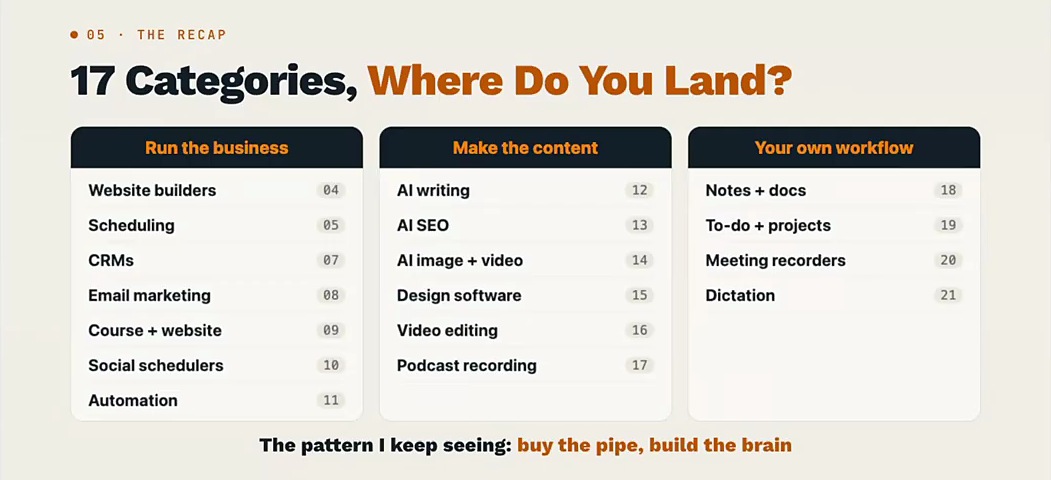
Pay for the pipes that other people, inboxes and live recordings depend on, and run your own build vs buy software check on everything else the next time a renewal email shows up.
Aaron's closing line is the shortest version: if it's not live and collaborative, you can probably build it yourself. Then decide whether it's worth the time and the tokens, or worth letting someone else maintain it for $19.99 a month.
Build vs Buy Software FAQs
Is SaaS dead in 2026?
No, not for most businesses. Even with AI coding agents on hand, my calls landed on buying or using an existing tool for 8 of 17 software categories, mostly tools that are live and collaborative, handle email deliverability or already pay for themselves. I skip almost any SaaS with no workable MCP, CLI or API, because it doesn't fit how my AI system works. For the founder's side of the argument, see how to grow SaaS with YouTube.
Is it cheaper to build or buy software with AI?
Building looks cheaper until you price your hours. I could vibe code a scheduling app, but for me the integrations, bug fixes and tokens aren't worth replacing a $10 a month Calendly plan. Building makes sense when only you and your agents use the tool, nobody needs it live with you, and the time to build and maintain it costs less than the subscription.
Should I build my own CRM with AI?
For most small, mid-size and enterprise businesses, no. An established CRM already handles features, security and permissions, and switching means retraining a whole team. Solopreneurs are the exception: Aaron suggests a free Notion database, Google Sheet or Airtable connected to Claude Code or Codex, and he advises against hosting a custom web app because for most people it isn't worth the headache.
What SaaS tools are still worth paying for?
Tools people use together in real time, like podcast recording and design whiteboards, tools that solve a hard technical problem for you, like email deliverability, and tools that return more than they cost. On this episode that meant Kit, Riverside, Skool and Calendly for me, and Figma, CapCut Pro and Wispr Flow for Aaron. Check each one against the renewal test before it renews.
Disclosure: some links in this post are affiliate links. If you buy through them I may earn a commission at no extra cost to you. I only recommend tools I actually use. Full disclosure.