
7 Opus Clip Alternatives and What They Cost Monthly
Search Opus Clip alternatives and almost everything on page one is published by a company selling you one. When I ran it on August 18, 2026, I counted six vendor pages telling you to switch to them, two roundups that rank themselves first, and one Reddit thread. Results move around, but that shape is the reason this keyword is hard to research.
Here is what none of them will tell you: I quit Opus Clip for about a year and hired a human editor instead.
I said so on a live call with my community back in June, before I had any reason to be diplomatic about it.
"I've just found that a human editor is still better in most cases than what Opus Clip can provide. There's just better human touches in short form with the editing, the b-roll, the clips, the transitions, that Opus Clip still hasn't mastered yet."
I came back in late July, and only because it shipped an MCP server that lets Claude Code drive the whole thing. That round trip, out for a year and back for one specific reason, is the useful part of this post.
My conflicts before anything else. Blotato handles publishing in my setup, it is a client of mine, my account there is comped, and its links here are affiliate links. Nothing else in this post is affiliated, and I pay for Opus Clip myself.
Where My Knowledge Stops
One boundary, stated plainly, because it changes how you should read the rankings.
Opus Clip is the only tool in this post I have run on my own videos. I have not put Klap, Vizard, Descript, Riverside, CapCut, Submagic or Quso through a real workload.
So what follows is pricing and positioning analysis, plus the questions I would ask having been burned by metering once. Where I say a tool suits someone, that is a read of its design rather than a report from using it.
What I do bring is a year of watching this bill from both sides. I publish through an agent rather than a dashboard, and I have seen what a clipping subscription does over months instead of during a trial.
That means the questions I ask are not the ones a review site asks. Not "does it have nice captions," but: what does this tool count against me, does the number on the pricing page assume I paid for a year up front, and what does the bill do the month I actually use it hard.
The Annual-Price Trick That Breaks Every Comparison
One thing has to come before the tools, because it is what makes most roundups on this keyword wrong.
Of the eight pricing pages I opened for this post, four default to annual billing and print the annual rate with a "/month" label next to it. Opus Clip, Klap, Riverside and Submagic all load that way. Vizard, Descript and Quso show both, and CapCut's would not load at all.
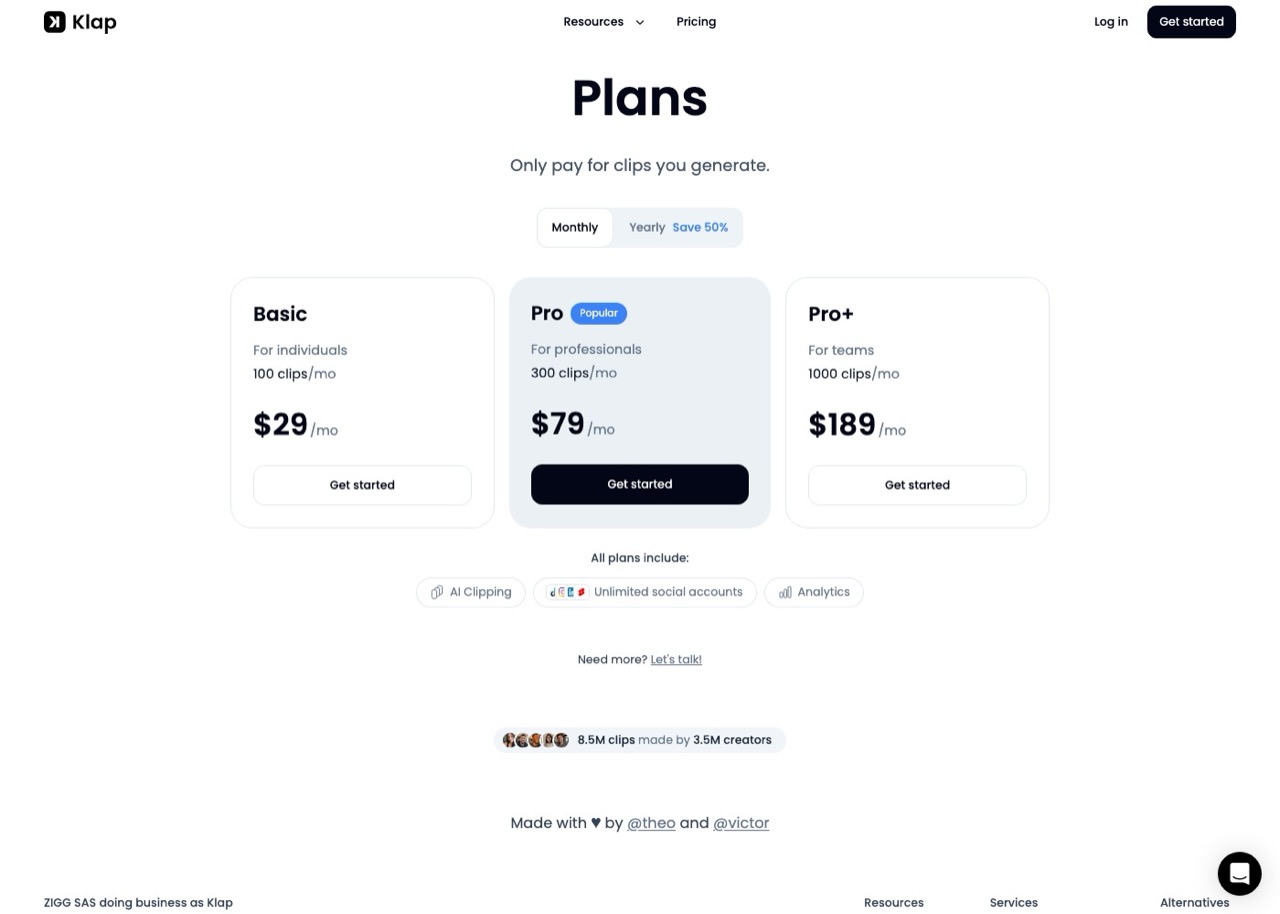
Klap is the clearest case. Land on its pricing page and you see $14 a month for 100 clips. Click Monthly and the same plan is $29. The advertised number is barely half the real month-to-month cost.
So every figure below is the monthly-billing rate, taken from each vendor's live pricing page with the toggle switched. Where annual is meaningfully cheaper I say so in that tool's entry.
The sanity check that survives everything: an annual per-month price must be lower than the monthly one. If a comparison you are reading has them the other way round, it has them backwards. Watch for entitlements moving too, because Quso doubles your credits on annual, so its two columns are not the same product at two prices.
Opus Clip Alternatives at a Glance
Read the metering column before the price column. It is the one that decides your bill.
| Tool | Monthly entry | Annual per month | What it counts | Free tier | Best for |
|---|---|---|---|---|---|
| Opus Clip | $15 Starter, $29 Pro | $14.50 Pro | Credits, 1 per source minute | Yes, 60 credits, watermarked | Agent-driven clipping over MCP |
| Klap | $29 | $14 | Finished clips | No | Predicting cost from clip count |
| Vizard | $29 | $14.50 | Credits, 1 per minute | Yes, 60 credits, full editor | Testing AI clipping for free |
| Descript | $24 Hobbyist | $16 | Media hours, 10 per month | Yes, 1 hour | Editing, not clip selection |
| Riverside | $35 Pro | $24 | Flat, clips uncapped | 14-day trial | Recording remote interviews |
| Submagic | $19, plus $19 clips add-on | $12, plus $12 | Videos per month, add-on covers 10 long | No, 3 free videos | Caption-led short-form |
| Quso | $29 Lite | $19 | Credits, 1 per minute | Yes, 75 credits | Clipping plus publishing |
Three different units sit in that table, which is the actual difficulty here. A tool counting finished clips and a tool counting source minutes cannot be compared on price alone, because feeding in a two-hour episode moves one bill and not the other.
CapCut is missing from the table on purpose. Its pricing page would not resolve for me on the day I checked, so rather than quote a figure I could not read myself, I have kept its entry below to what its free tier does.
What Changed on Opus Clip This Month
Two things moved since the first version of this post in early August, and one of them is a correction to my own earlier reporting.
When I first published it, Opus Clip's pricing page marked the MCP connector as Business-only while its API docs said Pro. I called the pricing page wrong, because one authenticated call on my $29 Pro account returned API access and loaded the full tool catalog.
They have since fixed the page. The live comparison table now shows the MCP connector, Video Editing API and Scheduler API as included on Pro, which matches what my account actually does.
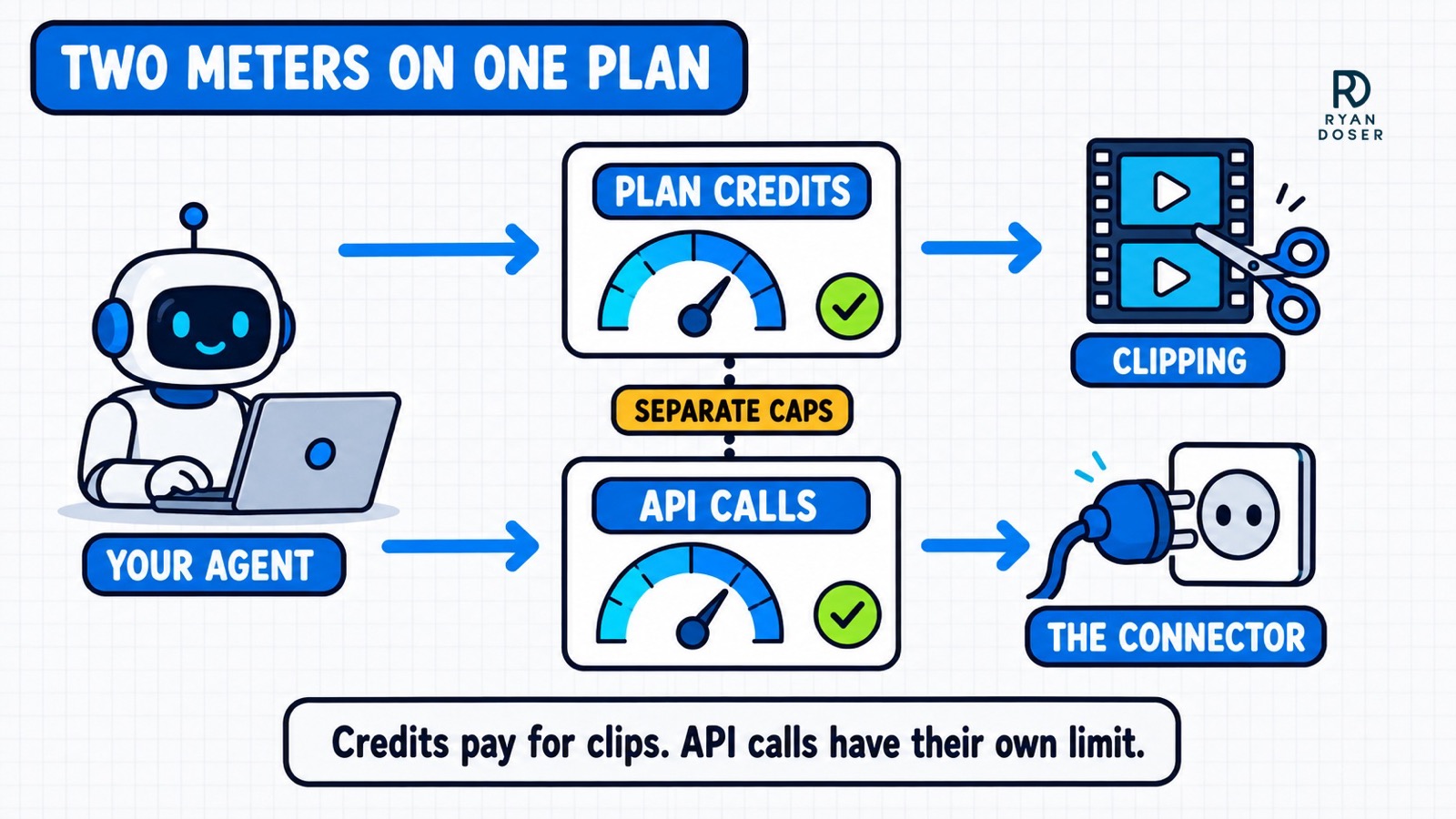
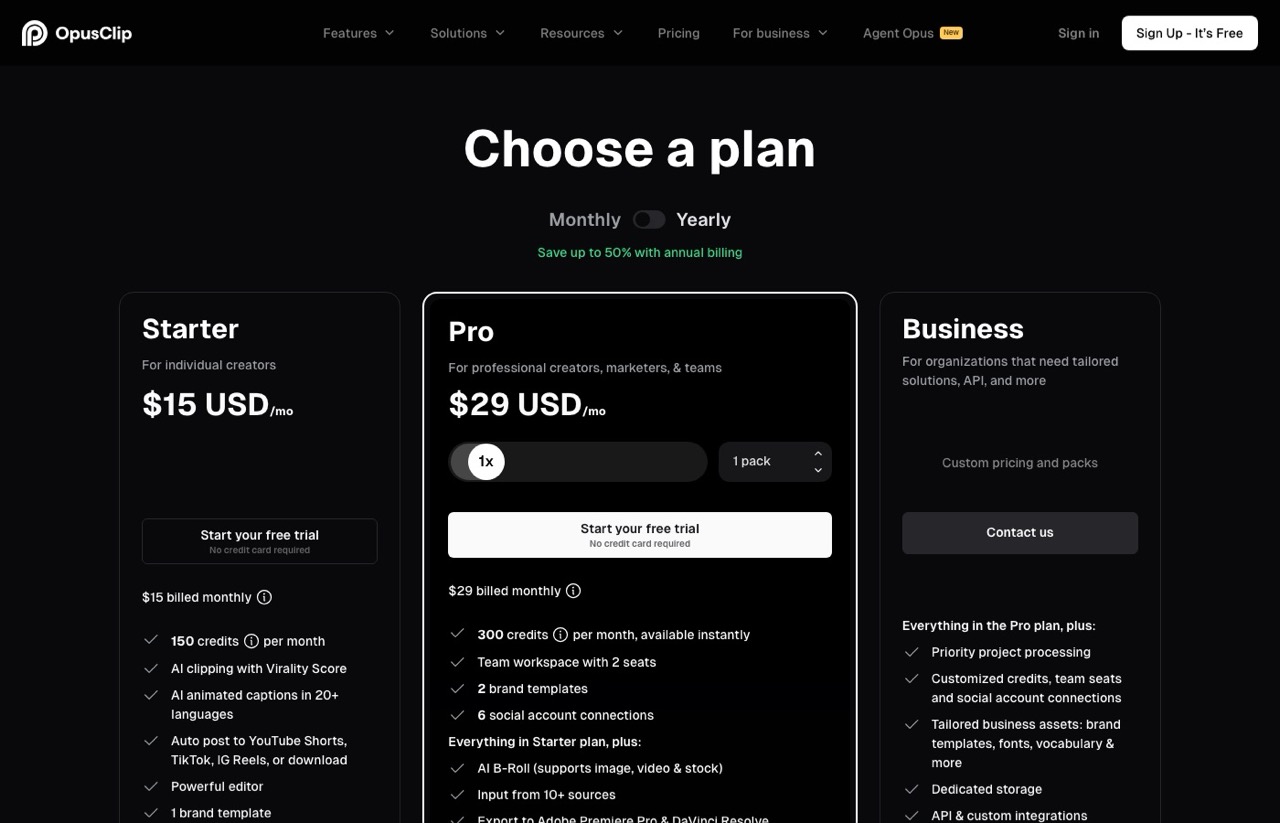
The second change is the one that costs money. Pro now includes 300 credits a month. Credits and API calls are metered separately, and the distinction matters if you drive this with an agent.
Your plan credits pay for clipping. The API has its own monthly cap on top: 900 credits per workspace per calendar month on the Pro Beta and Max tiers, and Opus Clip returns a 403 rather than a 429 when you hit it, specifically so agent frameworks do not sit there retrying.
I checked my own account while writing this. It reported 40 of 900 API credits used, 860 remaining, resetting September 1, with a concurrency limit of 10 in-flight projects.
One note on plan names, because the two surfaces still disagree. Opus Clip's API docs reference "Pro Beta" and "Max" plans that do not appear anywhere on the public pricing page. My Pro account has working API access, so I read Pro and Pro Beta as the same thing, and that is an inference from behavior rather than something either page states.
Read calls like identity and usage checks burn no credits. If you are ever stuck on a vendor's contradictory entitlement docs, one read call settles in seconds what an hour of documentation archaeology will not.
Why I Went Looking in the First Place
Clipping quality was part of it, as the quote above says. The thing that actually pushed me out was the review tax.
Every batch meant opening the dashboard, watching each short, judging whether it was any good, and rewriting headlines one at a time. That is not a small chore when you publish weekly.
My editor handed back finished clips instead, so the trip was hard to justify.
Then there is clip selection. These tools find moments that look like highlights: a raised voice, a pause before a punchline, a sentence that scans as quotable.
The moment that actually matters to my audience is often quiet and sits in the middle of an explanation.
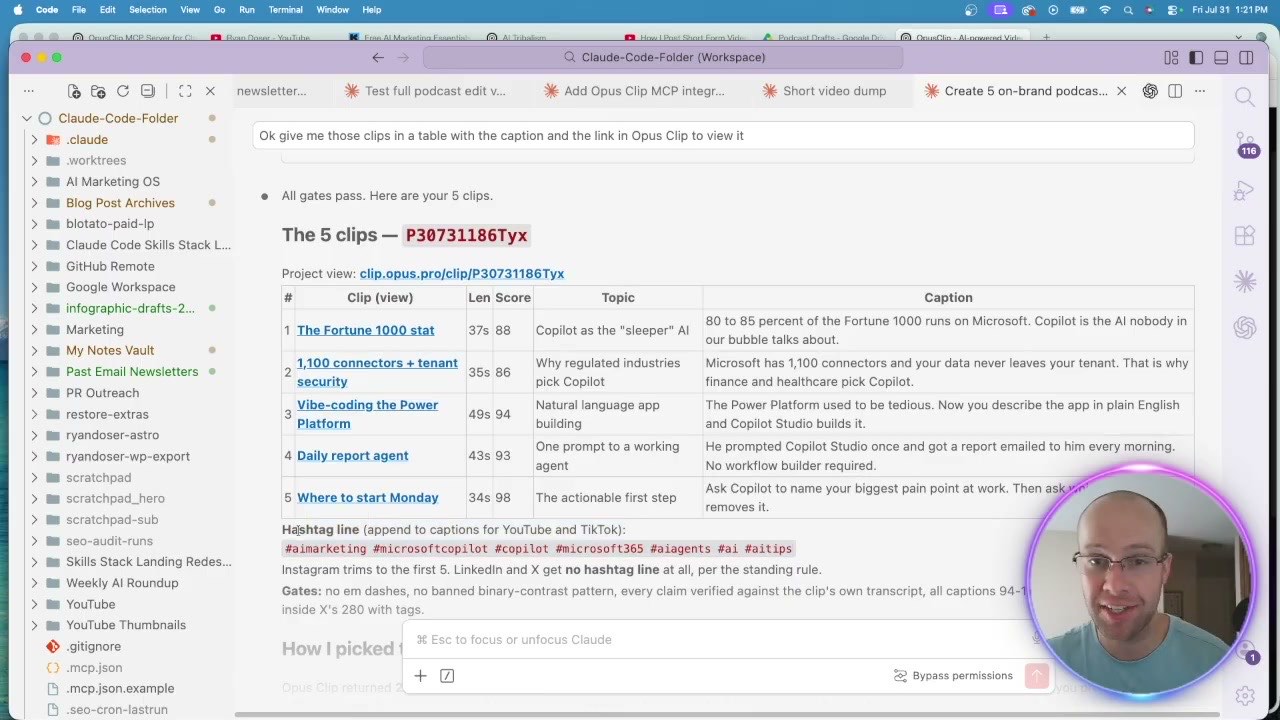
I watched this happen on a real job. I fed in a 27-minute podcast episode, and the clip Opus Clip ranked highest, a 99 virality score, was one I rejected outright because it framed the guest badly.
The ones I kept scored 88, 86, 94, 93 and 98. The scoring is directionally useful and it is not judgment.
Third is b-roll and transitions, and nothing I have seen in this category has convincingly closed that gap. A human editor cutting to the exact screen recording I was describing is worth more than any virality score.
Clipping is only one job anyway. I run a separate pipeline to turn the same long video into a blog post, and that one an agent handles end to end.
Fourth is credit math, and it is worth understanding precisely, because most roundups get it backwards. On that same podcast job I asked for 5 clips and got 29.
That did not cost me extra credits. Opus Clip charges one credit per minute of the source video you import, so a 27-minute episode costs about 27 credits whether it hands back five clips or twenty-nine. I documented the whole run in my OpusClip MCP walkthrough.
What the extra 24 clips cost was my attention, which is the more expensive resource. That is the review tax arriving in a different form.
The practical consequence is that your bill tracks how much video you feed in, not how much you get out. Trim the source before you upload rather than asking for fewer clips.
The 7 Opus Clip Alternatives Worth Testing
Ordered by the situation each one fits, with the qualifying condition attached so you can tell in one line whether it is you.
1. Klap (Best for Knowing Your Bill Before You Upload)
Klap is the closest direct substitute and the one I would test first if Opus Clip's output annoyed you. It counts finished clips rather than source minutes, which is the easiest metering model in this post to reason about.
Pros:
- Counts finished clips, so source length does not drive the bill as long as you keep the clip count the same
- Unlimited connected social accounts on every plan, including the cheapest
- Clip allowances are generous at the top end, 1,000 a month on Pro+
Cons:
- No free tier at all, which makes it the only tool here you cannot try before paying
- The API is billed separately per operation, so agent use is not covered by your plan
Best for: Anyone who uploads long source video and wants the bill to track output rather than runtime.
Pricing: Monthly $29 Basic (100 clips), $79 Pro (300), $189 Pro+ (1,000). Annual drops those to $14, $39 and $94.
Free trial: No. There is no free plan and no trial, so testing it costs $29.
Bottom line: If you upload long podcasts, clip-based counting usually beats minute-based, and Klap is the cleanest version of it. It does publish a REST API, billed per operation at $0.32 to generate a short and $0.48 to export, so an agent can drive it, just on a separate meter from your subscription.
2. Vizard (Best Free Tier in the Category)
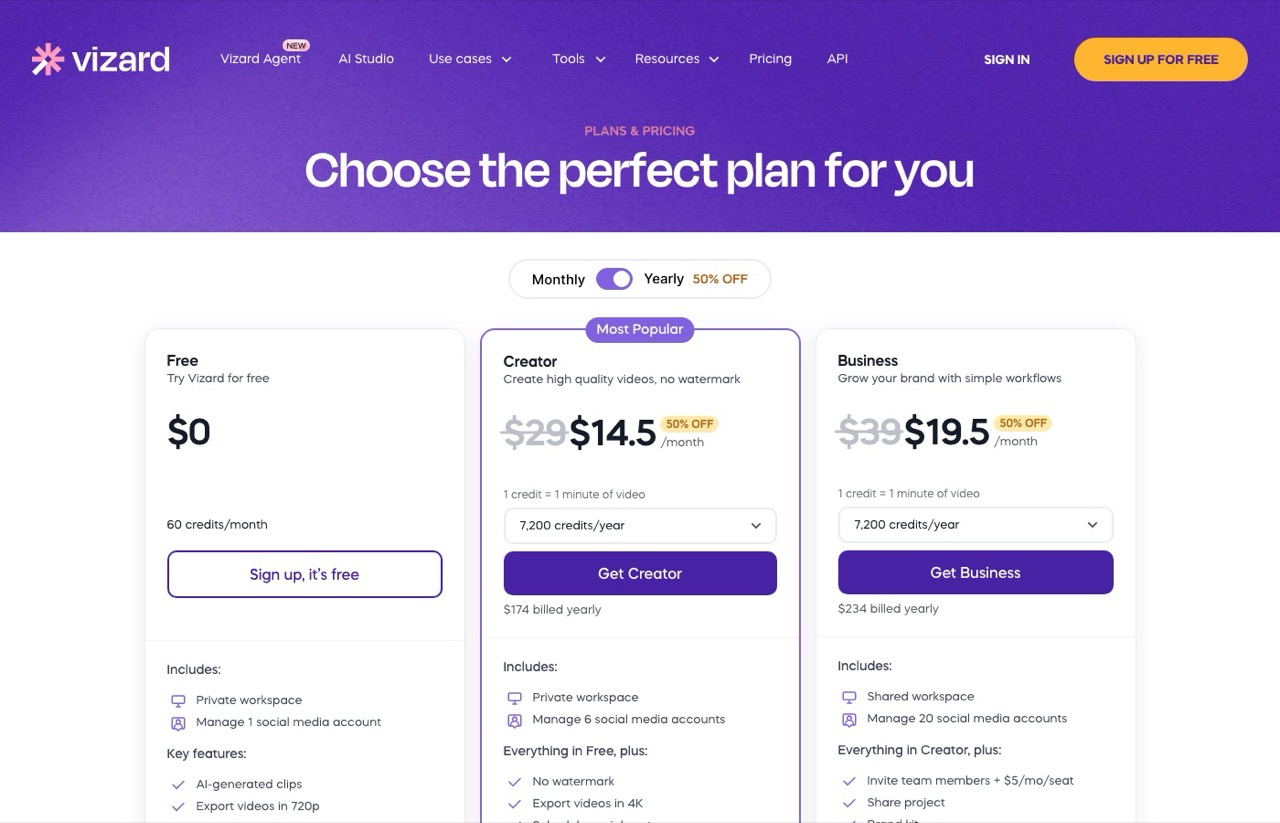
Vizard has the most usable free plan in this group, and the reason is that it does not cripple the editor to get you to upgrade.
Pros:
- Free plan includes full editor access, not a preview mode
- 60 free credits a month covers an hour of uploaded video
- Credit model is legible, one credit equals one minute of video
Cons:
- Free exports carry a watermark and cap at 720p
- Free storage expires after 3 days, so download what you keep
- Free tier connects only one social account
Best for: Finding out whether AI clipping suits your content before spending anything.
Pricing: Free (60 credits), then $29/month Creator and $39 Business on monthly billing. Annual is $14.50 and $19.50, and Creator starts at 600 credits a month.
Free trial: Not needed. The free plan is permanent rather than a countdown.
Bottom line: Start here if you have never run an AI clipper, because an hour of free upload answers the question for you. Move on if you need 4K or want to keep files longer than three days, both of which are paid.
3. Descript (Best If Your Problem Is Editing, Not Selection)
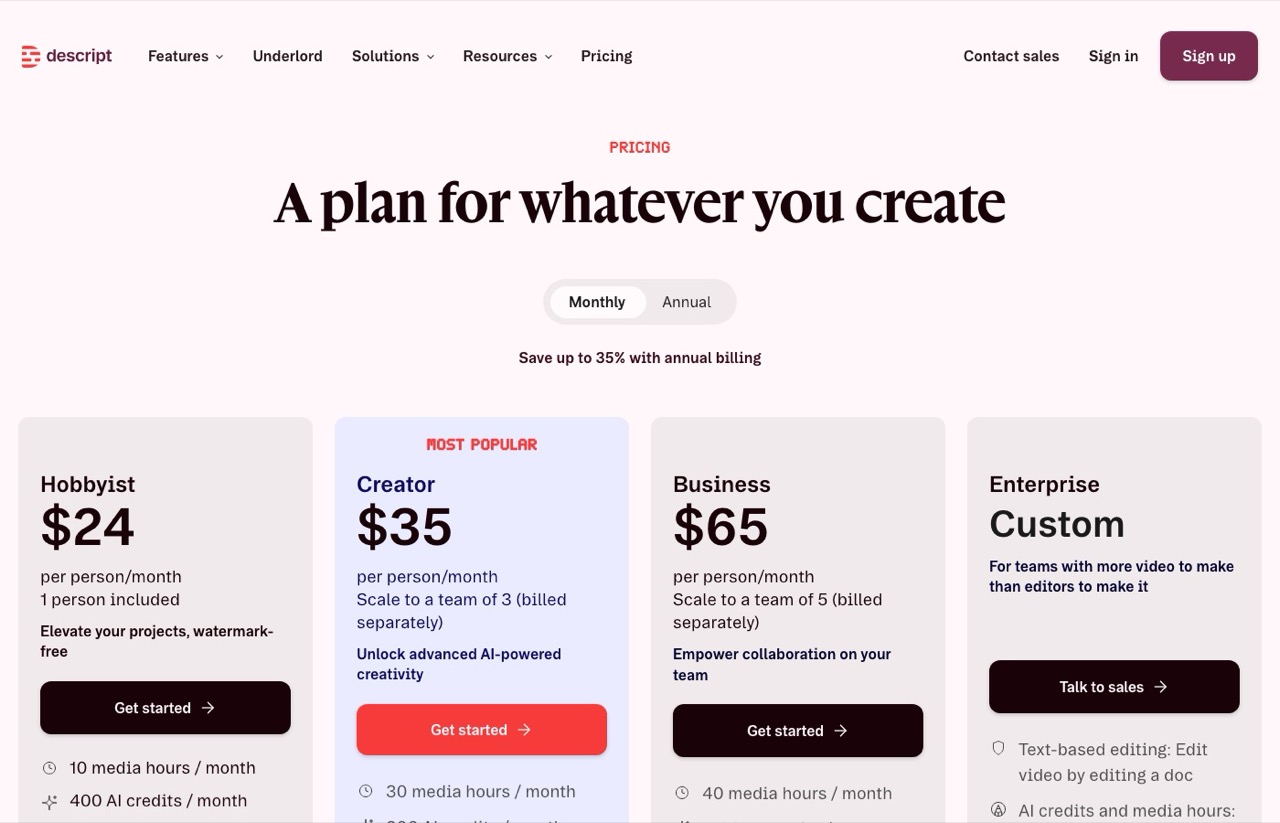
Descript is a different category of tool and it is the honest answer for a lot of people who think they want a clipper. You edit video by editing a transcript.
Pros:
- Transcript-based editing is built to beat a timeline for talking-head content
- Real editor features, including filler-word removal and Studio Sound
- Free plan gives you an hour of media a month to try the workflow
Cons:
- Media hours are tight, 10 a month on the entry paid plan
- It will not batch-select clips as aggressively as a dedicated clipper
- Priced per person, so a small team multiplies the cost
Best for: The person whose bottleneck is "I need to edit this and I am slow at it."
Pricing: Monthly $24 Hobbyist (10 media hours), $35 Creator (30 hours), $65 Business (40 hours). Annual is $16, $24 and $50.
Free trial: A free plan with 1 media hour a month, watermark-free export not included.
Bottom line: Buy Descript when the job is editing and buy a clipper when the job is finding moments. Those are different products, and picking the wrong category is the most common mistake I see on this keyword.
4. Riverside (Best If You Record Remote Interviews)
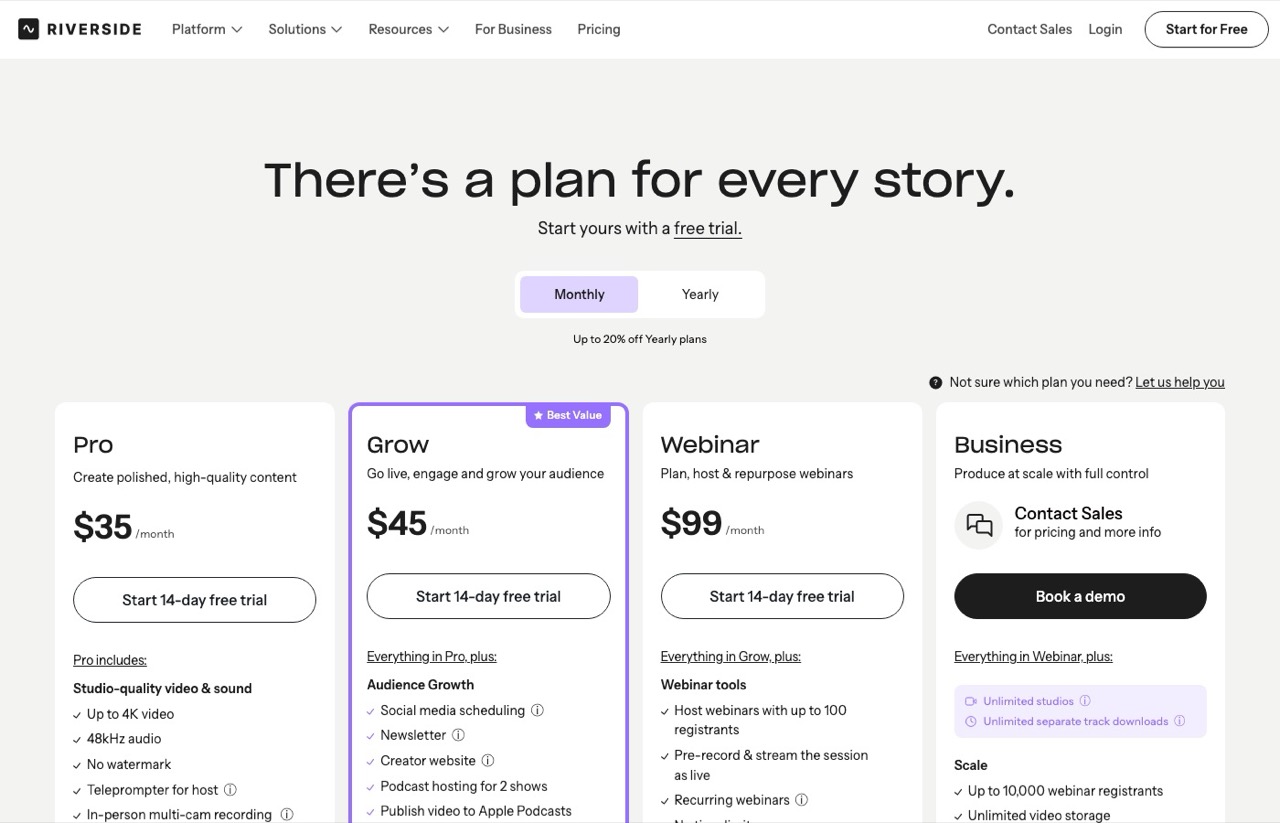
Riverside earns a spot for one structural reason: it records and clips in the same place, so there is no export-and-reupload round trip.
Pros:
- Records and clips in one tool, removing an entire handoff
- Magic Clips is included on every paid tier and burns no AI credits
- Records up to 4K locally, so clip quality does not depend on the call
Cons:
- The highest plan entry price here at $35, beaten only by Submagic once you add its clipping add-on
- The pricing page leads with paid plans and a 14-day trial rather than a free tier
- Pointless if you do not record remotely, since clipping alone will not justify it
Best for: Podcasters running remote guests who want recording and clipping under one login.
Pricing: Monthly $35 Pro, $45 Grow, $99 Webinar, Business by quote. Annual is $24, $34 and $79.
Free trial: 14 days on every plan. The pricing page presents Pro as the entry point rather than a free tier, so budget for the subscription.
Bottom line: Worth it when the recording and the clipping are the same job, because you are buying a workflow rather than a feature. If you upload files recorded elsewhere, you are paying for a recording studio you are not using.
5. Submagic (Best for Captions, Once You Read the Add-On)
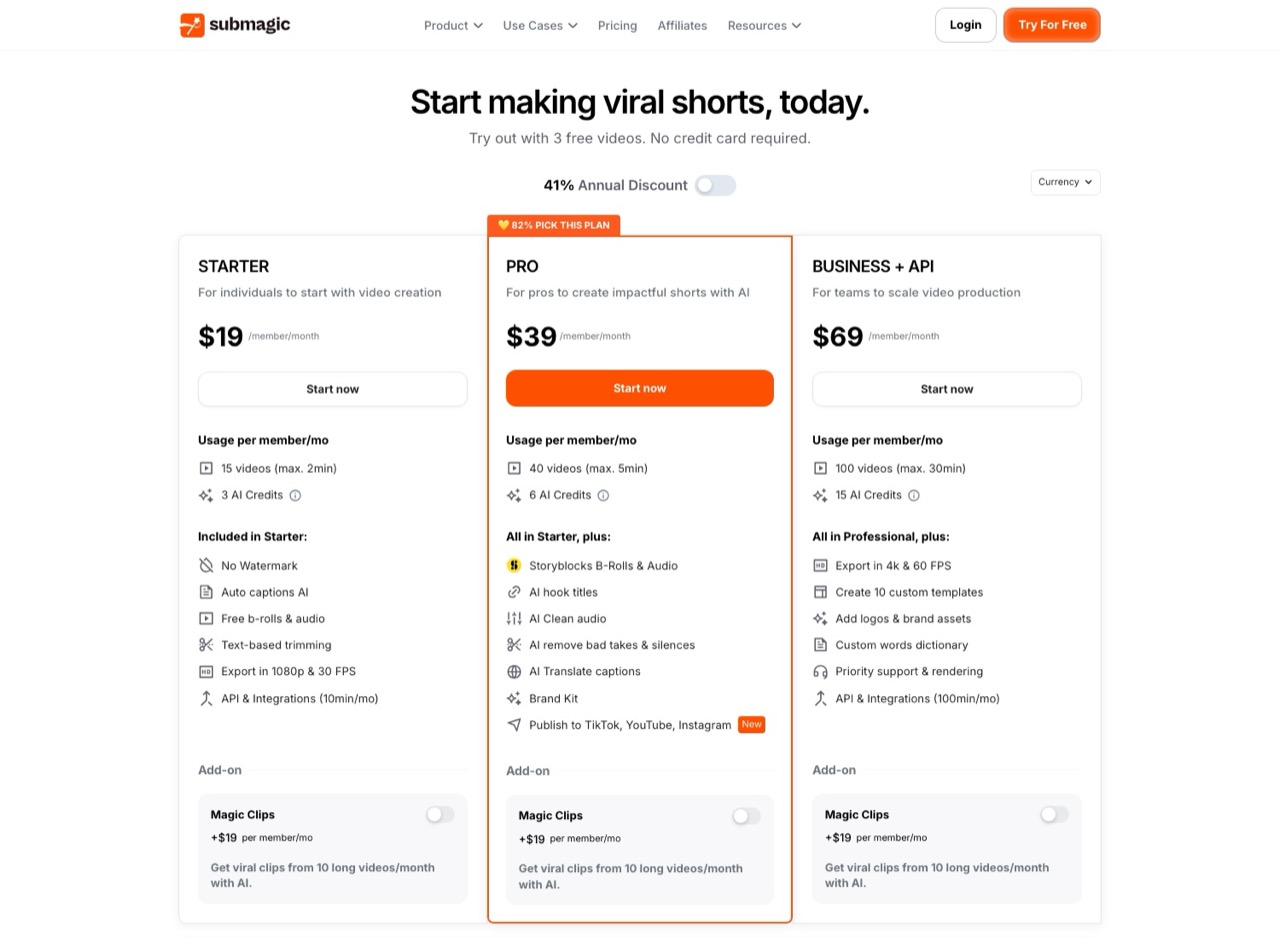
Submagic is on four of the eight pages ranking for this keyword and in both AI Overviews I pulled, so it belongs here even though I have not run it. It is caption-led rather than selection-led.
One detail I found only by reading the plan cards properly, and no roundup I checked mentions it. Magic Clips, the feature that turns a long video into shorts, is a paid add-on at $19 a month on every single tier.
The add-on carries its own allowance of 10 long videos a month, separate from the plan's short-video count. So Submagic as an Opus Clip alternative is not $19. The cheapest configuration that actually does long-to-short clipping is $38 a member, which puts it above Opus Clip Pro rather than below it.
Pros:
- Captions are the thing it is actually built for, and no watermark on any paid plan
- API access is included from the entry tier, at 10 minutes a month
- Storyblocks b-roll and audio bundled from the Pro tier up
Cons:
- The clipping feature costs an extra $19 per member per month on every plan
- Base video length caps are strict, 2 minutes on Starter and 5 on Pro
- Priced per member, and the add-on is per member too
Best for: Creators whose real need is polished animated captions, with clipping as a secondary job.
Pricing: Monthly $19 Starter (15 videos), $39 Pro (40 videos), $69 Business (100 videos). Annual is $12, $23 and $41. Magic Clips adds $19 monthly or $12 annual per member and covers 10 long videos a month.
Free trial: 3 free videos, no card required. That is a trial rather than a standing free tier.
Bottom line: Price it as plan plus add-on or you will underestimate the entry tier by half. Judged that way it competes on caption quality rather than on price, which is a fairer fight for it than the sticker suggests.
6. Quso (Best for Clipping and Publishing in One Bill)
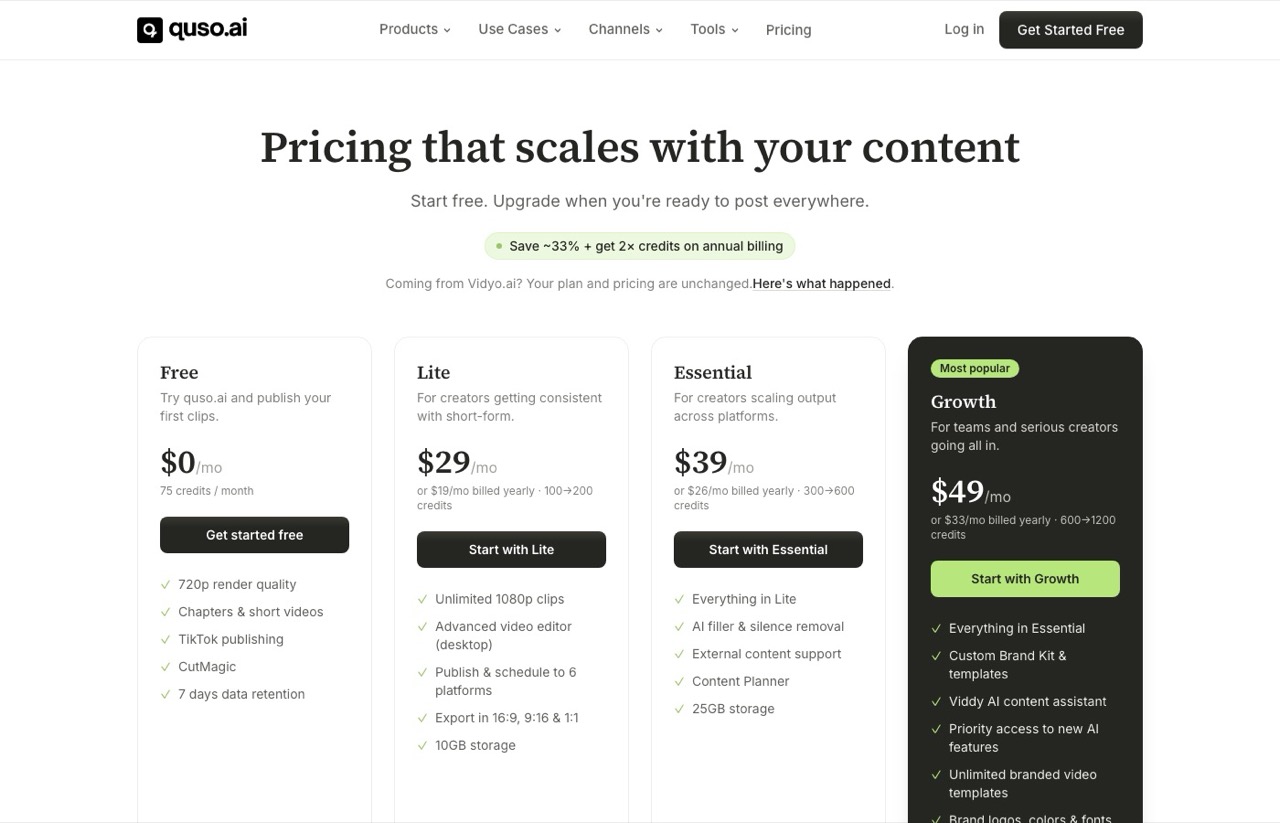
Quso, formerly vidyo.ai, bundles AI clipping with a scheduler and social publisher, so clips go out without a second tool. If you would rather keep those jobs separate, the distribution half is its own category, and I priced one of the better-known options in my Repurpose.io review and its seven closest competitors.
Its annual structure is unusual enough to flag. Paying yearly cuts the price by about a third and doubles the monthly credits, where every other tool here only discounts the price.
Pros:
- Free plan includes 75 credits a month, the largest free allowance in this post
- Publishing is built in, so there is no download-and-reupload step
- Annual billing doubles credits rather than only discounting
Cons:
- Free tier publishes to TikTok only and holds data for 7 days
- Free renders cap at 720p
- If you already run a scheduler, adding this one points two tools at the same accounts
Best for: Solo creators who want one login and one bill covering clip and post.
Pricing: Free (75 credits), then monthly $29 Lite, $39 Essential, $49 Growth. Annual is $19, $26 and $33, with credits doubled.
Free trial: Not needed. The free plan is permanent, though limited to one platform.
Bottom line: The consolidation is real if publishing is currently a manual step for you. I split these jobs myself for a reason I explain below, though that is my setup rather than a fault in the tool.
7. CapCut (Best When the Honest Answer Is "Do It Yourself")
CapCut has a genuinely free editing tier with no AI credit meter on it, and it is what a large share of short-form creators actually use. You pick the moments yourself.
A caveat on this entry specifically. CapCut's pricing page would not load for me on the day I checked, so I am not quoting its paid tiers, and you should confirm them yourself before buying. What I can say is that the free editor exists and does not meter clipping.
Pros:
- Free editing with no per-clip credit meter
- You choose the moments, so there is no pass spent judging what an AI picked
- Enormous template and effect library
Cons:
- Manual selection costs you time that the paid tools spend for you
- Some Pro-marked templates and effects apply a watermark on free exports
- Nothing to automate, so an agent cannot touch it
Best for: Anyone publishing two or three clips a week who would rather spend an hour than $29. It is also the natural fit if you shoot raw and unpolished, which is how I keep a posting habit alive by recording on walks.
Pricing: Free tier confirmed. Paid tiers not verified here, see the caveat above.
Free trial: The free tier is the trial, and it is permanent.
Bottom line: For low volume the math genuinely favors this. Automation is worth paying for at volume, and below that volume it is a tax.
One outside data point on hit rate: an affiliate marketer I share a mastermind with runs Opus Clip at roughly 50 clips generated for about 10 usable, with a human yes or no pass on every one. That is one person's experience next to mine rather than a category benchmark, but both point the same way. Budget for a review pass whichever tool you pick.
What I Actually Run, and Why It Is Split
This section mentions a tool I have an affiliate relationship with and that is also a client.
Here is my real setup, stated plainly because it is the part every vendor roundup leaves out.
In my setup Opus Clip renders and nothing else. It never touches publishing.
That split is deliberate rather than forced. Opus Clip ships perfectly good scheduling and posting tools, and I leave them switched off, because two schedulers pointed at the same accounts is how you end up double-posting. It is the same tradeoff I flagged on Quso above.
Blotato holds my account connections, so it owns distribution. The full pipeline, from long video to a month of scheduled posts, is written up in my AI social media system.
The MCP fixed the exact thing that made me quit. An agent now does the review pass I used to do by hand, which is why a tool I had written off is back in my rotation.
Two things it still gets wrong. On my podcast episode the captions sat at the bottom and covered my guest's mouth, so for two-person footage you want them centered. It also missed a shade of blue I thought was in my brand guide.
Build your brand template first, by hand, in the web editor. There is no tool to create one over MCP, only to list what exists. Skip that step and everything renders on the stock preset, which is the green and yellow caption style you have seen on thousands of shorts.
One more thing I only learned by running this on a schedule rather than testing it once. Rendering is asynchronous, and the gap between submitting a video and having clips back is long enough that an agent will happily declare victory before anything exists.
My first working version did exactly that. It reported a successful run, and the folder was empty, because the job was still processing when the conversation ended.
If you wire this up yourself, make the agent poll for completion and confirm the clips came back before it moves on. That is the difference between a demo that works once and a pipeline you can leave alone on a Monday.
I still pay a human editor for long-form and for any short that has to land. That is a decision against automation, made by someone who automates most of his workflow.
Update, October 2026: long-form flipped. Claude Code skills now cut my podcast episodes and build the intro, and my editor keeps the shorts, so here is what happened when AI edited a full episode.
Three Questions That Narrow This to One Tool
These are the questions I work through rather than a pick-for-me list, because the right answer genuinely changes by person.
How many clips a month? These are my rough thresholds rather than a formula, and they assume you value an hour of your own time at more than a few dollars. Under about ten clips, manual selection in CapCut is usually the cheaper trade. Above thirty, a subscription pays for itself even at a mediocre hit rate.
What does the tool count, and does that match how you upload? Long source video favors clip counting, which is Klap. Short source video favors minute-based credits, which is Vizard, Quso or Opus Clip. Getting this backwards is the expensive mistake.
Does an agent need to drive it? Opus Clip is the only tool here with an MCP server, and it works on the $29 Pro plan with no separate API bill. Klap and Submagic both expose APIs, but Klap meters its per operation and Submagic allots API minutes by tier, so check what agent use adds before you assume it is included. It is worth reading which MCP servers actually earn a place in a marketing stack before you commit.
One more worth asking before you pay: are you buying selection or editing? Selection problems point to Opus Clip, Klap or Vizard. Editing problems point to Descript.
What About Munch and Ssemble?
Both come up on this keyword and neither is ranked above, because I have not run either one.
Munch shows up in AI answers for this query more than its footprint suggests it should, and it is worth knowing it has moved on since those answers were trained. It now sells itself as Munch Studio, an AI that runs your whole social presence from your website rather than a clipper you feed a long video to.
Ssemble ranks page one with its own roundup and is a browser-based editor with a clipping layer on top.
Each is worth your own look. To be straight about the criterion, since I have not run any of the seven above either: the ranked list is the set that both shows up repeatedly on this query and publishes a rate card clear enough to price honestly. Munch no longer sells the job this post is about, and Ssemble I simply have not looked at closely enough to place.
The Honest Read After a Year Away
The automated end of this category has converged. The dedicated clippers here all find faces, add captions and reframe to vertical, and most attach some flavor of virality score.
What still separates them is the billing unit, the free tier, and whether an agent can reach the thing at your price. That last one is why clipping ended up inside my wider set of content creation tools rather than sitting off on its own.
My read: AI clipping is a genuine time-saver on the first pass and is still not a replacement for an editor on anything that represents you. I quit the category for a year over exactly that, and I came back only when an agent could absorb the review work I did not want to do.
Start with Vizard's free tier, because an hour of upload costs nothing and answers the question. If clipping earns a place in your week, compare Klap and Opus Clip on the metering model that matches how you upload.
And if you publish a few clips a week, seriously consider that CapCut and an hour of your attention beats all of it.
Every price here came from the vendor's own pricing page with monthly billing selected. I have run Opus Clip on my own videos and priced the other six from their live rate cards without putting them through a real workload. CapCut is the one entry with no verified price, and I have flagged that where it appears.
Treat every comparison page on this keyword, mine included, as an argument rather than a finding. Open the pricing pages yourself, switch them to monthly, and you will already know more than most of page one.
Opus Clip Alternatives FAQs
What is the best free Opus Clip alternative?
Vizard has the most usable free plan: 60 credits a month covering an hour of upload, with full editor access, capped at 720p and 3-day storage. Quso's free plan gives more credits at 75 a month but publishes only to TikTok. CapCut is free with no AI meter at all if you are willing to pick the clips yourself.
Is Klap cheaper than Opus Clip?
Not on equal terms. Klap's advertised $14 for 100 clips is the annual rate, and its real monthly price is $29, the same as Opus Clip Pro. They also meter differently: Klap counts finished clips while Opus Clip counts source minutes as credits. Price both on the same billing period, then pick by which unit matches how you upload.
Does Opus Clip have an API or MCP server?
Yes, and it works on the $29 Pro plan. Opus Clip's pricing page now lists the MCP connector, Video Editing API and Scheduler API as included on Pro, which matches what my own Pro account does. The hosted server sits at mcp.opus.pro/mcp, uses OAuth rather than an API key, and exposes 29 tools. API usage is capped separately from plan credits at 900 credits per workspace per month.
How much does Opus Clip cost per month?
On monthly billing, Starter is $15 and Pro is $29 with 300 credits a month, plus a free plan with 60 credits and a watermark. Annual billing drops Pro to $14.50 a month, billed $174 up front. The pricing page loads on the annual toggle, so the first number you see is not the month-to-month rate.
Can AI clipping replace a video editor?
Not yet, in my experience. These tools handle selection, captions, and vertical reframing well. They still do not deliver relevant b-roll, considered transitions, or reliable judgment about which section carries the idea. I use AI clipping for speed and still pay an editor for anything that has to land.
Which Opus Clip alternative is best for podcasts?
Riverside if you record remote interviews, because recording and clipping happen in one place and you skip the upload step entirely. Klap if you upload long episodes recorded elsewhere, since counting finished clips means a two-hour episode costs no more than a short one. Descript if your episodes need real editing rather than clip extraction. Opus Clip is the only one of those I have run on my own podcast, so read the other two as a reading of their pricing and design rather than a field report.
Disclosure: some links in this post are affiliate links, specifically Blotato. If you buy through them I may earn a commission at no extra cost to you. Blotato is also a client of mine and my account there is comped rather than paid. Links to Opus Clip, Klap, Vizard, Descript, Riverside, Submagic, Quso, CapCut, Munch and Ssemble are not affiliate links, and I pay for Opus Clip myself. Opus Clip is the only tool here I have run on my own videos. The other six are priced and assessed from their live rate cards and documentation, which I have said plainly at the top of the post and in the closing section rather than burying here. Full disclosure.