
ChatGPT Business Hub: How to Claim It and Read the Real Data
OpenAI's new ChatGPT Business Hub gives you first-party numbers on how often ChatGPT points people to your business and how many click through. That's the data marketers have been missing since AI search took off, and it makes a lot of prompt tracking look like guesswork.
How to Claim Your Business in ChatGPT Business Hub (6 Steps)
ChatGPT Business Hub is OpenAI's free portal where a verified business can edit how it appears in ChatGPT and see its mention and click data. OpenAI opened Businesses in ChatGPT in beta on November 10, 2026, pitching it as a way to reach the 1.2 billion people who use ChatGPT each week.
Here's the claim flow, straight from OpenAI's help docs.
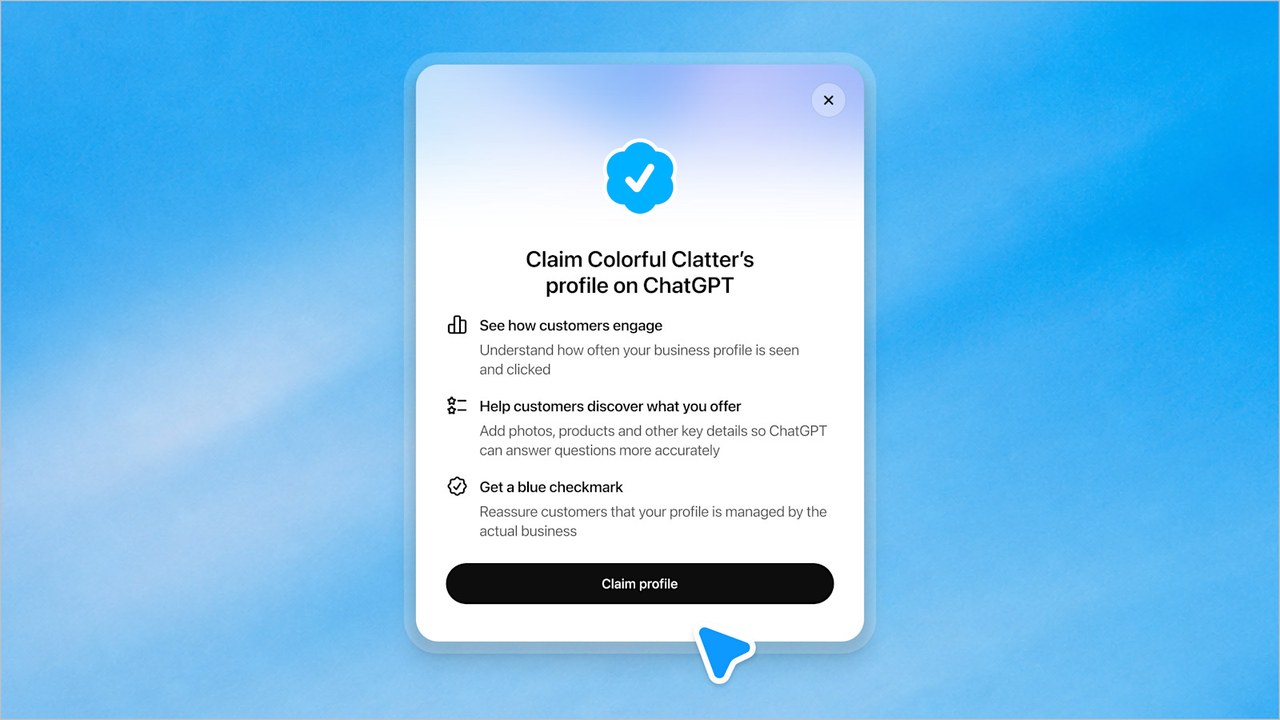
- Sign in to ChatGPT and open Business Hub from the sidebar, or go to chatgpt.com/business-hub. You don't need an Ads account or an Enterprise plan to claim a business.
- Search your business name and select the matching listing. Can't find it? Eligible online businesses may get an option to add one, but local stores and restaurants can currently claim only an existing US listing.
- Verify the claim with your business phone (text or automated call), your business email, a DNS TXT record on your website domain, or your Shopify store.
- Wait for OpenAI's review. The decision, or a request for more info, arrives by email.
- Complete identity verification with Persona, which can ask for a government ID, business registration details and proof you can represent the business. Insights, edits, product feeds and the blue check all stay locked until this step is approved.
- Open Insights and write down your first 28-day baseline: mentions, website clicks and discovery topics. Then update your website, description, category, logo and policies, and connect a product feed if you sell products.
If someone already claimed your business, open its profile, pick Dispute ownership from the ••• menu, and verify with Persona.
Business Agents, the branded chatbot people can open from your profile, are a separate step limited to eligible US ecommerce and online service businesses.
If you want the SEO skills I run on my own sites, my Claude Code Skills Stack holds them.
What ChatGPT Business Hub Actually Counts
OpenAI's setup guide for Business Hub defines each metric.
| Metric | What counts | What it won't tell you |
|---|---|---|
| Mentions | Online business: ChatGPT references your website. Local business: ChatGPT shows a result for your location. | Your brand name alone, with no website reference, is not counted |
| Website clicks | Recorded clicks on links to your site inside ChatGPT | Whether the visit loaded or converted |
| Discovery topics | Common themes in answers that mentioned or cited you | The individual prompts people typed |
OpenAI's guide says insights cover the past 28 days, and its demo dashboard also shows a profile views tile and a 7-day view.
A blank tile doesn't mean zero. OpenAI says it can mean you're under the reporting threshold, the data is still being collected, or reporting isn't available yet.
Your ChatGPT Click Rate Is the Number to Watch
Divide website clicks by mentions and you get a rough ChatGPT click rate. Prompt trackers can't give you that, because they never see real clicks.
PPC Land worked out that the first two live dashboards shared on November 10 recorded clicks on about 3.5% of mentions. OpenAI's illustrative demo dashboard implied about 35%.
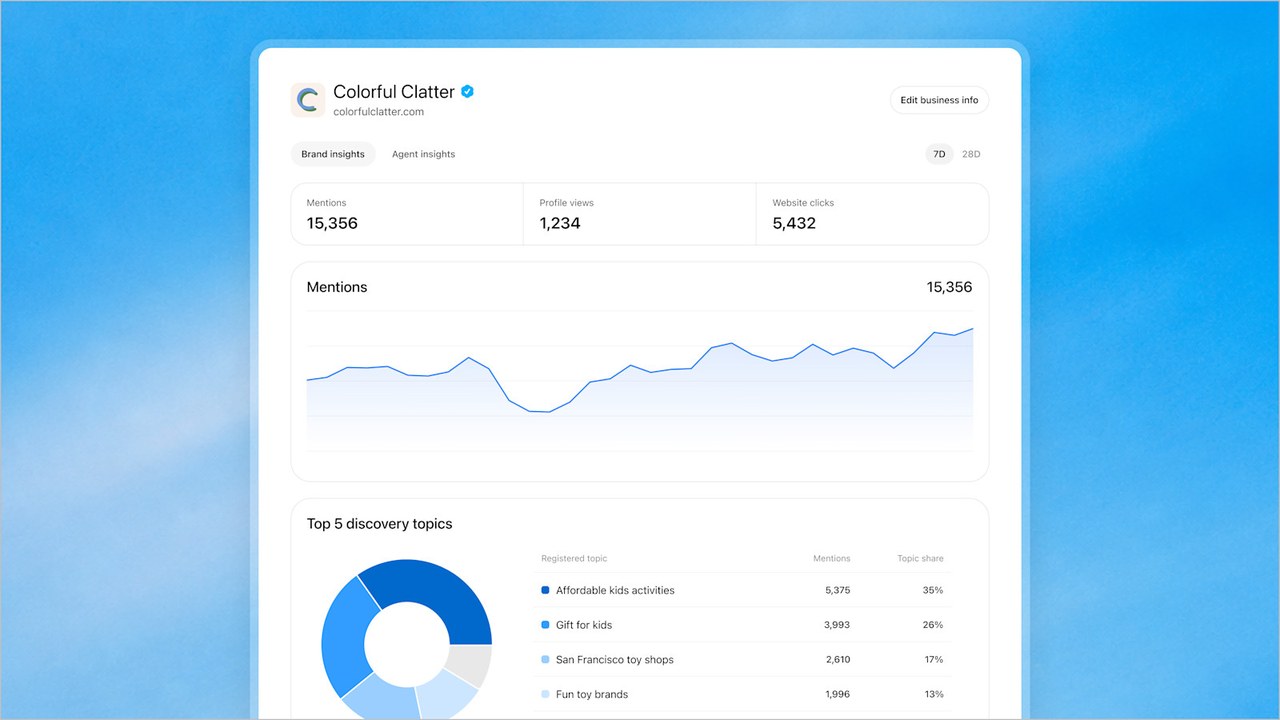
Two dashboards and a demo aren't a benchmark. Compare the ratio against your own history month to month, since OpenAI hasn't said the two counts follow matching rules.
Then check the clicks against your ChatGPT referral sessions in GA4. The Business Hub tooltip itself says clicks "don't confirm website visits or conversions," so the gap between the two numbers is worth tracking too.
Why ChatGPT Business Hub Ends the Scammy Side of Prompt Tracking
My bias, up front: I review AI visibility tools on this site and earn affiliate commissions from some of them. So I have every reason to go easy on them.
Sampling prompts isn't the scam. The scammy version sells that sample as real demand, with prompt "search volumes" no AI company publishes and a single run reported as your rank.
A sample with a nice dashboard on top is still a sample.
I watched one prompt rank the same brand anywhere from #1 to #8, which I broke down in my guide to tracking AI visibility as a trend.
That's normal variance, and a tool that reports one of those runs as your position is selling noise. ChatGPT Business Hub skips the sampling and counts what happened in real conversations.
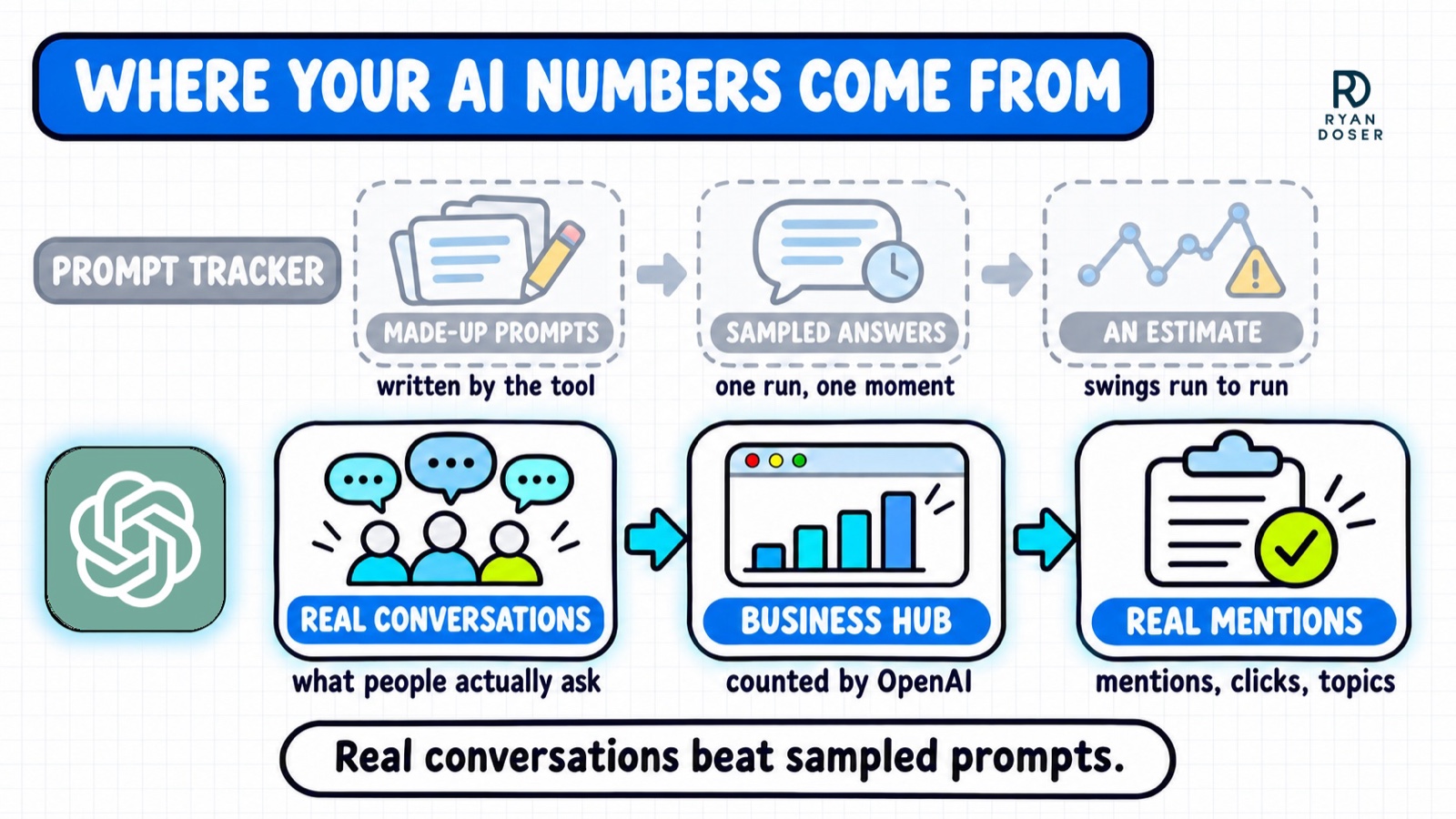
Expect the two to disagree. Trackers usually count every time your brand name shows up, while Business Hub counts an online business's mention only when ChatGPT references its website, so a bigger tracker number isn't a sign you're winning.
Even ChatGPT hasn't caught up. A ChatGPT answer pulled for this post on November 11 still claimed OpenAI offers businesses no mention dashboard, one day after launch.
Where Prompt Trackers Still Earn Their Fee
Business Hub only shows your own business. If you want to compare yourself against competitors, a tracker's sample (or your own manual testing) is still the practical way to do it.
It also covers ChatGPT alone. Claude and Perplexity have no equivalent that I know of, and Google's AI reports only cover Google's own surfaces.
My roundup of AI visibility tools compares which trackers cover the engines Business Hub can't see.
So keep one cheap tracker if competitor data matters to you. Stop paying one just to report how often ChatGPT shows your own website.
I Want a ChatGPT Business Hub API for My SEO Stack
My AI search reporting runs inside Claude Code. The Google Search Console MCP (the first pick in my list of SEO MCP servers) and the Bing Webmaster API pull my Search Console and Bing data into one place.
Nothing in OpenAI's announcement or help docs mentions an API, an MCP server or an export for Business Hub. Until OpenAI announces one, ChatGPT is a source I copy by hand.
| First-party AI report | What it shows | Reports clicks? |
|---|---|---|
| Google Search Console, Generative AI report | Impressions in Google's AI features like AI Overviews and AI Mode | No |
| Bing Webmaster Tools, AI Performance | Citations in Copilot and Bing's AI summaries | No |
| ChatGPT Business Hub | Mentions, website clicks, discovery topics | Yes |
Business Hub is the only one of the three that reports clicks, which makes it the piece I want automated most.
Neither Google's launch post nor Bing's AI Performance announcement mentions API access to those AI reports either. So the ask goes for all three.
The day OpenAI ships an API or MCP server, Business Hub goes into the same Claude Code report as my Google and Bing numbers.
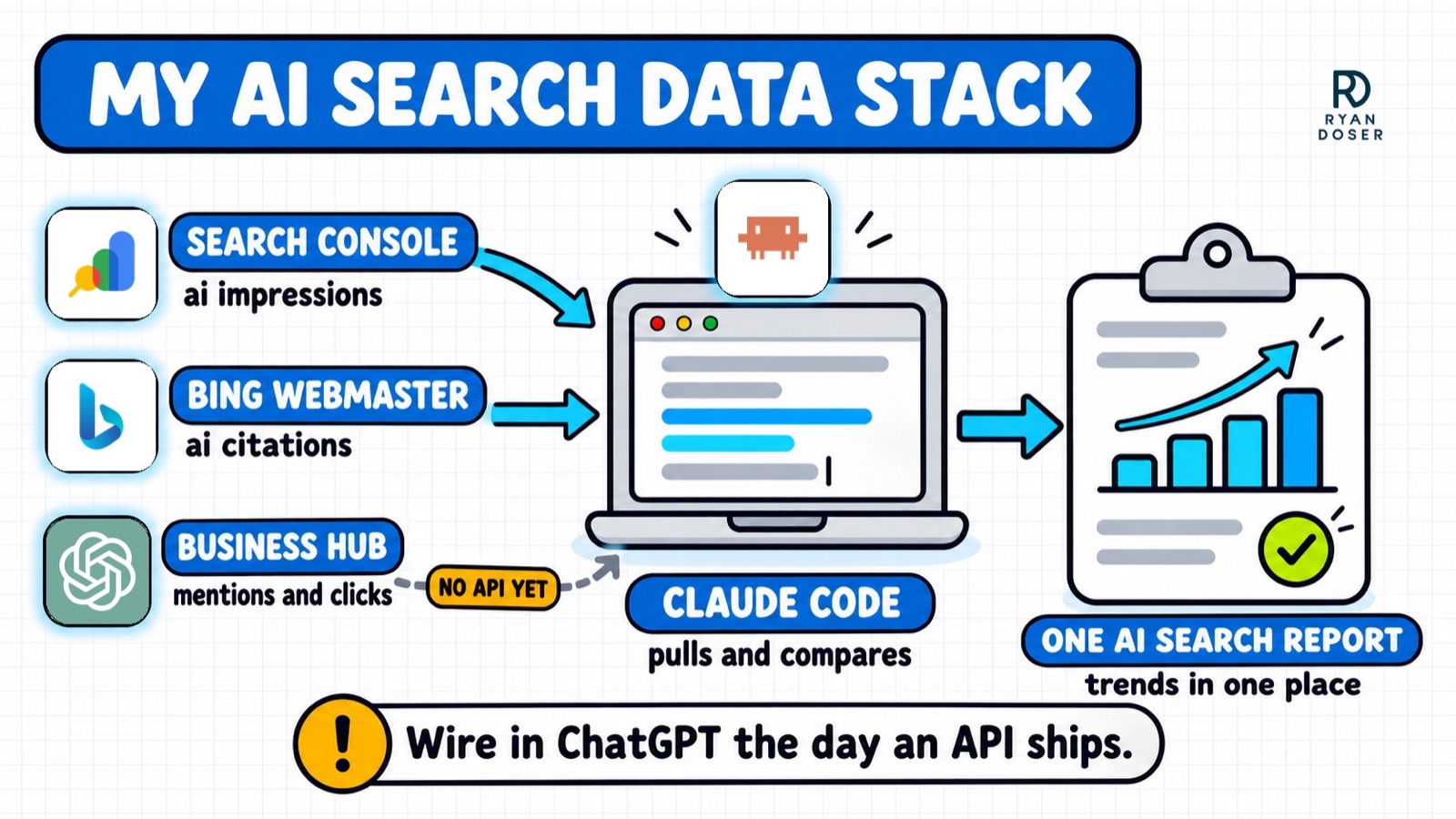
Here's the stopgap. Once a month, log the date, your 28-day mentions, clicks, click rate and top five discovery topics in a spreadsheet, so Claude Code can read it next to your Google and Bing exports.
It's the same habit as the free scorecard in my zero click marketing guide. Business Hub just replaces the hand-run ChatGPT prompts with real counts.
Claim It This Week, Judge It in a Quarter
OpenAI is clear that claiming doesn't guarantee higher placement or more sales. The work that moves those numbers is what I covered in how to rank in ChatGPT.
I still think AI search is overrated for most small businesses, and a new dashboard doesn't change that. What it changes is that you can check instead of guess.
Claim your ChatGPT Business Hub listing anyway, so you can start logging a baseline. Read the trend every month for a quarter, and let real counts decide where your AI search budget goes.
ChatGPT Business Hub FAQs
Is ChatGPT Business Hub free?
Yes, as of November 2026. OpenAI's pages list no fee for claiming a business, and its help guide says you don't need an Ads account or a ChatGPT Enterprise agreement. Paying shows up elsewhere: you can sponsor your Business Agent through ChatGPT Ads, and the dashboard also promotes OpenAI's paid ChatGPT Business workspace plan, a separate product.
Does ChatGPT Business Hub show the prompts people used?
No. You get discovery topics, which are themes grouped from ChatGPT answers that mentioned or cited your business, never the individual prompts or conversations. Treat the topics as a content brief rather than a keyword list, since OpenAI says they don't directly measure customer intent. Prompt testing shows how ChatGPT answers prompts you write, never the real ones behind these counts.
Can I manage several brands or locations in ChatGPT Business Hub?
Only one at a time for now. OpenAI's help guide says each distinct brand is managed separately, central management across a parent company's brands and locations isn't available yet, and claiming the main brand doesn't claim its locations. Agencies get access when the admin who claimed each business invites them, using each person's own ChatGPT account.
Is there a ChatGPT Business Hub API?
Not one OpenAI has announced. The launch post and setup guide mention no API, MCP server or data export for its insights. OpenAI does say it plans to "build tools for organizations with more complex needs," which is the most likely home for one. Agencies managing many clients feel this gap most, since every dashboard has to be read by hand.