
Webflow vs WordPress: Why I Pick WordPress (and Use Neither)
If you're stuck on Webflow vs WordPress in 2026, I'd take WordPress, because you can pack it up and move it. If you run the site alone, I'd skip both and have an AI coding agent build it on files you own.
Webflow vs WordPress: My Verdict for 2026
Webflow is a hosted visual builder. You design on a canvas, and Webflow runs the hosting and the CMS for a monthly fee per site.
WordPress is free, open-source software you install on a host you choose. You extend it with themes and plugins.
So the Webflow vs WordPress decision comes down to one question: can you move the working site later without rebuilding it? I ran ryandoser.com on WordPress until July 2026 and have only tried Webflow briefly, so factor in my bias.
These days an AI agent builds my sites, and the website designer and SEO skills I hand it live in my Claude Code Skills Stack.
| Question | Webflow | WordPress |
|---|---|---|
| Who hosts it | Webflow, on every Site plan | Any host you pick |
| Cheapest paid plan with the full CMS (Nov 21, 2026) | Premium, $25 a month billed yearly | Free software, plus hosting |
| Leaving later | Code export needs a paid Workspace plan and leaves the CMS content behind | Move the files and database to a new host |
| Upkeep | Webflow runs hosting and SSL | You or your host keep WordPress and its plugins updated |
| Design control | A visual canvas with fine control | Depends on the theme or page builder |
| Best fit | Design-led marketing sites with a budget | Content sites, stores and teams that want control |
Webflow wins on hands-off hosting and its visual design canvas. WordPress wins on what I care about most, which is being able to take your site with you.
WordPress also has the far bigger ecosystem. W3Techs had it on 38.5% of all websites and 57.4% of sites with a known CMS on November 21, 2026.
Webflow held 1.2% of sites with a known CMS on the same day.
How Much Does Webflow Cost After the 2026 Price Change?
Check the date on any Webflow vs WordPress post you read, because Webflow changed its plans this year. It merged its CMS and Business plans into one Premium plan on May 13, 2026.
Existing sites moved to the new prices at renewal, and Webflow's help center says sites in Freelancer or Agency Workspaces started moving on November 16, 2026.
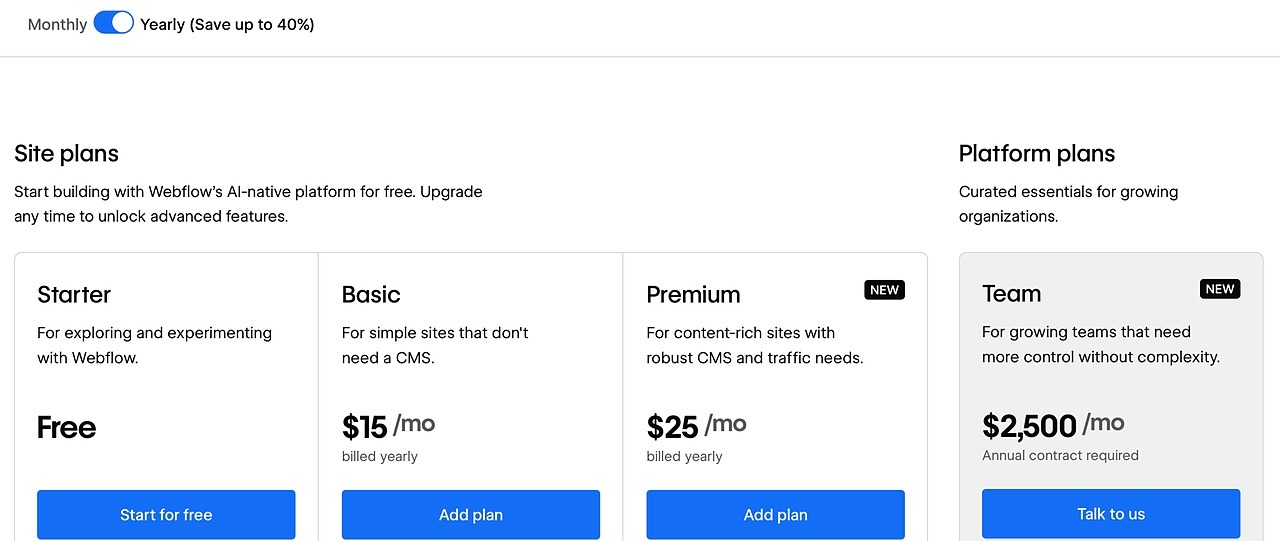
Here's the price sheet on webflow.com/pricing on November 21, 2026, billed yearly per site:
- Starter: free, on a webflow.io address with 2 static pages.
- Basic: $15 a month ($25 billed monthly), 300 static pages and no CMS.
- Premium: $25 a month ($39 billed monthly), with the CMS and up to 20,000 items.
- Team: $2,500 a month on an annual contract, with publishing workflows, single-page publishing and seats for a team.
WordPress itself is free software from WordPress.org, so you pay for hosting instead. WordPress.com, the hosted version, listed plans with plugins from $4 a month billed yearly on November 21, 2026.
Here's the three-year math for one small site with a CMS, at those list prices:
| Setup | Per month, billed yearly | Three years | Not included |
|---|---|---|---|
| Webflow Premium | $25 | $900 | Domain, paid add-ons |
| WordPress.com Personal | $4 | $144 | Premium plugins and themes |
| Astro on Cloudflare's free plan | $0 for hosting | $0 for hosting | Domain, the AI subscription that builds it |
Webflow Premium costs more than six times WordPress.com's Personal plan over the same three years, before a single Webflow add-on. Renewal prices can change, so check each pricing page before you commit.
The add-ons are billed per site on top of that, with analytics from $9 a month and A/B testing from $299 a month. Team at $2,500 a month only matters if your team needs publishing workflows or single-page publishing.
WordPress hosting costs money too, and hosts raise prices. The difference is that you can move a WordPress site to a cheaper host, while a Webflow site stays on Webflow's price sheet.
WordPress wasn't cheap for me in practice, either. My bill had a monthly platform fee, premium plugins and a theme on top, which is part of why I left WordPress this summer.
Who Owns Your Site on Webflow vs WordPress
Ownership is where the two platforms split hardest. On Webflow, code export is only available on paid Workspace plans, so a Site plan by itself doesn't let you download your code.
Even with export, Webflow's own export guide says the files leave out CMS content, ecommerce, user accounts, site search and form processing. Collection lists show up empty on the exported site.
You can export CMS Collections as CSV files, one collection at a time. That gives you a backup of the content, but the templates and dynamic pages built on it have to be recreated on the new platform.
WordPress works the other way. The software is open source, and your files and database can move to any host that runs WordPress.
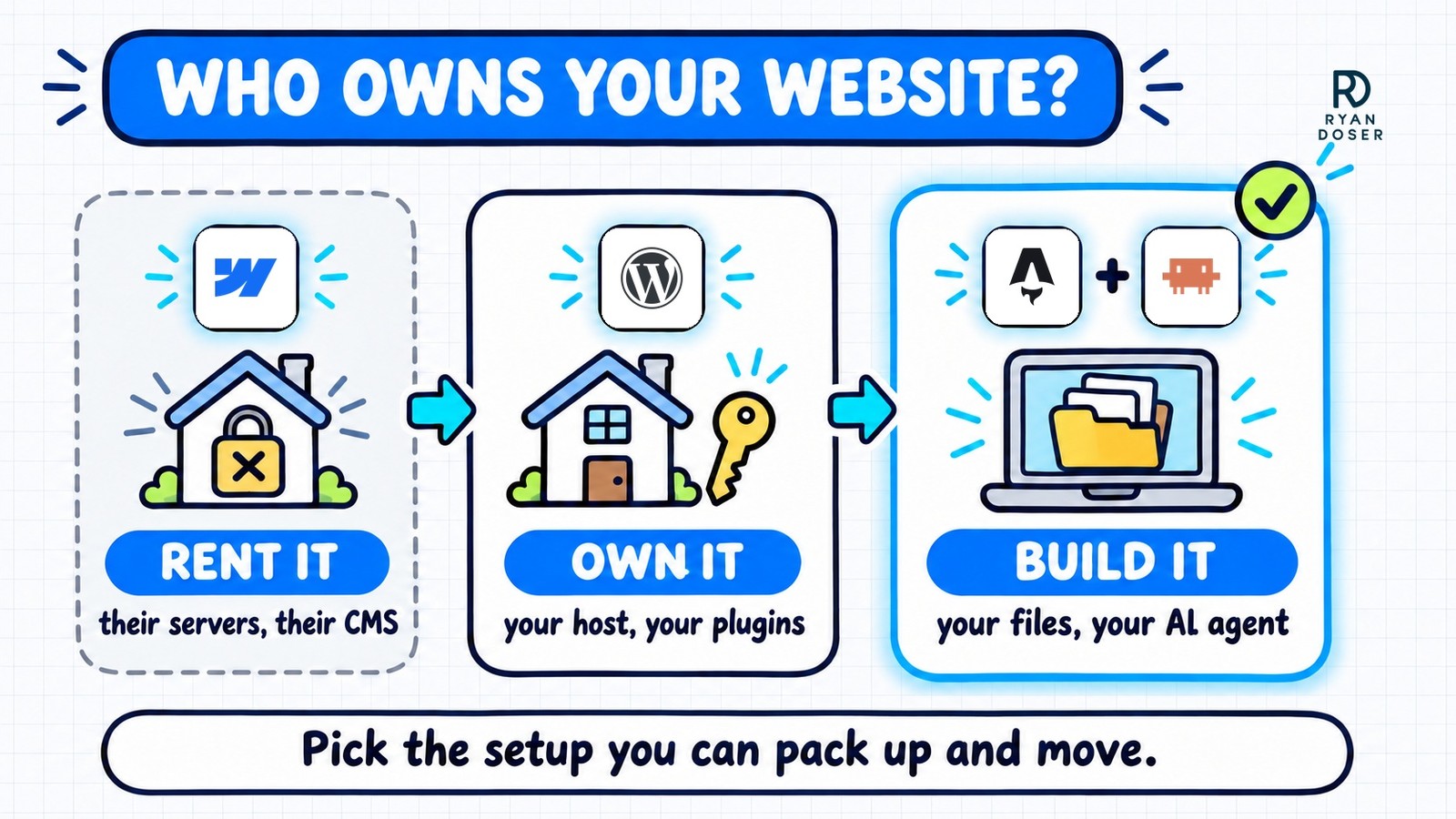
That's why I'd pick WordPress if those were the only two options. A WordPress site can outlive its host, while a Webflow site depends on Webflow staying a good deal.
Webflow vs WordPress for SEO and AI Search
Both can rank. Webflow's pricing page calls its sites SEO-friendly and points to fast hosting and standards-based code.
WordPress speed depends on your host, your theme and how many plugins you pile on.
Rankings come from your content, your links and how the site is organized, on either one.
AI assistants can't agree on a pick either. In API tests run for this post on November 21, 2026, sending the same three prompts to each model, ChatGPT recommended WordPress for most small businesses and Claude leaned Webflow for a typical small business.
Gemini split its answer by use case, and Perplexity called AI-search visibility a tie.
Only Gemini and Perplexity raised a third option, Astro, and only when the prompt asked about owning the site.
For me, the SEO difference shows up in upkeep. On WordPress, I changed the year in every title by opening each page in wp-admin, editing it, clicking update and going back to the dashboard.
Now it's one sentence to Claude Code, and the change deploys while I work on something else. I compared both workflows in my Astro vs WordPress breakdown.
Framer vs Webflow, Briefly
If Framer is also on your Webflow vs WordPress shortlist, it's another hosted builder. It lists Basic from $10 a month and Pro from $30 a month on its pricing page on November 21, 2026.
Pick Framer for a fast, design-led site with a small CMS. Webflow Premium includes 20,000 CMS items, while Framer Pro includes 2,500 and sells more as paid add-ons.
Both are hosted builders, so check Framer's export options against your exit plan before you commit.
Why I'd Skip Both Webflow and WordPress
For a solo marketer, my real answer to the Webflow vs WordPress question is neither. This site runs on Astro, a free web framework, with Claude Code or Codex doing the building, GitHub storing every file and Cloudflare hosting it.
Static pages can run on Cloudflare's free plan, and its Workers Paid plan starts at $5 a month if your site runs server code.
Beyond a domain, the bigger costs are the AI subscription and the time you spend reviewing what the agent builds.
Every file sits in your own GitHub repo, so there's no export button to worry about. You review each change the agent makes, and GitHub keeps every committed version if something breaks.
I made the full case, including the traps people fall into on the way out, in my WordPress alternative breakdown.
Webflow still fits a design team that wants a visual canvas and can absorb per-site pricing. WordPress still fits a team of editors who need logins and permissions, or a store built on WooCommerce.
Rent Your Website or Own It
So here's my Webflow vs WordPress verdict. Webflow is polished, and IMO an overpriced rental: over six times WordPress.com Personal across three years, with a working CMS that stays behind when you leave.
Pick WordPress if portability matters most. For a solo site, build one trial page in a GitHub repo you control first, or have my SEO website design service build it, where the code is yours once the build is paid in full.
Webflow vs WordPress FAQs
Is Webflow better than WordPress for SEO?
Both can rank, so pick on other factors. Webflow's pricing page touts fast hosting, and you get no plugins to manage, while WordPress gives you a huge plugin library for schema, redirects and sitemaps. On WordPress, every plugin is one more thing to keep updated. Long term, the bigger SEO factor is how easily you can keep every page updated.
How much does Webflow cost per month?
On November 21, 2026, webflow.com listed Basic at $15 a month and Premium, the plan with the CMS, at $25 a month, both billed yearly per site. Monthly billing raises them to $25 and $39. Yearly billing means paying for the year upfront, add-ons like analytics and A/B testing cost extra, and the Team plan is $2,500 a month on an annual contract.
Is Webflow still popular?
Webflow is a small player next to WordPress. W3Techs counted Webflow on 1.2% of sites with a known content management system on November 21, 2026, against 57.4% for WordPress. That gap matters in practice: far more developers and hosts work with WordPress, which makes it easier to hire help or switch providers later.
Should I switch from WordPress to Webflow?
Usually not. Unless your designers need Webflow's visual canvas, you'd swap plugin updates for a per-site monthly fee and a site you can't fully export. If your WordPress site works and a team of editors depends on it, keep it. If you run it alone and want out, move to plain files in your own repo, drop the plugin upkeep, and follow a redesign plan that protects your rankings.
What is the best Webflow alternative?
It depends on why you're leaving. Self-hosted WordPress is the closest swap, a CMS you can move to any host you choose. Framer is great for a small, design-led site, but it's a hosted builder too, so the same exit question applies. A solo marketer with a simple site can skip both: an AI coding agent builds it in Astro, the files sit in your own GitHub repo, and serving static pages from Cloudflare is free.