
How to Vibe Code a Website (For Non-Coders)
My answer to how to vibe code a website is one sentence plus four links fed into one slash command, on a stack that costs $20 to $40 a month instead of the $5,000 to $15,000 a legit agency would charge. Aaron Makelky and I ran it live on a real Des Moines tire shop's homepage.
How to Vibe Code a Website in 5 Steps
People in my community keep asking for the best way to vibe code a website: high quality, cost efficient, fast and built for SEO. Here's the live build, then the five steps.
- Write one sentence that names the business and its current site, then add four links: its Google Business Profile and social pages.
- Run a slash command you built once to hold your workflow. Mine scrapes the site and reviews, runs a DataForSEO check for about a dollar and sets a design direction with Impeccable.
- Let Claude Code build the site on Astro, the web framework the AI follows.
- Have Codex review the work before anything ships.
- Save the code to a private GitHub repo, deploy a noindexed preview on Cloudflare, review it, then push it live to your real domain.
If you want a head start, my Claude Code Skills Stack is the pack of skill files I build with every day.
My Verdict on How to Vibe Code a Website as a Non-Coder
Skip the website wrappers and run Claude Code with Codex as the reviewer, if you want a site you own with SEO research built in. That fits a personal brand site or a small local business, not an enterprise team with hundreds of people touching the site.
Lovable, Replit, Base44 and Bolt work, and at face value they might be cheaper up front. Lovable's cheapest paid plan was $25 a month for 100 credits when I checked on November 5.
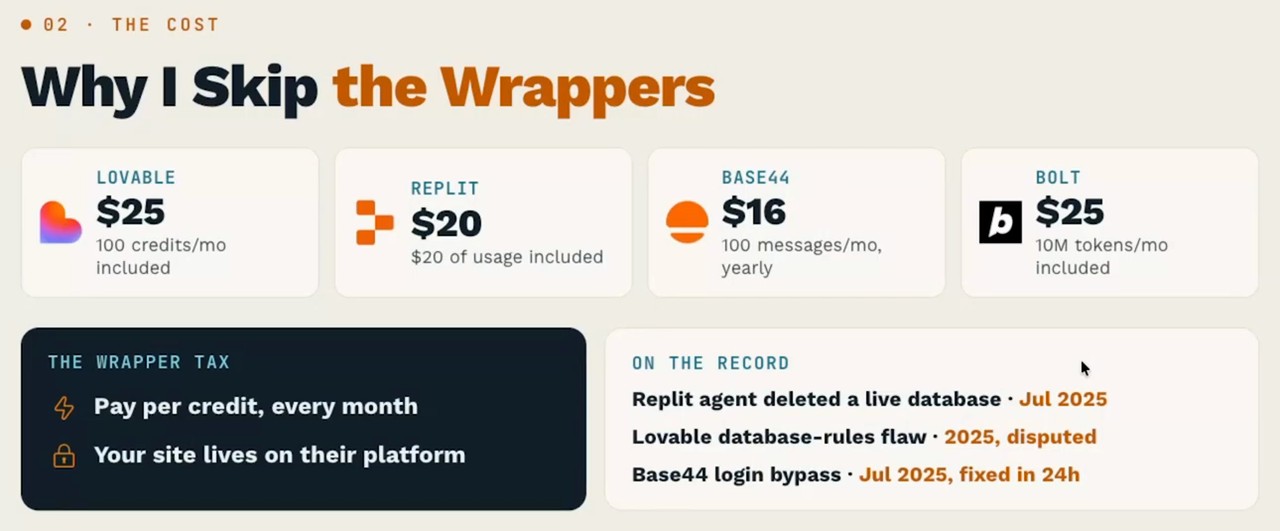
Each one sells credits, usage or tokens, and as I said on the episode, they never tell you what a credit is worth or which AI model does the work. Your site also lives on their platform, a trade Aaron and I covered in is Lovable worth it.
The caveats are real: setup takes accounts at GitHub, Cloudflare and DataForSEO, and the run stops at checkpoints that need your approval. Still, I'm not technical, and as I put it on the recording, "if I can do it, I know anyone can do this."
The Exact Prompt I Used to Vibe Code a Website
Below is the full prompt I ran in Claude Code on Opus 5.5 High for Tire Heroes, a Des Moines mobile tire shop owned by a friend of mine. His current site is terrible, and he's overpaying someone for it.
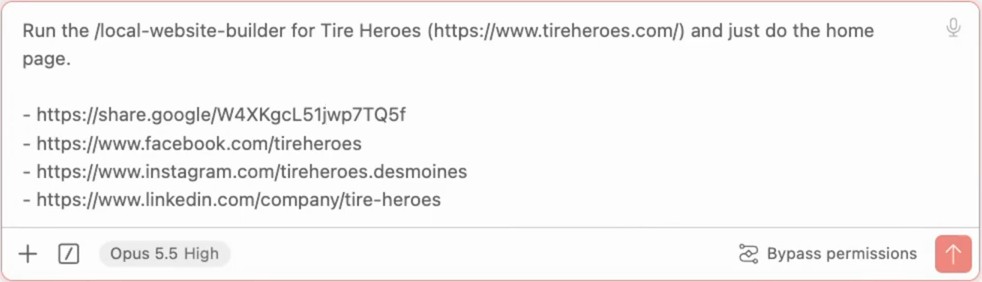
This is the part of how to vibe code a website you can copy. Swap in your own business name, site and profile links:
Run the /local-website-builder for Tire Heroes (https://www.tireheroes.com/) and just do the home page.

- https://share.google/W4XKgcL51jwp7TQ5f
- https://www.facebook.com/tireheroes
- https://www.instagram.com/tireheroes.desmoines
- https://www.linkedin.com/company/tire-heroes
One catch: this prompt only works because the slash command already exists on my machine. Build yours first (see below), and then one sentence does the heavy lifting.
Aaron joked that he thought we all had to be prompt engineers, then called it "one sentence with four links." My answer on camera: "Those days are over. The magic lives inside this forward slash local website builder slash command."
Bypass permissions skips Claude Code's step-by-step approvals, though the slash command still stops at its own checkpoints. For your first run, start in auto mode instead.
What the Slash Command Does When You Vibe Code a Website
A slash command is the engine behind how to vibe code a website this way: a saved workflow that chains several skills, so one short prompt kicks off the whole job. Mine chains a local website designer, a brand foundation builder and a local SEO strategist, built over many rounds and given reference sites so it knows what good looks like.
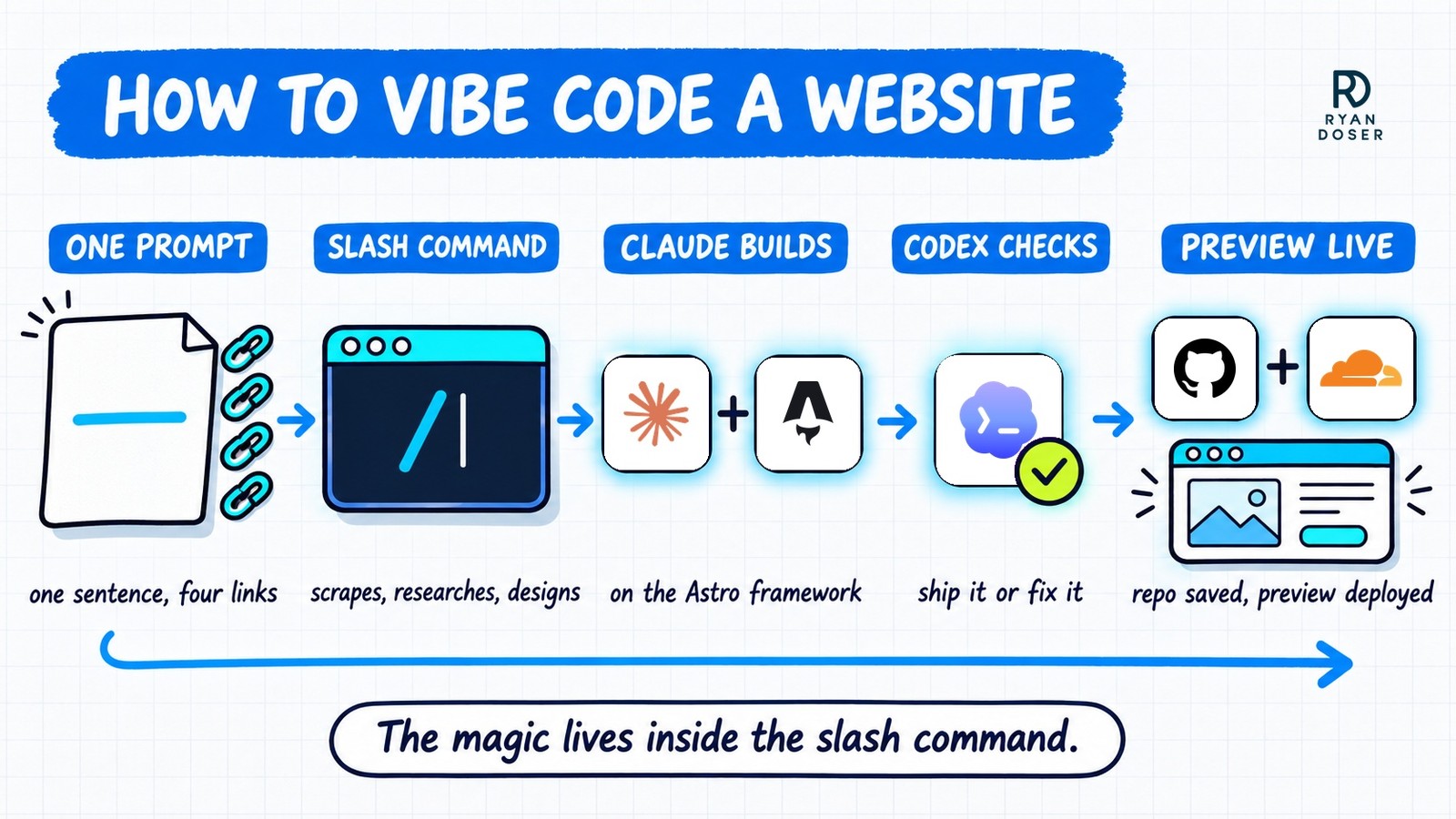
On the Tire Heroes run, it also pulled the shop's images and newest Google reviews into the build. Aaron's take on Impeccable is that it "puts a barrier to AI slop," so the site "just won't look like everyone else's generic site."
The second model is the step most people skip. Codex is the gatekeeper that decides "ship it or not ship it," and I think it's running GPT-6.1 Sol.
Aaron compared the setup to two developers checking each other's work, which I break down in my Claude Code and Codex together walkthrough.
The homepage finished after we stopped recording. You can see the finished Tire Heroes preview on its noindexed staging link.
To build your own, ask Claude Code to "create a slash command named" whatever you like, listing the skills it should use. Or, at the end of a long chat that went well, tell it to save the task as a new slash command.
Aaron's rule of thumb is that anything you'll do three times should become a skill.
What It Costs to Vibe Code a Website This Way
Bare bones, this answer to how to vibe code a website runs $20 to $40 a month. By my estimate, a site like this would previously cost $5,000, $10,000 or $15,000 from a legit agency.
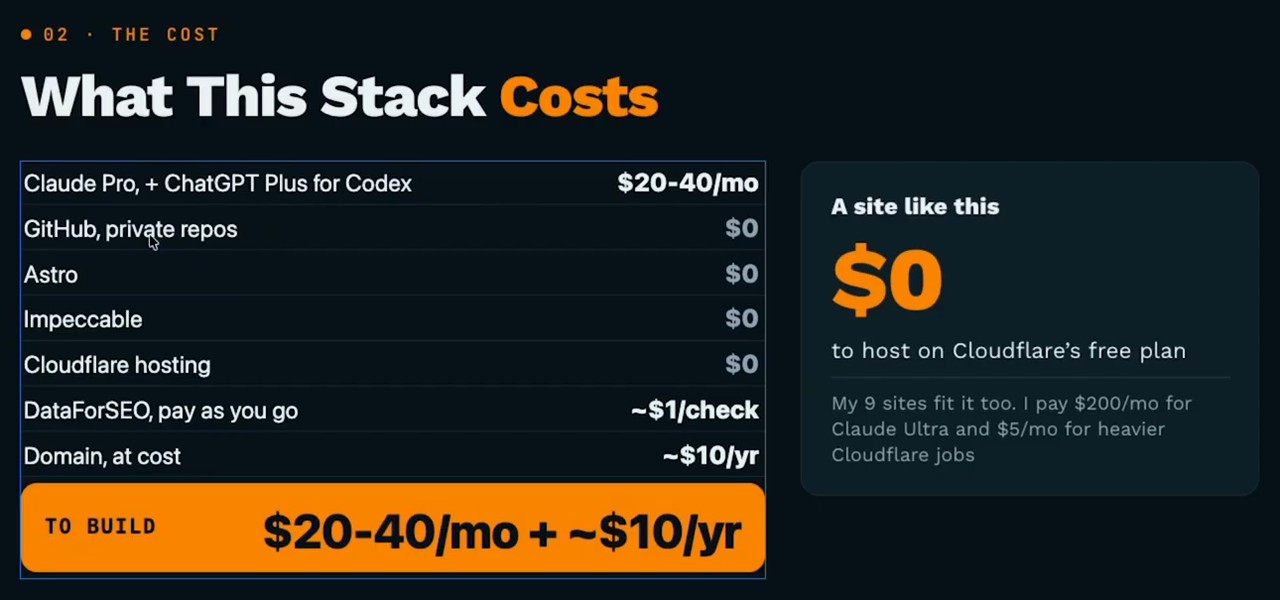
| Tool | Job in the stack | Cost (Nov 5) |
|---|---|---|
| Claude Pro, plus ChatGPT Plus for Codex reviews | Builds and reviews the site | $20-40/mo |
| GitHub | Stores your code in private repos | $0 |
| Astro | Framework the AI follows | $0 |
| Impeccable | Design guardrails | $0 |
| Cloudflare | Hosting and preview links | $0 |
| DataForSEO | SEO market research | ~$1 per check, $50 minimum top-up |
| Domain | Your .com, at cost | ~$10/yr |
For transparency, I pay $200 a month for Claude Ultra and $5 a month for Cloudflare's Workers plan because I run nine sites. You don't need either, and on a $20 plan, Opus 5.5 on medium could probably get most of this job done.
Aaron framed the agency gap with a hypothetical: an agency might quote $800 a month and a week of work for a reviews widget that costs "like a dollar worth of tokens."
Why I Use Astro to Vibe Code a Website
Think of Astro like a WordPress theme, except it's a framework for AI agents to follow. For anyone learning how to vibe code a website, pasting the astro.build URL into Claude Code or Codex gives the AI rules to follow instead of a blank page.
Every site I run is on Astro now, including ryandoser.com, which I rebuilt this spring. It passes the speed and stability checks in Google's PageSpeed Insights on desktop and mobile.
Cloudflare acquired the team behind Astro in January 2026, and Astro stays open source. Still, my loyalty has limits: "if something better than Astro comes out, bye bye Astro."
What about a CMS? Cloudflare's EmDash installs on top of an Astro build, but it was rough when I tested it at launch, as I covered in my EmDash CMS episode.
These days I skip a CMS entirely. Aaron's point is that a CMS is an abstraction your AI tool doesn't need when you add pages by slash command, though WordPress still makes sense for big teams.
What You Need Before You Vibe Code Your First Website
Most of the setup is free accounts you make once:
- A Claude Pro plan, plus ChatGPT Plus if you want Codex reviewing the work
- A free GitHub account connected to your AI setup (new to it? start with how to use GitHub)
- A free Cloudflare account (Vercel works too) with the Wrangler command-line tool installed
- A DataForSEO account with the $50 minimum in credits
- VS Code with the Claude Code and Codex extensions, or the desktop apps, which are actually easier
The best first project for learning how to vibe code a website is one you know well. Aaron's suggestion is to buy yourname.com and build a resume or portfolio site, and mine is a personal brand site or a small local business.
My estimate is 30 to 60 minutes for high-quality results, and I work on other things while it runs. Aaron's claim is bolder: the two of us could go "from buying the domain to deploying" in about thirty minutes.
Prefer to see each step by hand? My step-by-step guide to vibe coding websites with Claude Code walks through the manual version.
One Sentence, Four Links, Your First Vibe Coded Website
Knowing how to vibe code a website comes down to building the slash command once, then feeding it one sentence and four links. Start with your own name or a business you know, and review the noindexed preview before anything touches your real domain.
How to Vibe Code a Website FAQs
Can you vibe code a website with no coding experience?
Yes. I'm not technical, and I kicked this build off live from one prompt. The hard part is setup, not code: an AI plan, free GitHub and Cloudflare accounts, and Wrangler installed. Run it in auto mode the first time instead of bypass permissions, so you approve each step yourself, including the DataForSEO check that costs about a dollar.
How much does it cost to vibe code a website?
About $20 a month for Claude Pro, or $40 with ChatGPT Plus added for Codex reviews, plus roughly $10 a year for a domain, based on pricing pages I read on November 5. GitHub, Astro, Impeccable and Cloudflare's free hosting cost $0, and DataForSEO runs about $1 per check after a $50 minimum top-up. By my estimate, an agency would charge $5,000 to $15,000 for a similar site.
Is Lovable better than Claude Code for building a website?
Lovable might be cheaper up front, at $25 a month for 100 credits on its cheapest paid plan as of November 5. The trade is control: you can't tell what a credit is worth or which model does the work, and your site lives on Lovable's platform. With Claude Code, your code sits in your own GitHub repo, so you can switch tools whenever you want.
How long does it take to vibe code a website?
My estimate is 30 to 60 minutes for high-quality results once your accounts exist, and Aaron Makelky's claim is about thirty minutes from buying the domain to deploying. Your first run takes longer while you create accounts and install Wrangler, but the workflow does the long part, so you can work on other things while it runs.