
Claude Skills vs Custom GPTs: What to Do Before GPTs Retire
The Claude Skills vs Custom GPTs comparison looks very different now that OpenAI is retiring custom GPTs on December 11, 2026, and its migration path turns a GPT's instructions into a skill.
Claude Skills vs Custom GPTs: What Each One Is
A custom GPT is a version of ChatGPT you configure with instructions, knowledge files, and actions. You build it in the GPT Builder, and it lives inside ChatGPT.
A Claude Skill is a folder with a markdown file called SKILL.md inside it. Claude loads the full file when your request matches what the skill is for or when you call it by name, and you can drop scripts and reference files into the same folder.
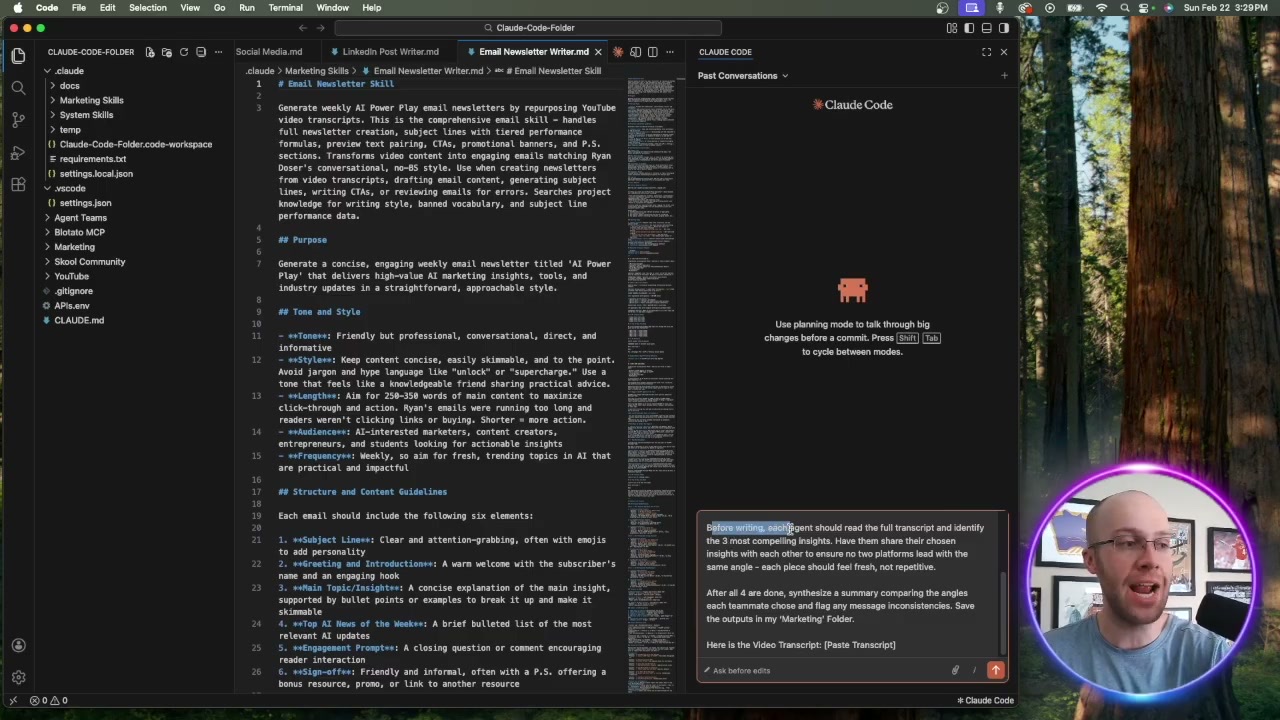
In the video below, I build the same email newsletter skill three different ways, including one that starts from an existing GPT or Project.
When I recorded it, my setup already ran on 15 to 20 skills, from an anti-slop checker to an email writer to a social post writer. If you want to skip the blank page, I packaged the ones I use to run my business into the Claude Code Skills Stack.
OpenAI Is Retiring Custom GPTs
This is the news that makes the Claude Skills vs Custom GPTs comparison urgent. On September 11, 2026, OpenAI announced it will retire custom GPTs across every ChatGPT plan.
According to OpenAI's custom GPT retirement FAQ, GPTs are scheduled to retire on December 11, 2026. Enterprise workspaces with an approved deferral get until February 11, 2027.
At retirement, custom GPTs stop running and their GPT pages go away. OpenAI's GPT creation help article says personal accounts (Free, Go, Plus, and Pro) can no longer create or publish new GPTs, though its pricing page still lists GPT creation on the paid personal plans.
OpenAI's help pages don't fully agree on the interim milestones, so treat any date other than the retirement itself as a moving target. The December 11 date is the one to plan around.
What the GPT Migration Keeps and What It Drops
OpenAI offers a "Migrate to plugin" option under My GPTs, which the GPT's creator runs on a published GPT. Per OpenAI's GPT migration guide, you can even migrate after retirement, although the GPT itself will no longer run.
The telling part is what the migration does with your instructions.
Your GPT's instructions become a skill inside the new plugin. Knowledge files get copied over as reference files, and connected apps move over as apps.
Several things do not survive the move:
- Custom actions (the API calls your GPT made) do not transfer.
- The model you picked for the GPT does not carry over.
- Sharing settings reset, so a migrated plugin starts private.
- Drafts and unpublished edits are left behind, because migration uses the latest published version.
- Conversation starters don't transfer one-to-one, and OpenAI warns the plugin may respond differently than the GPT did.
If your GPT leans on custom actions, budget time to rebuild them. If it is mostly instructions and a few files, the migration keeps the valuable part, but run a few real tasks through it before you trust it.
ChatGPT and Claude Now Share One Skill Format
Skills in ChatGPT follow the same open SKILL.md standard Claude reads, so the instructions you once wrote for a GPT can also run as a Claude Skill. That is the part of the retirement OpenAI's help pages don't spell out.
OpenAI's skills documentation says skills in ChatGPT and Codex build on the open agent skills standard: a directory with a SKILL.md file that needs a name and a description.
The Agent Skills standard site lists dozens of tools that read these folders, including Claude, Claude Code, ChatGPT and Codex, Cursor, VS Code, and Gemini CLI. The format is shared, so a skill is no longer tied to one chatbot, though any scripts inside it may need edits to run somewhere new.
That changes my old Claude Skills vs Custom GPTs argument, and I want to be honest about it. When I first wrote this post, the case against GPTs was that you could never take one with you, and that is now only half true.
The migrated skill still lives inside a ChatGPT plugin on OpenAI's servers. A skill folder you keep on your own computer, whichever app runs it, is the version you fully control, so I build mine as files first.
Fix a Skill Mid-Task, Not in a Builder
This is still the difference that sold me. When Claude gets something wrong, I correct it once and tell it to update the skill file so the fix sticks.
In the video, I ask Claude to put an emoji in every subject line and shorten the email, then add one line: update this skill going forward. Claude shows the exact change in red and green and asks before it edits the file.
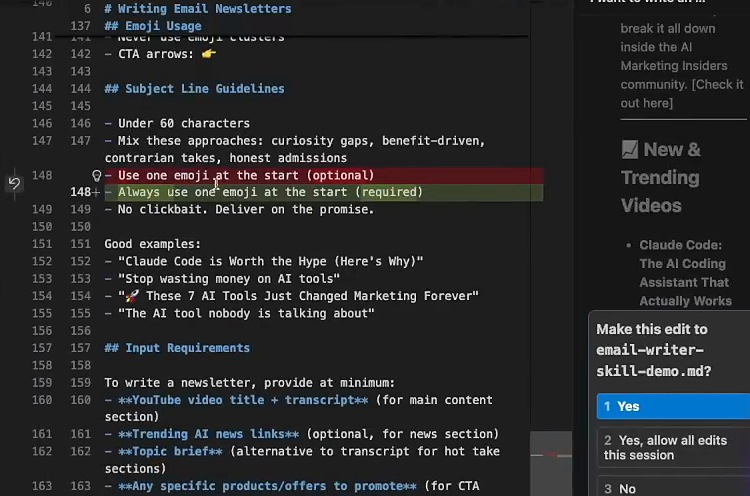
A real example from my own setup: my blog skill kept slipping a dash I never use into drafts, so I had Claude write a rule banning it into the skill file. The fix now lives in the skill instead of in my memory.
A custom GPT stayed exactly as configured until you went back into the builder to change it. With a skill, the correction happens in the same chat where you spotted the problem.
If you want to see how far this loop goes, I broke down my setup in my guide on Claude Code autoresearch.
Where Claude Skills Work Today
Skills are no longer a paid-only feature. According to Anthropic's skills help article, they are available on the Free, Pro, Max, Team, and Enterprise plans, as long as code execution is turned on.
On the Free, Pro, and Max plans, you turn on code execution under Settings, then add skills under Customize, where you can upload a skill as a ZIP file. The menu has moved since I recorded the video, so follow the current path rather than what you see on screen.
Inside Claude Code, a skill is just a folder, so there is no upload step at all. Skills you enable in your Claude settings also load in Claude Code 2.1.273 or later, and the API supports skills in beta through the code execution tool.
Moving a skill from your laptop into the Claude app still means zipping and uploading it. The file travels anywhere, but the install happens once per place.
How to Move a Custom GPT Into a Claude Skill
You won't write any code for this. My method starts from the context you already built.
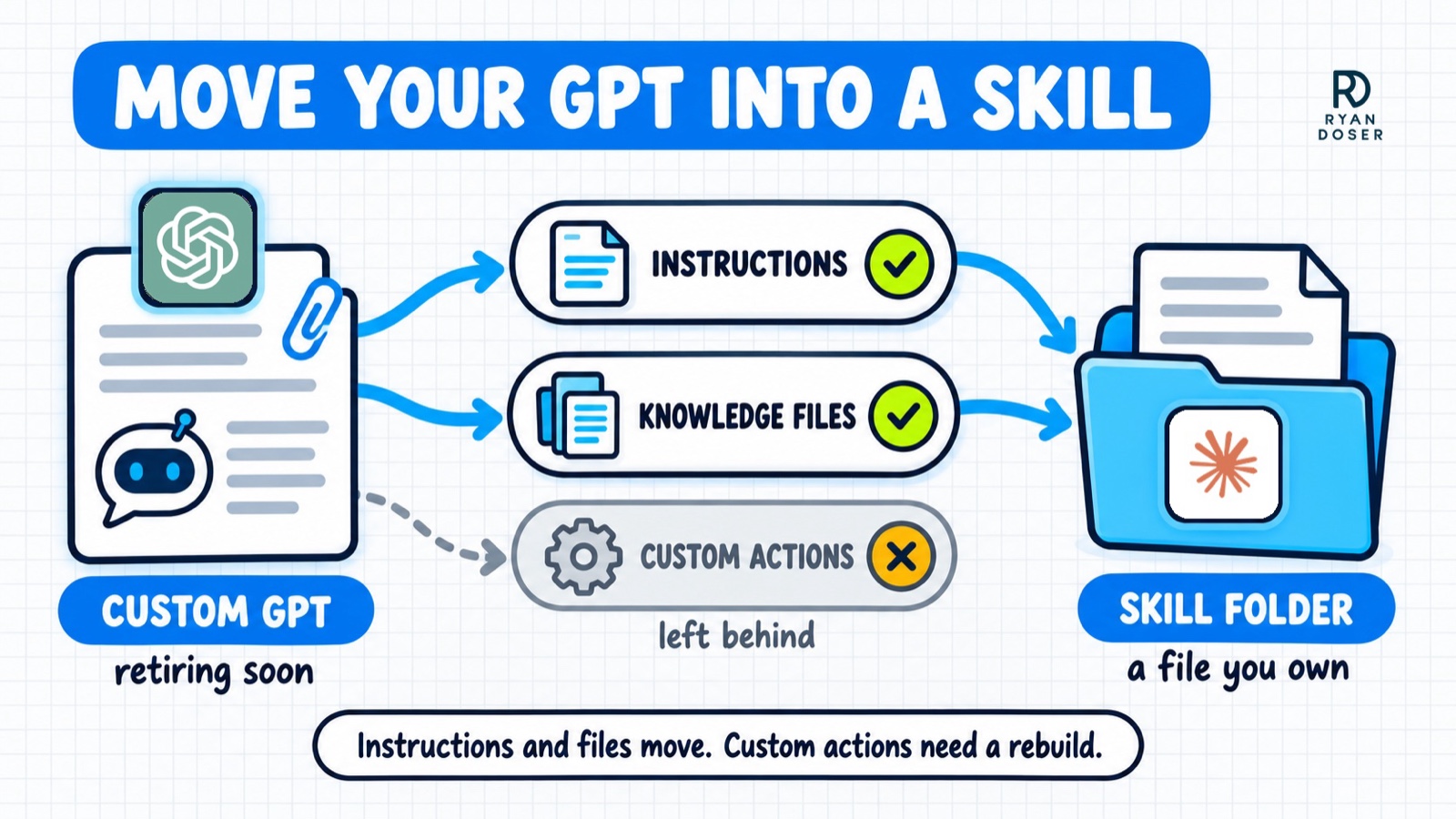
- Open your GPT's configuration and copy its instructions, plus any knowledge files you uploaded.
- Paste them into Claude along with Anthropic's skill best practices, and ask it to turn everything into a SKILL.md file.
- Review the file, ask for changes until it reads right, then download it.
- Drop it into your skills folder in Claude Code, or upload it in the Claude app.
When I did this in the video from an existing Claude Project, the skill came out far more detailed than the one I built from a blank prompt. The project's instructions, files, and chat history gave Claude real context to work from.
If you are converting a Claude Project, I walked through rebuilding a Project as a skill file step by step. My full guide on how to create Claude Skills covers the three methods from the video and adds a fourth.
If you are leaving ChatGPT entirely, my walkthrough on switching from ChatGPT to Claude covers the rest of the move.
The Deed Still Beats the Lease
A custom GPT was always the rental, and OpenAI just gave notice. The instructions you wrote are worth keeping, and a skill is where they belong.
Move them before December 11 so you can test the replacement while the original still runs, and keep a copy as a file on your own machine. That way the next platform change is an upload, not a rebuild.
Claude Skills vs Custom GPTs FAQs
Is OpenAI getting rid of custom GPTs?
Yes. OpenAI announced on September 11, 2026 that custom GPTs will retire on December 11, 2026, with a February 11, 2027 date for Enterprise workspaces that get an approved deferral. After that, GPTs stop running, but OpenAI's migration guide says a GPT's creator can still migrate it to a plugin later, so your instructions are not lost on the deadline.
What is the ChatGPT equivalent of Claude Skills?
ChatGPT now has skills of its own, built on the same open SKILL.md standard Claude uses. Where you can use them depends on the surface and your plan: standalone skills run in the ChatGPT desktop app and Codex, while skills bundled in plugins reach ChatGPT on web and mobile too.
Can Claude Skills be used with ChatGPT?
Often, yes. Because both follow the Agent Skills standard, a SKILL.md folder built for Claude has the same basic structure ChatGPT and Codex expect. Test it before relying on it, since a skill that calls Claude-specific tools or scripts may need small edits to run somewhere else.
Should I migrate my GPT to a plugin or rebuild it in Claude?
If you plan to stay in ChatGPT, OpenAI's migration is the fastest way to keep your instructions and files. To make the work outlive any one platform, rebuild it as a SKILL.md file you store yourself. Either way, rebuild custom actions separately, because they do not carry over.