
How to do Keyword Research in Claude Code (The Future of SEO)
Claude Code keyword research gives you access to high-quality SEO data without spending hundreds on traditional tools.
How Claude Code Keyword Research Actually Works
Most marketers default to typing "give me keyword ideas" into ChatGPT or Claude's web app. That approach falls short for one reason: those models don't have real-time keyword data.
Monthly search volume, keyword difficulty, CPC, and intent signals come from platforms like Data for SEO and Ahrefs. Generic AI models can brainstorm topics, but they can't pull live metrics the way dedicated SEO platforms can. That gap is exactly what Claude Code fills when you connect it to external data providers via MCP. Data for SEO is the one I settled on for daily work, and I wrote up a full review of the platform covering its real costs.
The workflow has three parts. First, you create a Claude Code skill dedicated to keyword research. Second, you connect an external data provider through MCP (Model Context Protocol). Third, you run queries and refine results in real time. I'll break down each step.
Create a Keyword Research Skill First
You might wonder why a skill file matters when you could just prompt Claude Code directly. A skill acts as an SOP that tells Claude Code exactly how to format results, which columns to include, and what quality bar to hit. Without one, you'll get inconsistent outputs every time you run a query.
I built a keyword research skill that pulls metrics like monthly search volume, keyword difficulty, CPC, and search intent. It also generates SEO title suggestions for each keyword. If you don't have a skill file yet, I recommend creating your own first to understand the mechanics. You can learn more about how Claude Code works for marketing in my earlier walkthrough.
The real power shows up when you chain skills together. After pulling keyword data, I can immediately tell Claude Code to use my SEO blog post writer skill to draft an article targeting one of those keywords. That kind of workflow stacking is what separates Claude Code from every other AI tool for keyword research.
Connect Data for SEO via MCP
Data for SEO is the easiest entry point because you pay only for the calls you make. I compare it against the other SEO MCP servers worth connecting and break down what each one really costs. You sign up, get API credentials, and connect through an MCP server in Claude Code. The whole setup takes about five minutes.
You fund the account first, and the pricing page currently sets a $50 minimum payment. Each query costs roughly five to ten cents, so that balance covers hundreds of keyword pulls rather than a handful.
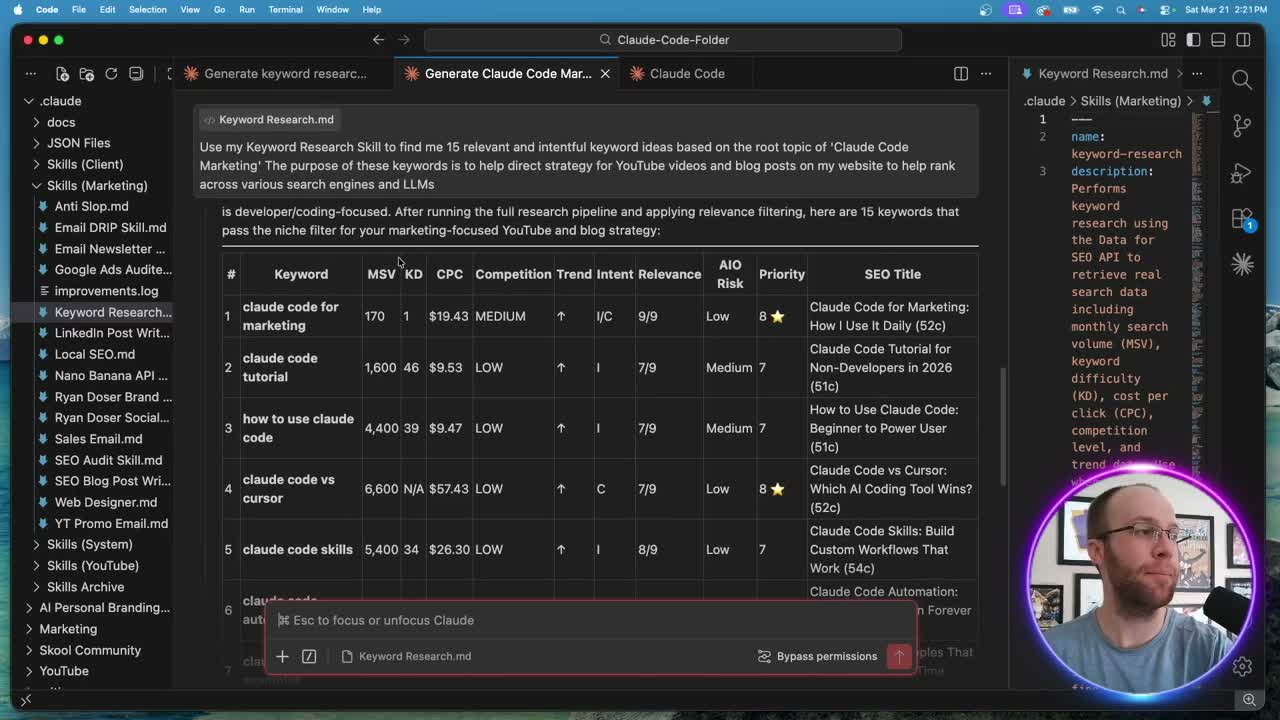
Once connected, you paste a prompt like "find me 15 relevant keyword ideas based on the root topic of Claude Code marketing." Claude Code calls the Data for SEO MCP, pulls real metrics, and returns a formatted table. Run this on Opus 5.5, the current Claude Code default, for the highest quality output.
The results include monthly search volume, keyword difficulty, CPC, and intent classification. If you don't like certain keywords in the list, you tell Claude Code to swap them out and add new columns. The skill updates your results in real time without starting over.
If you would rather see those same DataForSEO numbers in a dashboard with rank tracking built in, I weighed whether OpenSEO is worth paying for against this direct setup.
Upgrade to the Ahrefs MCP for Better Data
Data for SEO works well for getting started. But if you're deep in SEO and already paying for Ahrefs ($129/month minimum), the Ahrefs MCP is a significant upgrade. Ahrefs is one of the premier platforms for organic keyword data, and their API recently became available on lower-tier plans.
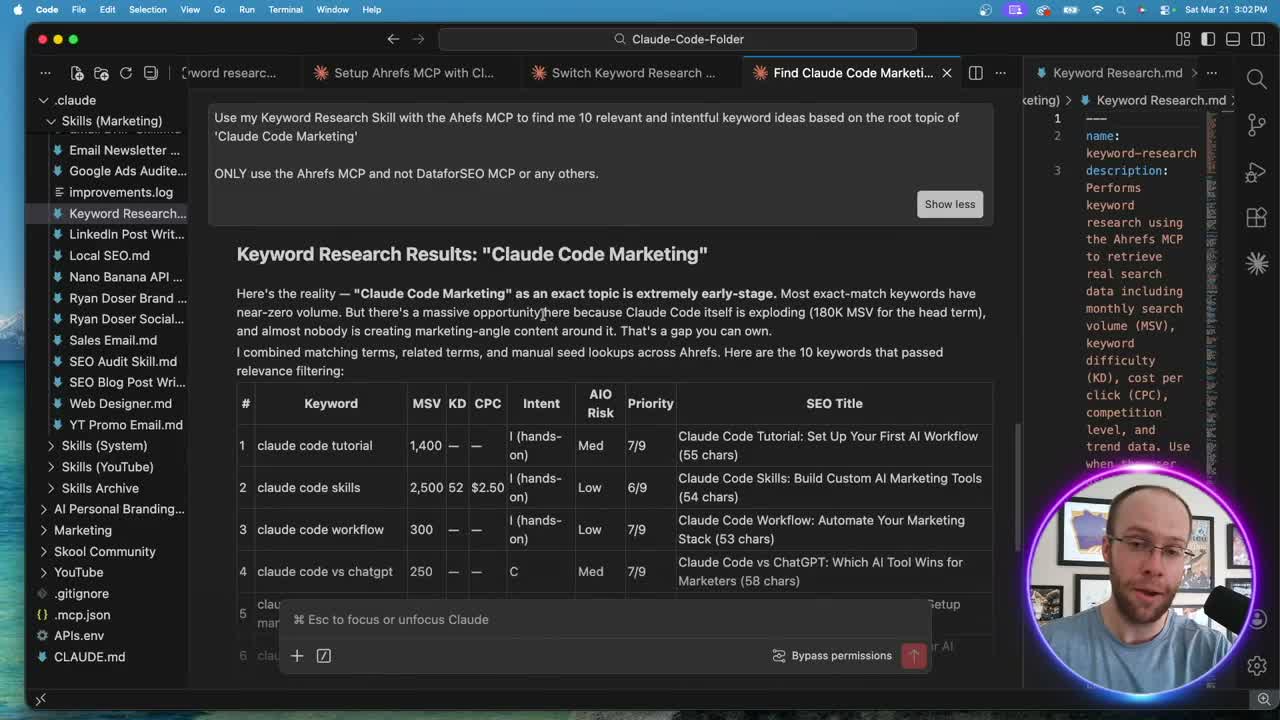
I set up the Ahrefs MCP live for the first time on camera. The process is straightforward: copy the MCP documentation, paste it into Claude Code, authenticate through the Ahrefs website, and you're connected. After that, update your keyword research skill to point at the Ahrefs MCP instead of Data for SEO.
The quality difference is noticeable. Ahrefs pulls from a larger index with more accurate difficulty scores and better keyword suggestions. If you're serious about Claude Code SEO workflows, this connection is worth setting up.
Which one you should actually point Claude at depends on whether you are buying data or an index, and I worked through that tradeoff in DataForSEO vs Ahrefs.
Backlink Analysis and Beyond
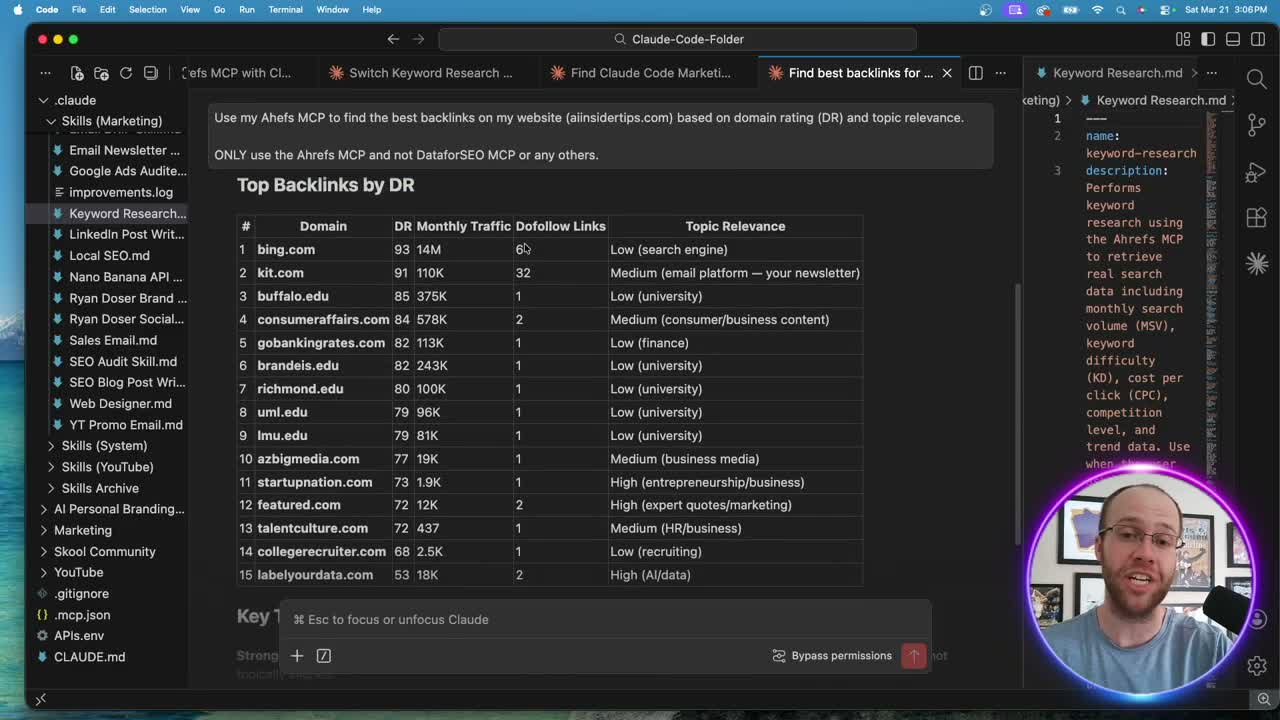
Keyword research is just the starting point. With the Ahrefs MCP connected, I can also pull backlink profiles straight from Claude Code. I ran a query asking for the best backlinks on my website sorted by domain rating and topic relevance. Claude Code returned a full breakdown with DR scores, monthly traffic, dofollow status, and relevance ratings.
That opens up bigger opportunities. You could analyze competitor backlinks, build outreach lists, and even draft cold emails using other Claude Code Skills Stack files. All without leaving your terminal.
The ability to stack keyword research with blog writing, backlink analysis, and outreach planning inside one interface is what makes this an AI keyword research tool that actually replaces expensive SaaS subscriptions.
Ryan's Final Thoughts
Claude Code keyword research replaces the manual process of bouncing between SEO platforms, spreadsheets, and AI chatbots. Connect Data for SEO for pay-as-you-go pulls or Ahrefs for premium data, build a skill file, and let Claude Code handle the heavy lifting. Once that is running, the other servers worth connecting alongside it are where the rest of the leverage sits. The workflows you can chain from a single keyword query (blog posts, YouTube strategy, backlink outreach) are what make this approach worth trying today.
Claude Code Keyword Research FAQs
Is Claude Code keyword research free?
Data for SEO is pay-as-you-go, and its pricing page currently sets a $50 minimum payment to fund your account. Each query costs about five to ten cents, so that balance stretches a long way. Claude Code itself requires a Claude Pro or Max subscription. Ahrefs integration requires a paid plan starting at $129 per month.
Do I need coding skills to do keyword research in Claude Code?
No. Claude Code runs in a terminal, but the keyword research workflow is entirely prompt-based. You type natural language queries and Claude Code handles the API calls through MCP connections. Building a skill file is as simple as writing instructions in a markdown document.
What is the difference between Data for SEO and Ahrefs for keyword research?
Data for SEO is pay-as-you-go and provides solid keyword metrics for most use cases. Ahrefs offers a larger keyword index, more accurate difficulty scores, and additional features like backlink analysis. If you already pay for Ahrefs, their MCP connection delivers higher quality data inside Claude Code.
Can I combine keyword research with other Claude Code skills?
Yes. After pulling keyword data, you can chain it with a blog post writer skill, YouTube SEO skill, or any other skill in your system. This is one of the biggest advantages of running keyword research inside Claude Code versus standalone SEO tools.
What AI model should I use for keyword research in Claude Code?
Opus 5.5, the current Claude Code default, is my pick for keyword research queries. It produces higher quality analysis and better formatted results compared to Sonnet. Sonnet 5.5 also works and stretches your plan's usage further, but may need more prompting to refine outputs.