
Poppy AI Review: Is This Popular AI Tool Worth the Hype?
After testing Poppy AI for several weeks, this Poppy AI review separates the marketing hype from what the tool actually delivers.
Updated August 3, 2026: Poppy has moved to a new v2 site, removed public pricing entirely, and now sells through a booked demo with a 15% revenue guarantee. Details below.
Some links below are affiliate links. See my disclosure.
My Honest Review of Poppy AI
Poppy AI markets itself hard. Catchy Instagram rap ads, thumbnails claiming "$35,000 from one video," and countdown timers on the checkout page that reset every five minutes. The marketing machine behind this tool is impressive. The question is whether the product matches the pitch.
Try This Poppy AI Alternative Instead
At its core, Poppy AI is a visual board-based content creation platform. You drag and drop content sources onto a canvas, connect them to an AI chatbot, and generate new content based on those inputs. Think of it as a mind map that talks back. You can feed it YouTube videos, TikTok clips, Instagram reels, documents, and website URLs. The AI transcribes everything and uses it as context for whatever you ask next.
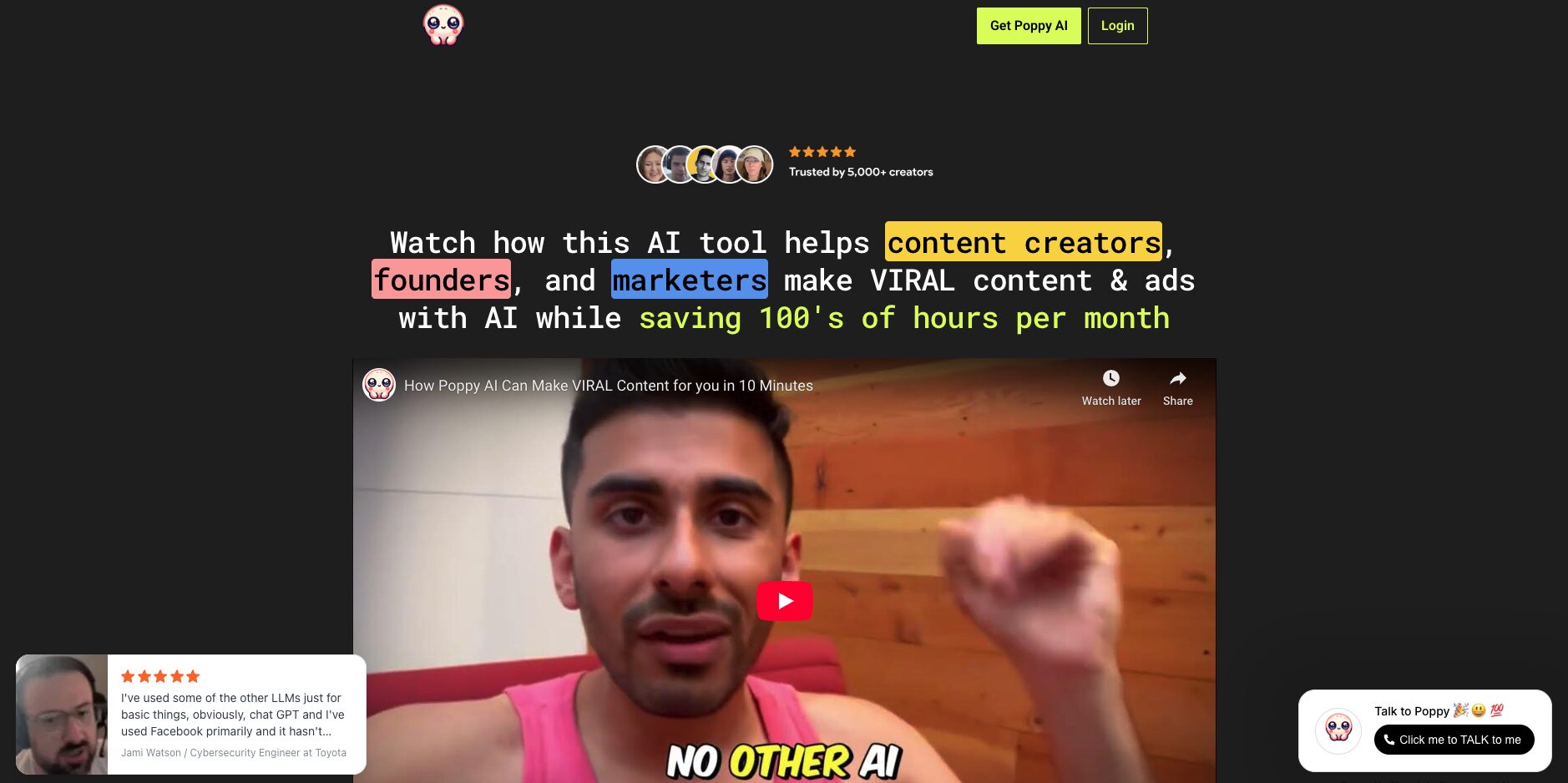
The visual interface is genuinely one of the best I've tested across dozens of AI tools. Drag-and-drop organization, clean layout, and everything stays visually connected on the board. If you're someone who thinks better with spatial layouts than text prompts, this part of Poppy AI delivers.
Poppy AI Features Worth Knowing
The Board System and Brand Voice Training
I built a board to generate video ideas by training two groups: one folder with my own YouTube videos and TikTok clips (my brand voice), and another with videos from a popular AI creator I wanted to study. Poppy transcribed everything automatically, and when I connected both folders to the chatbot, it blended the viral patterns from the competitor with my own voice.
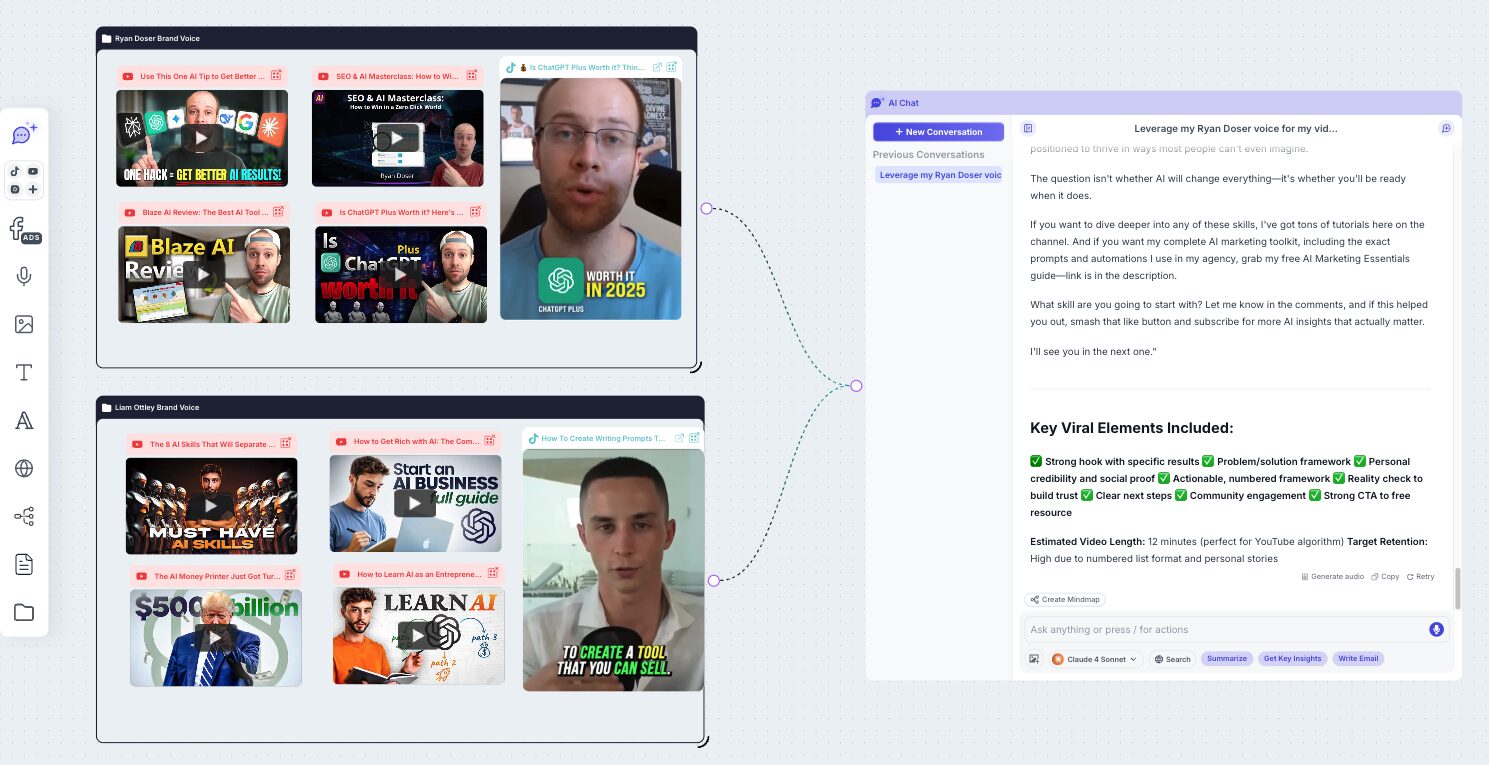
The output was solid. Ten video ideas with titles, keywords, and hooks that actually sounded like something I'd publish. You can apply the same approach to email newsletters, social captions, blog posts, or short-form scripts.
Multi-Model AI Access
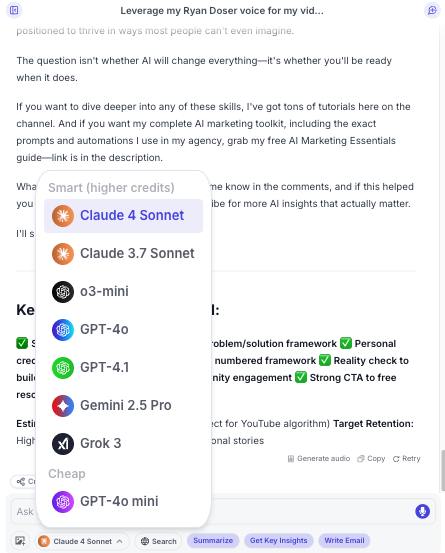
Unlike tools that hide which models run in the background, Poppy AI lets you pick your engine. Poppy describes the current lineup as Claude, ChatGPT, Gemini, and the leading image models, and the specific versions rotate as the labs ship new ones. For content creation I still reach for Claude first, because it produces the cleanest copy with the least cleanup. Being able to see and switch the model is a real advantage, and it is the exact thing Blaze AI refuses to disclose, as I cover in my Blaze AI review.
Strong Transcription from Multiple Platforms
Poppy handles YouTube, TikTok, and Instagram transcription better than most competitors. Paste a URL, and the transcript appears in seconds. Most AI tools struggle with short-form video platforms, so this is a genuine advantage.
Poppy AI Pricing: What You Actually Get (Updated August 2026)
Poppy's pricing has changed in a way most reviews have not caught up to, and the change is structural rather than a simple price bump. You can no longer buy this tool without talking to someone.
When I originally reviewed Poppy, you could buy it directly: $399 for the year, no monthly billing, no free trial. That self-serve checkout is gone. Poppy has moved to a new site at v2.getpoppy.ai, and the only route in through Poppy's own site is now a booked call. The homepage headline is now a guarantee ("increase your revenue by 15% from your content and ads in 90 days or you don't pay") and the single call to action is "book a 5-min prove it demo."
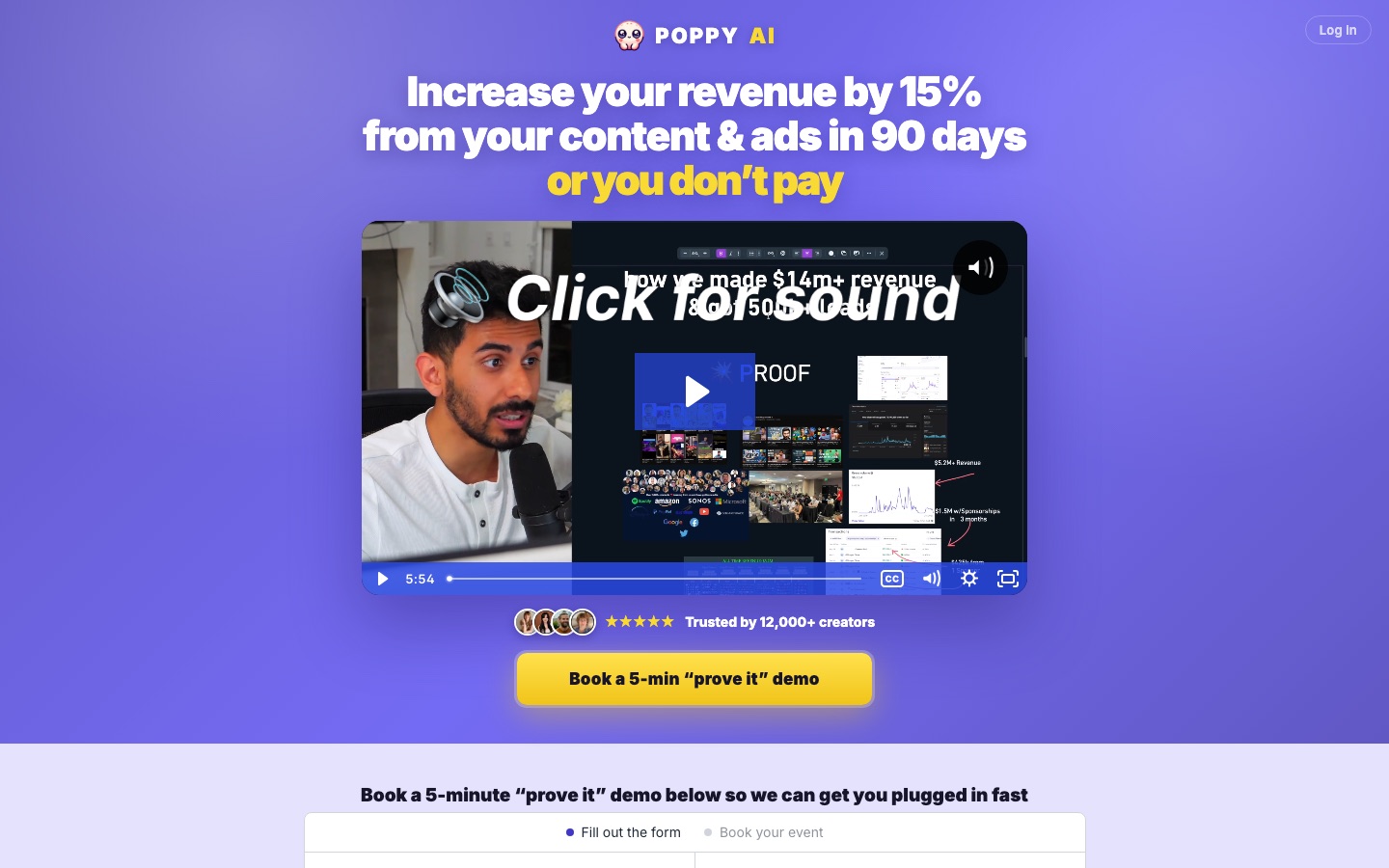
Poppy's own FAQ still describes three credit tiers, Basic at 2,000 credits a month, Creator at 8,000, and Power User at 16,000, but it no longer publishes a price next to any of them. The guarantee is described as "tailored to your numbers," so the terms get set on the call rather than published on a page.
Be honest with yourself about what that means for how you buy. Purchasing a tool at a listed price and negotiating one on a sales call are different experiences, even if the final number lands in the same place. If you want to see a price before talking to anyone, AppSumo is the route: lifetime tiers start at $279 for 500 monthly credits and run up to $4,459, with a 60-day refund window. Check the credit math before you buy there, because 500 credits a month is a quarter of the 2,000 that the old $399 Basic tier included.
On my test account with 2,000 monthly credits, I burned through a noticeable chunk just transcribing five longer YouTube videos and running a few chatbot sessions. Power users would hit the ceiling fast, and that ceiling is the number I would press hardest on if I were taking the demo call.
The top tier has historically run into the thousands and is where API access sits. For context, Blotato gives you API access on its $29/month plan. That price difference is hard to justify unless the board workflow is genuinely the thing you are buying.
After generating content, you still have to manually copy it to wherever you want to post. There's no publish button, no scheduler, no connected social accounts. You write inside Poppy and paste outside it. If your workflow depends on automated content distribution, you'll need a second tool on top of this one.
My Honest Take on Whether Poppy AI Is Worth It
I'll give you two answers depending on where you are with AI.
If you haven't used AI tools much yet, skip Poppy entirely. ChatGPT Plus or Claude Pro at $20/month gives you access to the same models, higher usage limits, image generation, and projects. Google's free NotebookLM handles video transcription and summarization without spending a dollar.
If you're a working creator or marketer, the board system has genuine value for content ideation and competitor research. I built boards that blended another creator's viral patterns with my own voice, and the output was actionable. That specific workflow is unique to Poppy.
But before you book the demo call, test Blotato at $29/month with no annual commitment. It handles content generation, social scheduling, and API access in one platform. If Blotato covers your needs, Poppy becomes a hard sell at several times the effective cost. I keep a wider list of options in my roundup of the best AI tools for content creators.
Ryan's Final Verdict on Poppy AI
I wanted to like this tool more than I do. The board interface is the most creative approach to AI content generation I've seen, and the competitor analysis workflow produced results I couldn't replicate anywhere else. If Poppy offered a $30/month plan with transparent credit limits, I'd recommend it without hesitation. Instead, the annual lock-in, hidden credit math, and expensive API tier undercut what's otherwise a well-built product. The move to demo-call-only pricing pushes it further in that direction: the product got better, but buying it got harder. Test it with the 30-day money-back guarantee if the visual concept appeals to you. Just know that the marketing paints a rosier picture than what most users will experience.
Poppy AI Review FAQs
How much does Poppy AI cost in 2026?
Poppy AI no longer publishes prices on its website. The new v2 site replaced the pricing page with a booked "prove it" demo, where the cost and the performance guarantee are set based on your business. Poppy's FAQ still lists three credit tiers, Basic at 2,000 credits per month, Creator at 8,000, and Power User at 16,000, without attaching a price to any of them. The old self-serve rate was $399 per year for Basic. The only published self-serve pricing today is the AppSumo lifetime listing, which starts at $279 for 500 monthly credits.
Is there a free version or free trial of Poppy AI?
No. There is no free tier and no free trial. What you get instead is a 30-day money-back guarantee, so you pay first and request a refund if it does not work out. Poppy also advertises a 90-day revenue guarantee that is customized during the demo call. If you want to try a visual AI canvas without paying, Google's NotebookLM handles multi-source research and video transcription for free.
Can I use Poppy AI to study what makes competitor content go viral?
Yes, and this is its strongest use case. Create a board with your competitor's YouTube videos or TikTok clips, connect them to the chatbot alongside your own content, and ask it to blend their viral patterns with your voice. I tested this approach and the output was genuinely actionable.
What happens if I don't like Poppy AI after signing up?
They offer a 30-day money-back guarantee: email support within 30 days and you get a full refund. No free trial exists, so you commit upfront and request a refund if it doesn't fit. Make sure to test the tool thoroughly within that first month, and get the refund terms confirmed in writing on the demo call before you pay.
How does Poppy AI's board system compare to regular AI chat tools?
Standard tools like ChatGPT process one conversation at a time. Poppy lets you connect multiple content sources on a visual canvas, then reference all of them simultaneously in one chatbot session. For single-question tasks, it's overkill. For multi-source research and ideation, the spatial layout adds real value.
Is Poppy AI worth the price?
The monthly math sounds fair when you divide an annual plan by twelve, but the commitment changes the equation. You pay for a year before knowing if the tool works for your specific workflow, and you now have to sit through a sales call to find out the number. Tools with month-to-month plans let you test for $29-$34 and cancel anytime, which is a lower-risk way to evaluate. Buy Poppy for the board workflow, not for the AI models, because you can get those anywhere for $20 a month.
Can Poppy AI post directly to my social media accounts?
No. Content stays inside the platform until you manually copy and paste it elsewhere. If you need creation and distribution in one tool, you'll need to pair Poppy with a separate scheduler or choose a platform that bundles both features together.
Disclosure: some links in this post are affiliate links. If you buy through them I may earn a commission at no extra cost to you. I only recommend tools I actually use. Full disclosure.