
Claude Meetings: How It Works, Pricing and Client-Call Rules
Claude Meetings adds Claude to Google Meet calls on Claude Team and Enterprise plans, where it builds docs and whiteboards while you talk. Anthropic says it stays out of calls with outside guests by default, but Team plans actually allow guests by default, and where guests are blocked, a client's notetaker bot joining is enough to make Claude leave.
How to Add Claude Meetings to a Google Meet Call (4 Steps)
Claude Meetings is a beta feature from Anthropic that works as Claude's own AI note taker and live collaborator inside video calls, starting with Google Meet. Anthropic announced it on November 10, 2026, alongside Claude Sheets and Whiteboards, according to TechCrunch.
Two days later, on November 12, Anthropic's launch post said the beta was starting to roll out on Team and Enterprise plans.
Here's the setup, from Anthropic's Help Center guide. Every claim here about how the feature works comes from Anthropic's docs and launch demos, since the beta is only now reaching accounts.
- Confirm you're on Claude Team or Enterprise. Team plans have Claude Meetings on by default, while an Enterprise owner has to turn it on for all or part of the organization.
- Open Meetings in Claude and connect your Google Calendar. An owner has to enable Google Calendar for your organization before this step works.
- Get everyone's OK first. Anthropic says to make sure everyone on the call is fine with being transcribed before you add Claude or turn on auto-join.
- Pick a meeting on your calendar and click "Add Claude." To skip this step on future calls, set Settings > Capabilities > Meetings > Auto-join to all meetings or all except one-on-ones.
The host usually doesn't have to admit Claude. If Claude does ask to join and the host declines, it won't try that call again unless someone re-adds it.
Since it's limited to Team and Enterprise, Pro and Max subscribers can't use it. During the beta it's also off-limits to organizations with zero data retention, a HIPAA-ready configuration or customer-managed encryption keys.
If you want the Claude skills I run for my own marketing work, my Claude Code Skills Stack has them.
What Claude Meetings Does During a Call
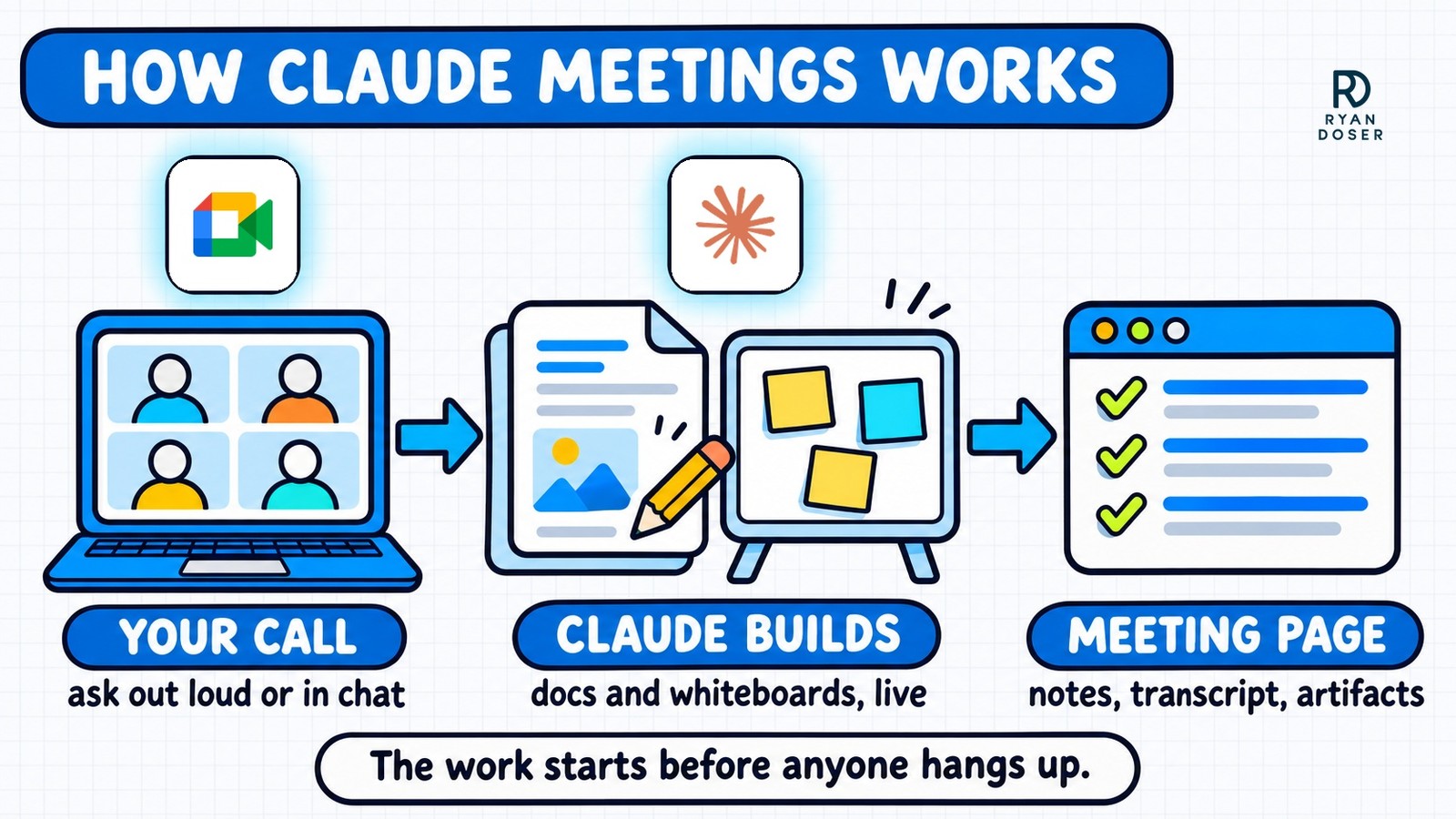
Say "Claude" and ask a question, or type it in the Meet chat, and Claude answers in writing in that chat by default. Say "Claude, make a doc" or "Claude, make a whiteboard," and it builds one that teammates on the invite can edit as it takes shape.
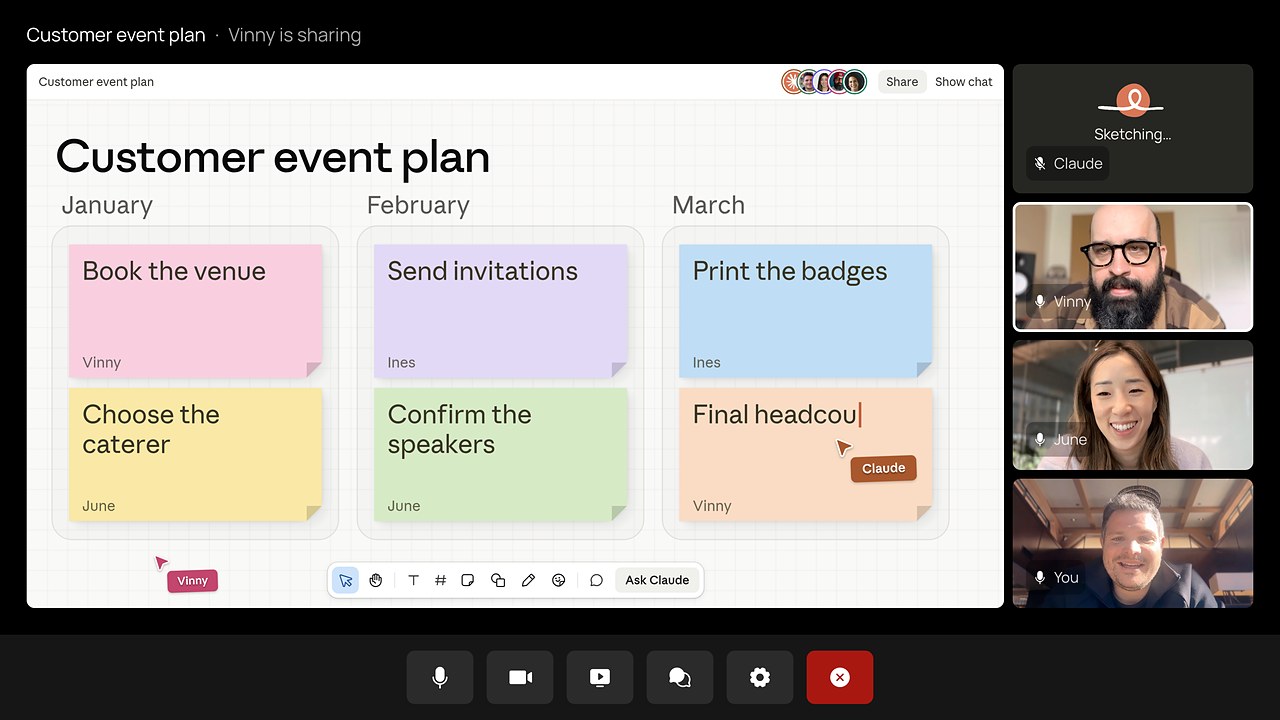
It can also use connected tools mid-call, like sending a Slack message, and it uses each person's own tools only with that person's permission. Claude asks the first time, and for now it confirms who's speaking each time someone asks out loud.
My list of the best Claude connectors for marketers covers which tools are worth connecting first.
You can tell Claude to stop listening, resume it from the meeting page, or remove it. It stays for up to eight hours and warns you before it leaves.
Claude Meeting Notes: What You Get After the Call
Claude Meetings gives each meeting its own page in Claude with the notes (a summary plus action items), the transcript and everything Claude built.
People from your organization on the invite get a recap email with a link to it. They can edit what Claude made and share the page with anyone else in your organization.
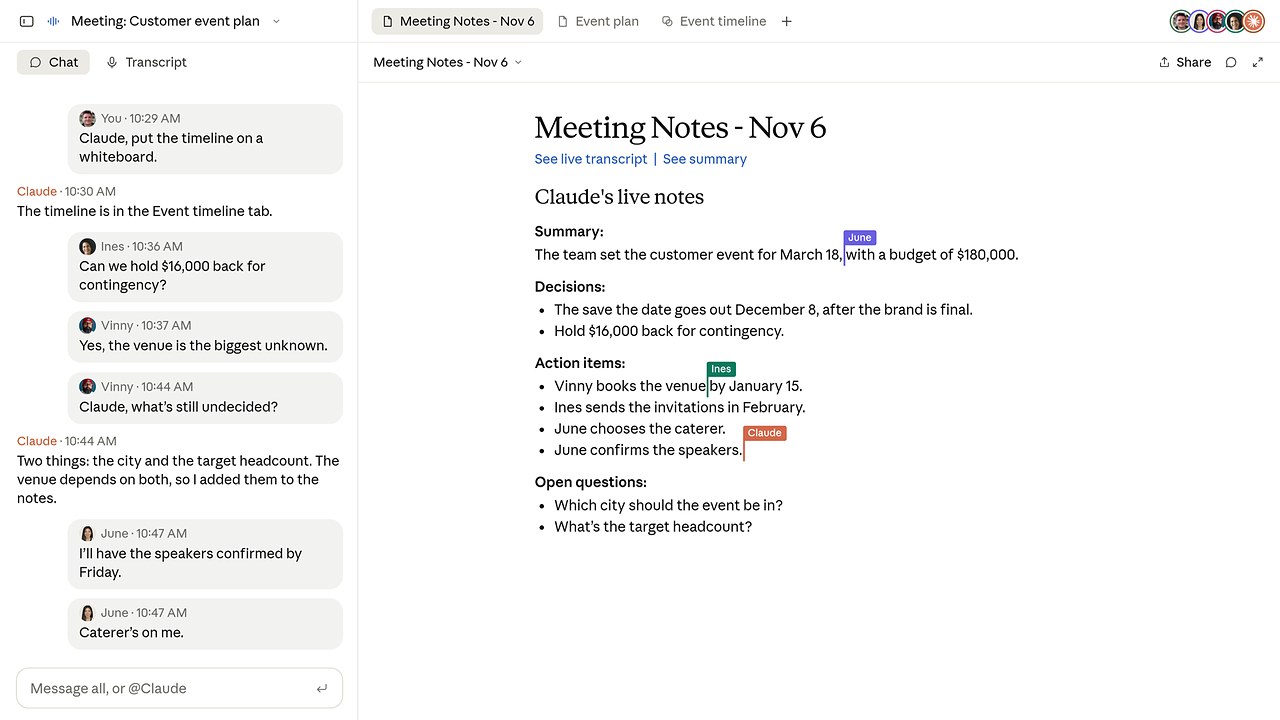
Later, you can ask Claude about past meetings you have access to from a regular chat. That's the feature I'd use most, because every call Claude joins becomes context you can come back to.
Claude posts a notice in the call chat when it joins. It saves a transcript, a summary and descriptions of what was on screen, but no audio, and neither the launch post nor the Help Center guide says how long it keeps them.
Can Claude Meetings Join Calls With Clients?
If you run an agency or sell services, most of your calls include someone from outside your company. Client calls are also where Anthropic's announcement and its Help Center guide don't quite match.
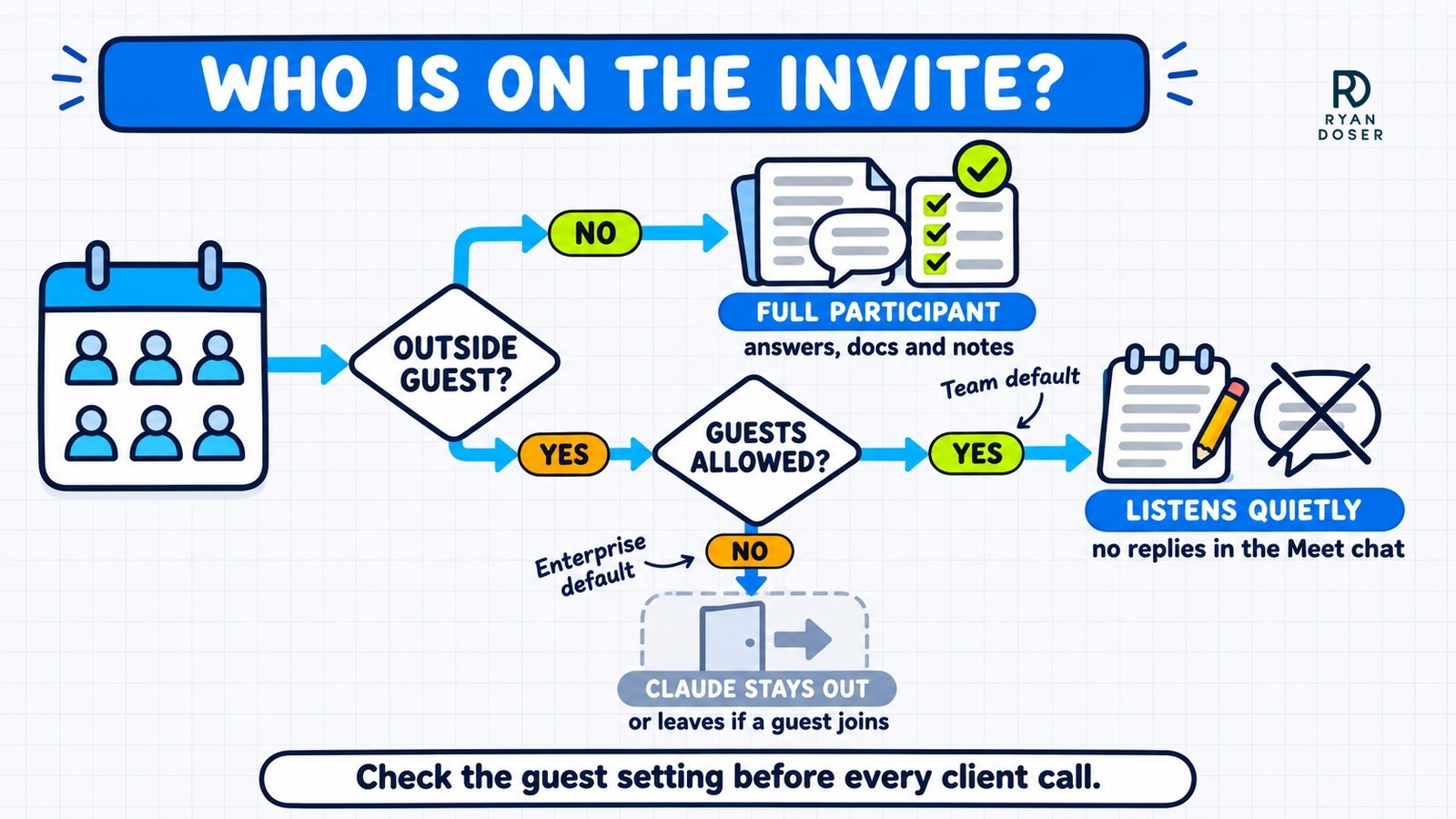
The announcement says Claude is set to stay out of calls with outside guests "by default." The Help Center guide is more precise: that's the Enterprise default, and Team plans allow outside guests unless an owner turns it off.
| Owner setting | Team plan default | Enterprise plan default |
|---|---|---|
| Claude Meetings | On for everyone | Off |
| Meetings with external guests | Allowed | Internal meetings only |
When outside guests aren't allowed, Claude stays out of any call with an outside invitee and leaves if one joins partway through. That includes another company's notetaker bot, so a client's AI notetaker showing up is enough to make Claude leave.
When guests are allowed, Claude listens, takes notes and posts its notice in the call chat, but it doesn't reply in the Meet chat. Docs, whiteboards and Claude's chat stay on the internal meeting page.
Guests don't get that page or the recap email. What they say still lands in your notes and transcript.
On top of the owner setting, every user has a personal "Meetings with external guests" switch under Settings > Capabilities > Meetings. The Help Center doesn't say which one wins if they disagree.
So check both before your next client call. Then tell the client Claude is there before it starts transcribing.
How Much Does Claude Meetings Cost?
Anthropic hasn't published a separate price for Claude Meetings. These are its beta terms as of November 12, 2026.
| What you use | Cost during the beta |
|---|---|
| Notes, transcripts and answers that don't use connected tools | Included on Team and Enterprise plans |
| Docs, whiteboards and other artifacts made in a call | Free through February 10, 2027 |
| Anything that uses your connected tools | Counts toward your own usage and can lead to charges for your organization |
During the beta, your cost is the Team or Enterprise seat you already pay for, plus any connected-tool usage.
Owners can switch off "Members' connectors in meetings" in the organization settings if they'd rather keep Claude away from connected tools on calls.
If your team leans on in-meeting docs, put that February date on your calendar. Anthropic hasn't said what they will cost once the free window ends.
Claude Meetings vs Granola: Do You Still Need an AI Note Taker?
One of the top replies to Anthropic's launch post on X was "RIP to 1000 more startups." Anthropic itself is lining up notetaker partners instead.
It says it's working with Gong, Attention, Granola, Fireflies.ai and Otter so you'll soon be able to send a meeting's transcript to those tools.
The biggest practical difference is how each one joins. Claude Meetings is a visible bot that only works in Google Meet for now.
Granola skips the bot and uses your computer's audio instead. That's why it works on Zoom, Google Meet, Teams and other meeting apps.
My take: if your team already pays for Claude Team and runs on Google Meet, try Claude Meetings on internal calls first. Keep your current notetaker for Zoom, Teams and client calls until other platforms arrive, or pick one from my roundup of the best AI note takers.
The simplest test is whether the action items need fixing before you send the recap. A commenter in the r/ClaudeAI launch thread said their company still writes board meeting notes by hand, because AI notetakers can pin a task on the wrong person.
If you're still sorting out where each Claude app fits, my breakdown of Claude AI vs Cowork vs Code covers the rest of the lineup.
Claude Meetings FAQs
Is Claude Meetings free?
There's no separate price, but you need a Claude Team or Enterprise seat. During the beta, notes, transcripts and answers that skip connected tools are included, and docs and whiteboards made in meetings are free through February 10, 2027. Connected-tool use counts toward your own usage and can lead to charges, so owners who want to avoid that can turn off the "Members' connectors in meetings" setting.
Does Claude Meetings record audio?
It doesn't save audio. Claude keeps a transcript, a summary and descriptions of what was shared on screen, and it posts a notice in the call chat when it joins. Neither the announcement nor the Help Center guide says how long those transcripts are kept, so ask your admin before you put sensitive calls through it.
Does Claude Meetings work with Zoom or Microsoft Teams?
Not yet. It launched on Google Meet only, and Anthropic says other video platforms are coming soon without naming them or giving a date. The Otter and Fireflies.ai partnerships cover sending transcripts to those tools, which won't put Claude into a Zoom or Teams call. Until then, Zoom and Teams users need a separate notetaker for AI notes.