
8 Best AI Note Takers in 2026: Does Claude Meetings Replace Them?
The best AI note takers just got a new rival in Anthropic's Claude Meetings, which only runs on Google Meet for Claude Team and Enterprise customers. On an internal-only setup, a client's notetaker bot joining the call is enough to make Claude leave, so here's who it actually replaces.
Does Claude Meetings Replace the Best AI Note Takers?
For some teams, yes. An AI note taker, also called an AI notetaker or AI meeting assistant, is an app that records or listens to your calls and writes the transcript, summary and action items for you. Claude Meetings is Anthropic's version of one.
Anthropic started rolling it out in beta on November 12, 2026. It joins Google Meet calls as a visible participant, writes the notes and action items, answers questions in the Meet chat and builds docs while you talk. The setup is in my full Claude Meetings breakdown.
It can replace a separate note taker if your company already pays for Claude Team or Enterprise and your calls run on Google Meet. It isn't on the Pro, Max or Ultra plans. It doesn't join Zoom or Microsoft Teams yet, and Anthropic only says other platforms are "coming soon."
Client calls depend on guest settings, set by the admin and by each person. Team plans allow outside guests by default, and on those calls Claude keeps taking notes but stops replying in the Meet chat. Enterprise defaults to internal meetings only, once an admin turns Meetings on. Then Claude stays out of any call with an outside invitee, and leaves if one joins partway through.
Anthropic's Help Center counts another company's notetaker bot as an outsider. So on an internal-only setup, a client's Fireflies.ai or Otter bot showing up is enough to make Claude leave.
Anthropic doesn't expect to be the only note taker in the room either. Its launch post says it's working with Gong, Attention, Granola, Fireflies.ai and Otter so you can soon send a meeting's transcript to those tools. Three of the eight tools below are on that list.
How I Picked and Priced These Eight
I checked 14 roundups that rank for this search. Fireflies.ai, Fathom, Granola, Otter, tl;dv and Fellow show up on most of them, so all six are here. Claude Meetings is here because it's the question this post answers. Calendly Notetaker made it because most lists skip it, and plenty of consultants already pay for Calendly.
I've used Granola, Fathom, Fireflies.ai, Otter and Calendly Notetaker. I haven't used Claude Meetings, tl;dv or Fellow, so those three come from their pricing pages and their own documentation, and their cons are design notes rather than field reports.
The order is my judgment call for a marketer or consultant whose calendar is mostly client calls. It weighs whether a tool can skip the bot, how far the free plan gets you, and price.
I read every price off the vendor's own pricing page on November 12, 2026, with monthly billing selected wherever there's a choice. Seven of the eight take 20% to about half off if you pay for a year up front.
Best AI Note Takers at a Glance
| Tool | Best for | Paid plans start at (monthly) | How it captures the call | Free plan |
|---|---|---|---|---|
| Granola | Client calls where a visible bot would feel awkward | $14/user/mo | No bot, records your computer's audio | Yes, 30 days of history |
| Fathom | Solo operators who want unlimited free recordings | $20/mo solo, or $19/user for teams of 2+ | Bot, or bot-free in a Mac beta | Yes, unlimited recordings |
| Fireflies.ai | Teams that want every call searchable in one place | $18/seat/mo | Bot, or no bot through its Chrome extension | Yes, 400 minutes of storage per team |
| Otter | Watching a live transcript scroll during the call | $16.99/user/mo | Bot joins the call | Yes, 300 minutes a month, 30-minute cap per call |
| Calendly Notetaker | People who already book client calls through Calendly | $24/seat/mo (Standard Plus) | Bot, after the host approves it (a Zoom app can skip the bot) | No |
| tl;dv | A free video record of recent calls, kept up to three months | $29/seat/mo | Bot, with a bot-free option on Google Meet | Yes, AI notes on 10 meetings |
| Fellow | Teams that need rules for which calls get recorded | $11/user/mo | Bot, or bot-free through the desktop app | Yes, 5 lifetime AI notes |
| Claude Meetings | Claude Team companies running internal Google Meet calls | Included with Claude Team ($25/seat/mo, 2-seat minimum) | Visible participant, Google Meet only | No, beta on Team and Enterprise |
Best AI Note Takers in 2026
1. Granola (Best for Client Calls Where a Bot Would Feel Awkward)
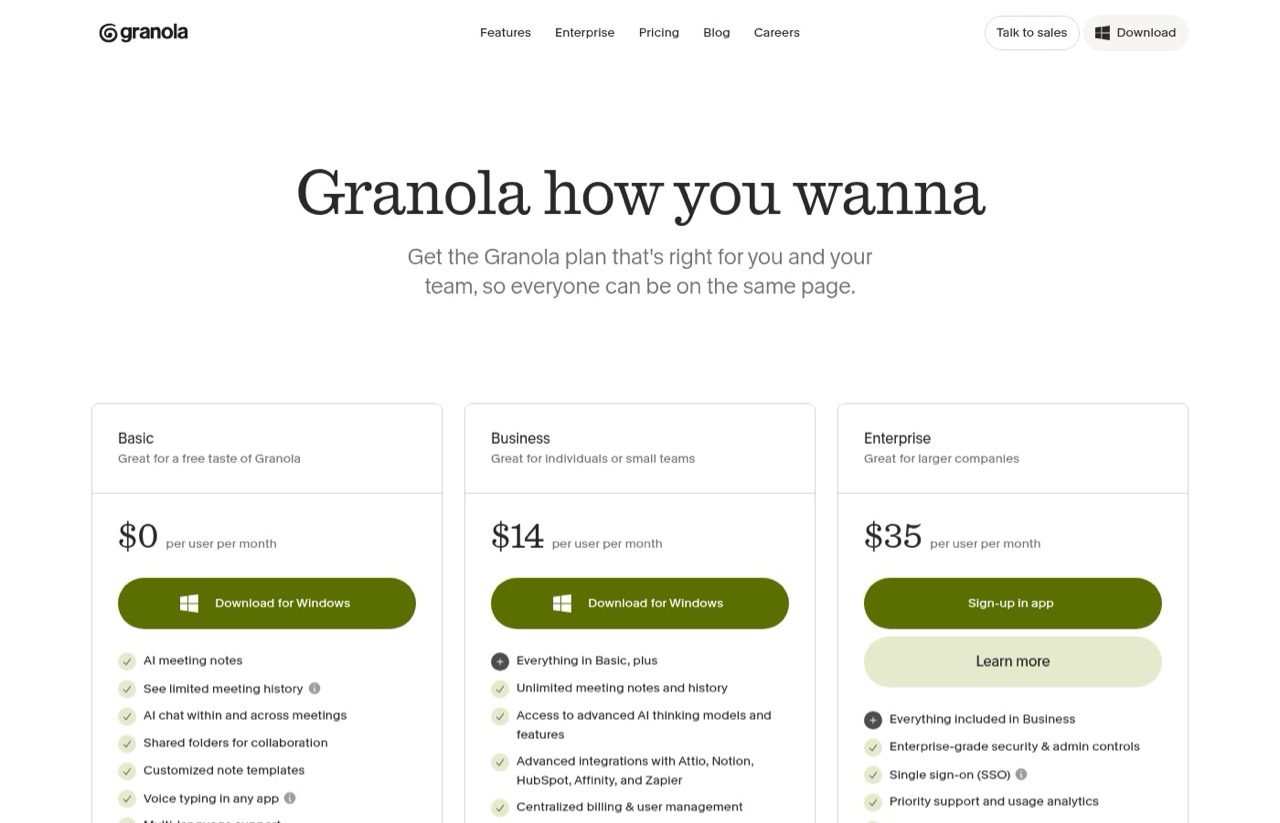
Granola, one of the five here I've used, never joins the call. It listens through your computer's microphone and system audio while you type rough notes, then fills those notes out from the transcript afterward. Because it doesn't care which app is open, it works with any of the big meeting apps.
It's the only tool on this list that never uses a bot, which is why it tops a list built around client calls.
Pros:
- Nothing shows up in the participant list, so a client never has to ask whose bot that is
- Works the same way on Zoom, Meet, Teams, Slack and WebEx
- The free Basic plan includes AI chat within and across meetings, plus custom note templates
Cons:
- Basic only keeps 30 days of meeting history
- Granola doesn't keep the audio, so there's nothing to replay if you need someone's exact words
- With no bot in the call, people only know if you tell them or switch on Granola's automatic notice. The admin-enforced version is an Enterprise pilot
Best for: Consultants and agency owners who live on client calls across different meeting apps.
Pricing: Basic free, Business $14/user/month, Enterprise $35/user/month. The page lists one price per plan, with no annual option shown.
Free trial: No trial. Basic is free with no time limit.
Bottom line: The best fit for client-heavy calendars, as long as you tell people you're taking AI notes and don't need a recording to fall back on.
2. Fathom (Best Free AI Note Taker)
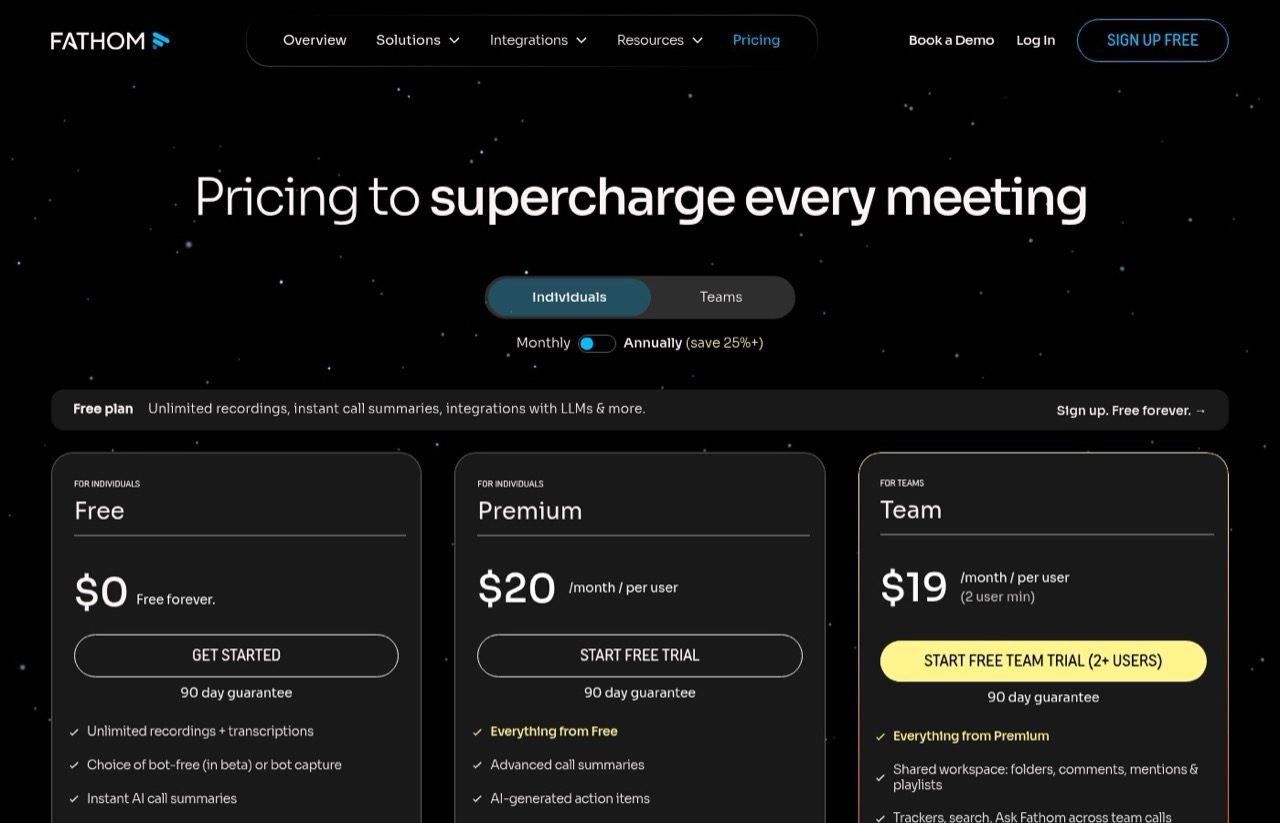
Of the tools I've run, Fathom is the one I'd hand to anyone who wants to try an AI note taker without paying. The free plan covers unlimited recordings and transcripts on Zoom, Google Meet, Teams and Slack huddles. It now also offers bot-free capture as a Mac beta, which I haven't tried.
The company behind it changed this fall. Superhuman acquired Fathom in September 2026, according to TechCrunch.
Pros:
- Unlimited recordings and transcripts on the free plan
- Bot or bot-free capture, with bot-free still in beta on Mac
- Paid plans come with a 90-day guarantee
Cons:
- Summary templates and custom summaries are "limited use" on the free plan
- Team and Business both require at least two users
Best for: Solo operators and freelancers who want every call recorded without a subscription.
Pricing: Free plan. Premium $20/month billed monthly ($16 annually). Team $19/user/month and Business $34/user/month, both billed monthly with a two-user minimum.
Free trial: Free plan, plus free trials on the paid tiers.
Bottom line: The easiest first install, since the free plan records every call. Pay once you need custom templates or team features.
3. Fireflies.ai (Best for Teams That Want Every Call Searchable)
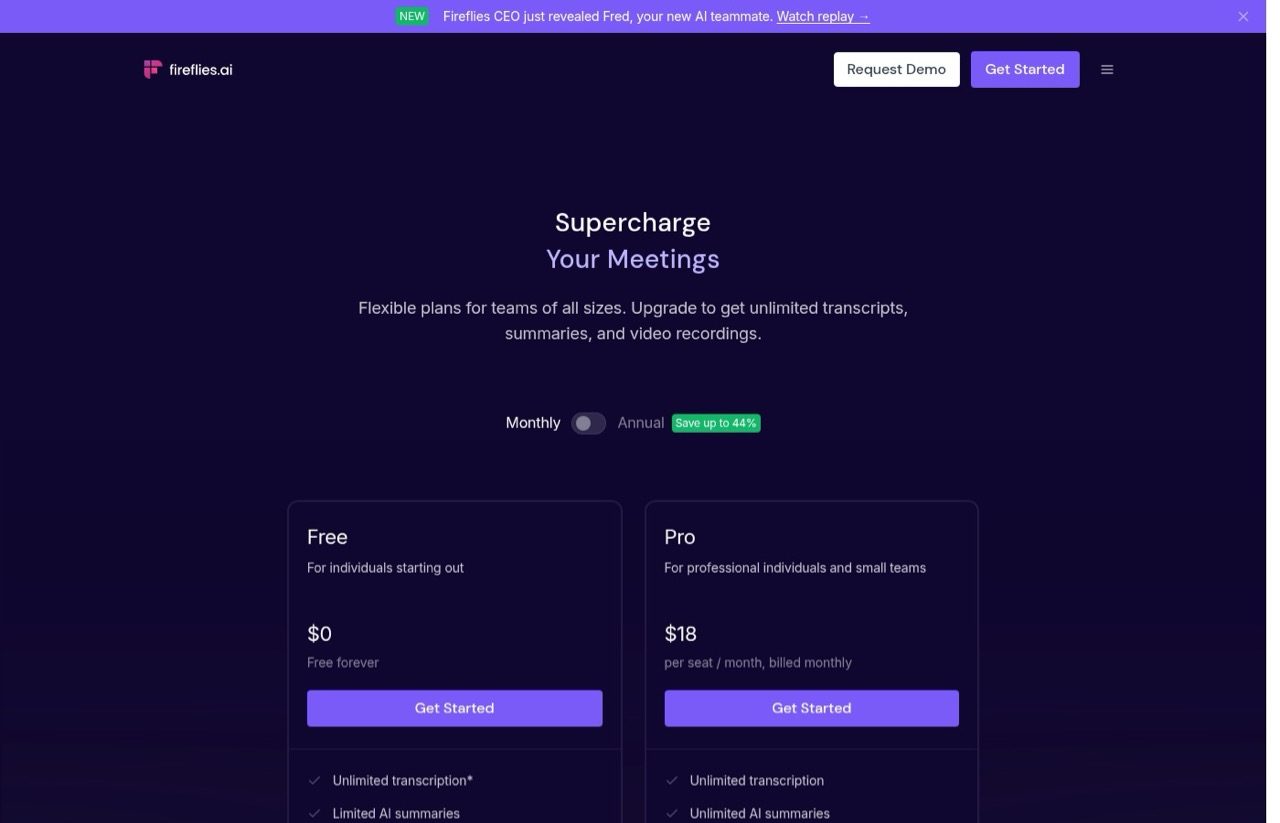
Fireflies.ai is another one I've had on my calls. By default it sends a bot into your Zoom, Google Meet or Teams call, and its Chrome extension can record without one. Every meeting lands in a searchable library, which suits teams that want to look back across months of calls.
Pros:
- Transcription in 100+ languages, even on the free plan
- Bot-free recording through the Chrome extension
Cons:
- The free plan caps storage at 400 minutes for the whole team, and AI summaries and the AskFred assistant are limited
- Pro costs nearly twice as much on monthly billing as on annual
Best for: Small teams that want one searchable record of every internal and client call.
Pricing: Free plan. Pro $18/seat/month billed monthly ($10 annually). Business $29/seat/month billed monthly ($19 annually). Enterprise $39/seat/month, annual only.
Free trial: No trial. The free plan has no time limit.
Bottom line: Pick it when the value is in the archive, and budget for Pro from the start.
4. Otter (Best for Live Transcription)
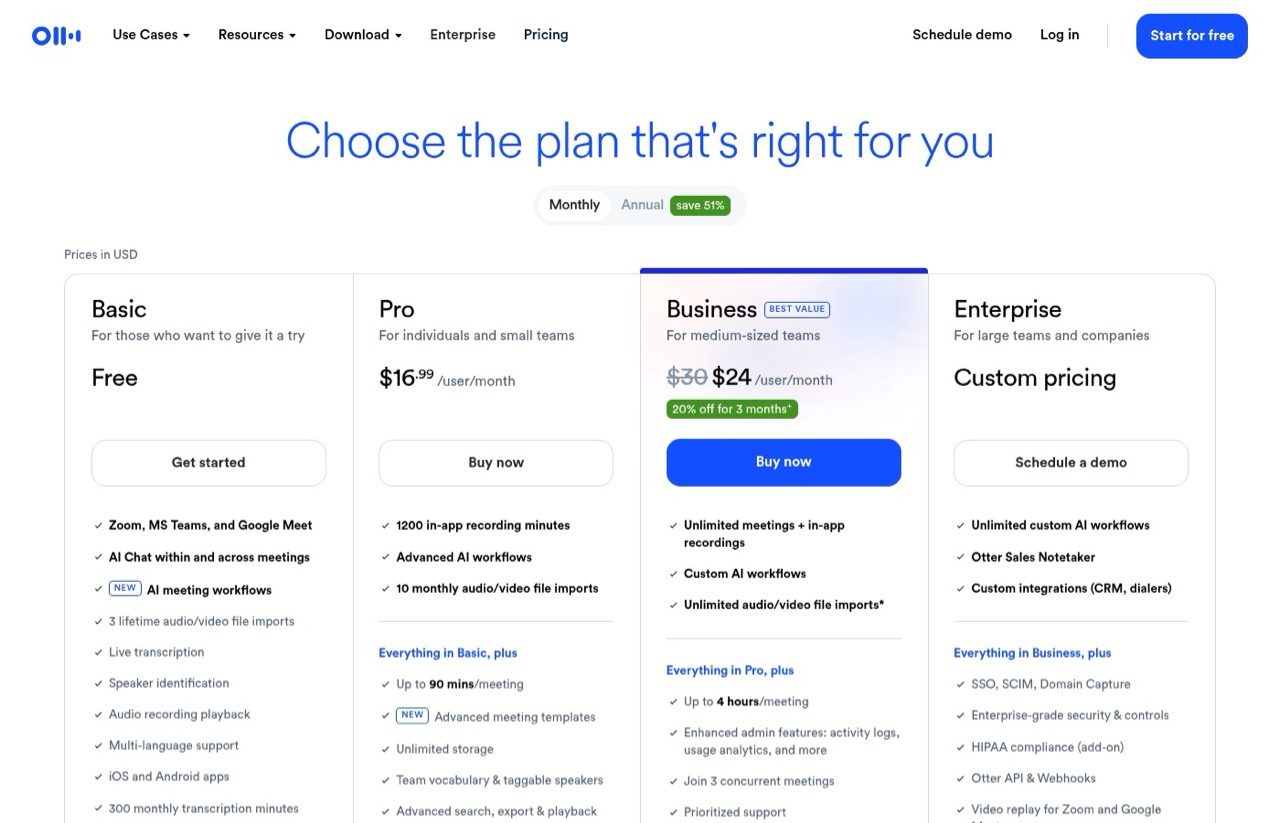
Otter, which I've also used, sends a bot into Zoom, Teams and Google Meet. The transcript builds live while people talk, which is handy when you need to catch a number or a name mid-call.
Pros:
- Live transcription with speaker identification on every plan
- Even the free plan includes an MCP server, a connector that lets AI assistants like Claude read your Otter notes
Cons:
- The free plan stops each conversation at 30 minutes, Pro at 90 and Business at four hours
- Minutes reset monthly and don't roll over
Best for: Interviews and calls where seeing the transcript as it happens matters.
Pricing: Basic free (300 minutes a month). Pro $16.99/user/month billed monthly ($8.33 annually). Business $30/user/month billed monthly ($19.99 annually), and first-time subscribers on monthly billing pay $24 for the first three months.
Free trial: No trial. Basic is free with no time limit.
Bottom line: Good live transcription, but treat the free plan as a demo and pick Pro or Business by how long your calls run.
5. Calendly Notetaker (Best If You Already Book Calls Through Calendly)
Calendly Notetaker is what records my own client calls right now. It joins Zoom, Google Meet and Teams as "[Your Name]'s Calendly Notetaker," including meetings that weren't booked through Calendly. Afterward it sends a recap with a summary, action items, the transcript and the recording.
I pull those recaps into my own notes system with a script, so each client call turns into context I can search later. That's the trade-off against Granola at #1: on Meet and Teams, Calendly's bot shows up in the call, but you get a recording to fall back on, and Granola doesn't keep one.
Pros:
- Lives inside the scheduling tool you may already pay for
- Drafts a follow-up email to send with the recap
- Works on meetings from your connected calendar, not just Calendly bookings
Cons:
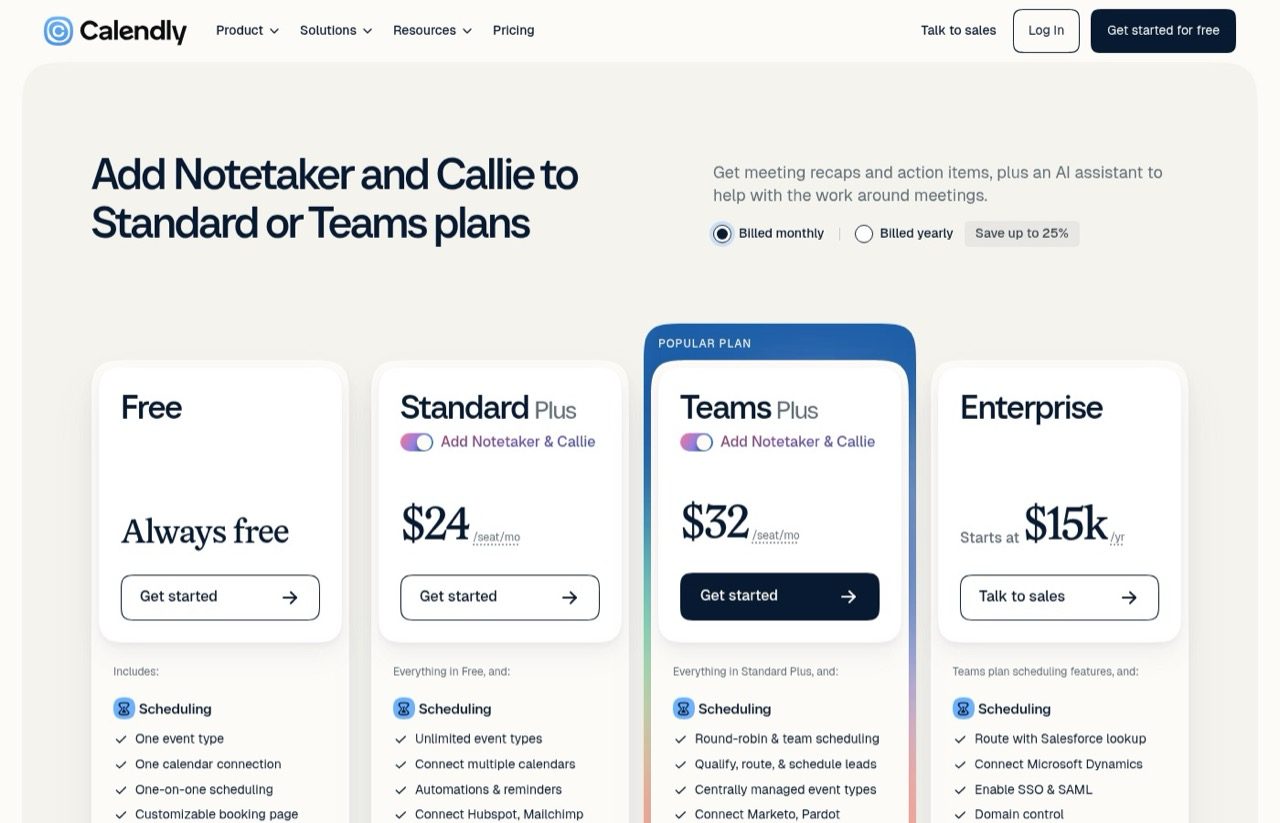
- Only on the Standard Plus and Teams Plus plans, or as an Enterprise add-on
- The host has to approve it, and it leaves after 15 minutes without approval
- Records a maximum of two hours per meeting and only works in English
Best for: Consultants and coaches whose client calls already start from a Calendly link.
Pricing: Standard Plus $24/seat/month or Teams Plus $32/seat/month, billed monthly with Notetaker included. An add-on on Enterprise.
Free trial: Calendly's own Notetaker guide points new users to a 14-day free trial.
Bottom line: If Calendly already runs your calendar, this removes a whole extra vendor.
6. tl;dv (Best for Bot-Free Recording on Google Meet)
tl;dv records Zoom, Google Meet and Teams calls with video and transcription in 100+ languages, even on the free plan. On Google Meet it offers a bot-free option as well as the usual bot. I haven't used it.
Pros:
- Free video recordings, kept for up to three months
- Bot-free recording is available on Google Meet
Cons:
- The free plan caps AI notes at 10 meetings and web recordings at 40 a week
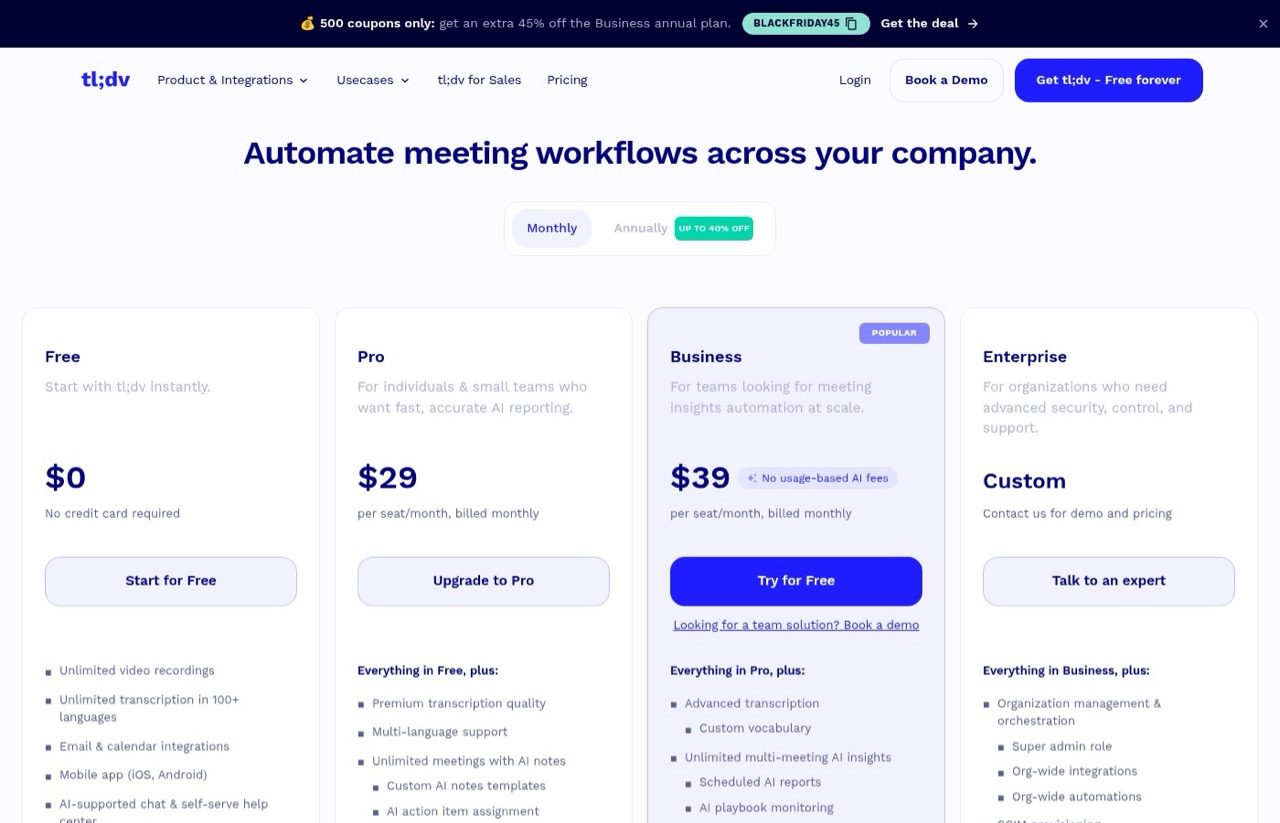
- At $29 a seat, Pro has the highest per-seat entry price on this list
Best for: Remote teams that want a video record of every call before they pay for AI notes.
Pricing: Free plan. Pro $29/seat/month and Business $39/seat/month, both billed monthly. Up to 40% off on annual billing.
Free trial: Free plan, plus a free trial of Business.
Bottom line: Worth a look if you want the video itself, with the AI part rationed until you pay.
7. Fellow (Best for Teams That Need Recording Rules)
Fellow aims at regulated industries such as financial services, legal and healthcare. It records with a bot or bot-free through its Mac and Windows desktop app, and handles in-person meetings too. It's not one I've used.
Pros:
- Bot or bot-free capture, plus in-person meetings
- Enterprise adds advanced recording permissions and domain control
Cons:
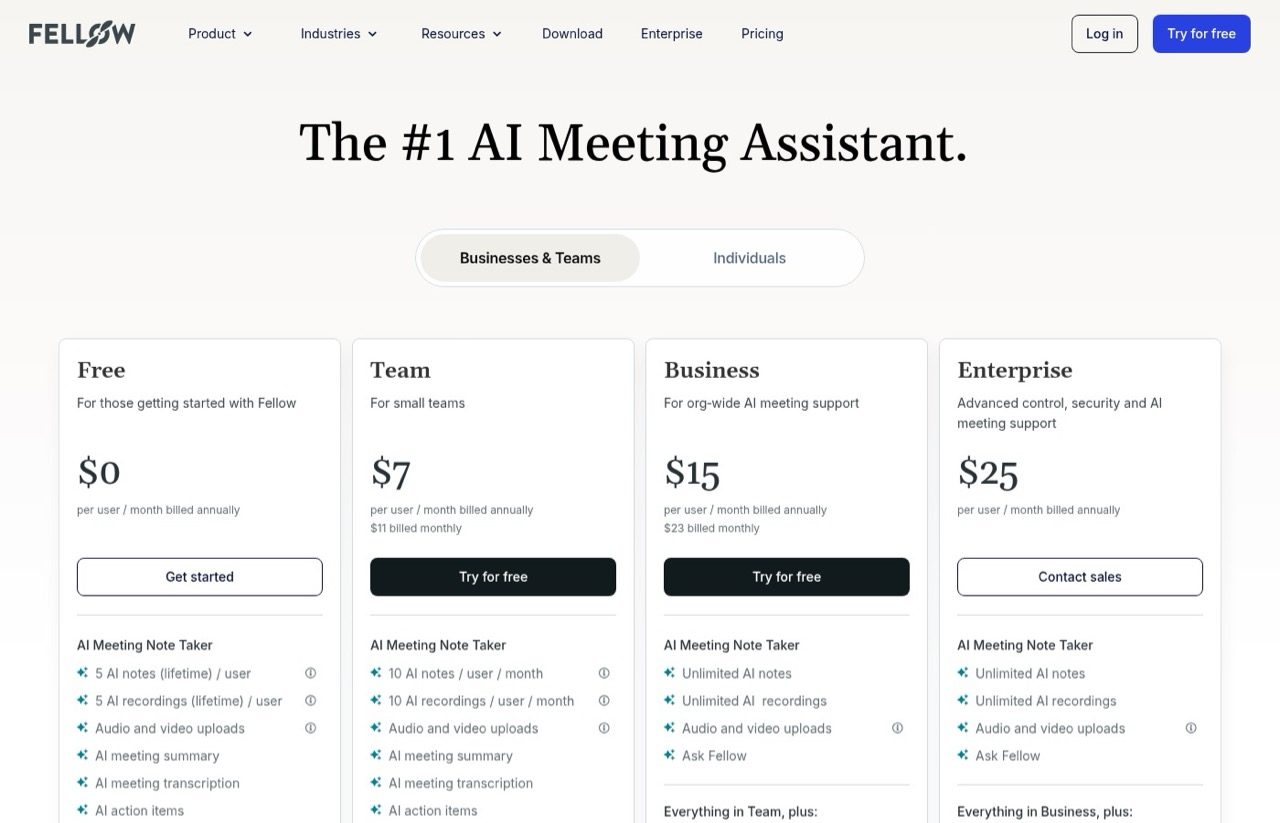
- The free plan includes only 5 AI notes per user, ever
- Team caps AI notes at 10 per user per month
Best for: Teams whose compliance people need a say in which calls get recorded.
Pricing: Free plan. Team $11/user/month billed monthly ($7 annually). Business $23/user/month billed monthly ($15 annually). Enterprise $25/user/month billed annually, from 10 users.
Free trial: Free plan. The paid plans show a "Try for free" button but don't state trial terms.
Bottom line: Built around governance, which suits regulated teams and is more than a solo marketer needs.
8. Claude Meetings (Best for Claude Team Companies Running Internal Google Meet Calls)
Claude Meetings lands last for the client-heavy calendar this list is built for, because it can't join a client's Zoom call at all. For a company already paying for Claude Team and holding internal calls on Google Meet, the math flips. The notes come with the seat during the beta, and Claude can build docs and whiteboards while you talk.
I haven't used it, since the beta is only now reaching accounts. Everything here comes from Anthropic's launch post and Help Center guide.
Pros:
- Notes, transcripts and answers that don't use connected tools are included in Team and Enterprise seats
- Docs and whiteboards made in a call are free through February 10, 2027
Cons:
- Google Meet only, with no date for Zoom or Teams
- Not on Pro, Max or Ultra, and not available to organizations with zero data retention, HIPAA-ready setups or their own encryption keys during the beta
- Saves a transcript and summary but no audio
Best for: Teams already on Claude Team or Enterprise whose internal calls run on Google Meet.
Pricing: No separate price. A Claude Team standard seat is $25/month billed monthly ($20 annually), with a two-seat minimum, so $50 a month is the smallest way in. Using connected tools during a call counts toward your usage and can add charges.
Free trial: No. It comes with a Team or Enterprise seat during the beta.
Bottom line: If you already pay for Claude Team, it's worth testing on internal calls. For client calls on Zoom, on Teams, or under an internal-only setting, keep one of the seven above.
What About Gemini, Copilot and Zoom's Built-In Note Takers?
Gemini in Google Meet, Copilot in Microsoft Teams and Zoom AI Companion each live inside one meeting app and depend on a plan your company may already pay for. Check that first. If the built-in one covers your calls, you may not need anything on this list. Claude Meetings shares that single-app limit, which is why it ranks last here.
Jamie and Krisp show up in Google's AI Overview for this search, Read AI ranks on page one with its own roundup, and Bluedot shows up on a few lists. I haven't used them and few lists rank them, so they're unranked.
How to Choose an AI Note Taker for Meetings
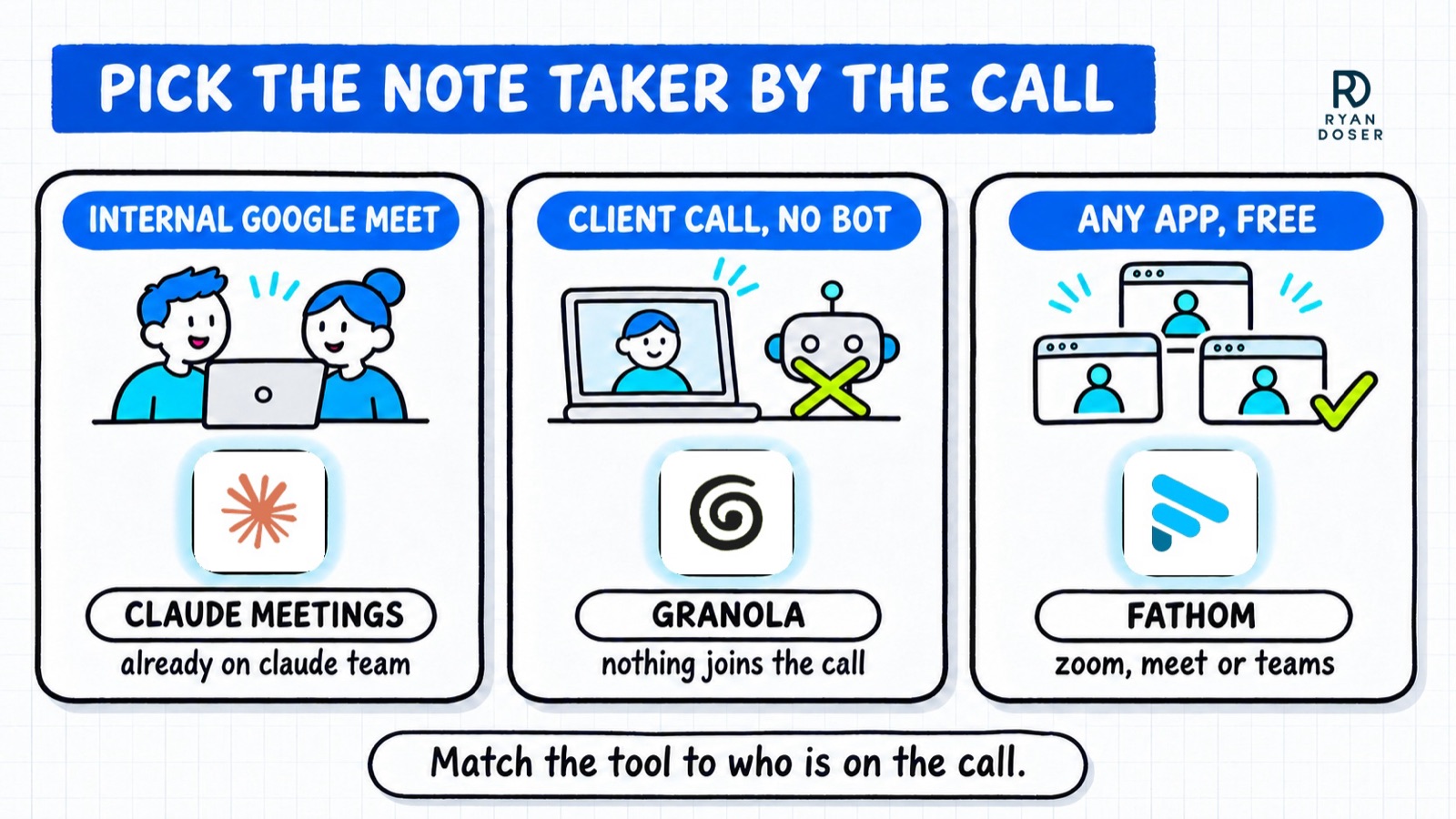
- Who's usually on the call? Mostly clients points you toward a bot-free tool. Mostly your own team opens up every option.
- Which app do people send you? Claude Meetings only works on Google Meet, and each built-in assistant lives in one app. The other seven on this list work across Zoom, Meet and Teams.
- Do you need a recording? Granola and Claude Meetings keep no audio. Fathom, Calendly Notetaker and tl;dv keep video you can replay.
- How long do your calls run? Free plans cap things differently: 30 minutes per call on Otter, 400 minutes of storage on Fireflies.ai, 10 AI notes on tl;dv.
- Where should the notes end up? If the answer is Claude, my list of the best Claude connectors covers which connectors are worth setting up first.
Where I'd Start Tomorrow
Granola vs Fathom comes down to whether you need a recording to fall back on. If you don't and most calls are with clients, start with Granola and tell people you're using it. Need one? Install Fathom's free plan and get permission before its bot joins.
Fathom vs Fireflies.ai is simpler: Fathom for one person who wants free unlimited recording, Fireflies.ai for a team that wants one searchable archive. If Calendly already books your calls, price the Plus upgrade against a separate tool before adding one. More tools I'd actually pay for are in my best AI marketing tools roundup.
And if your company pays for Claude Team and lives on Google Meet, test Claude Meetings on internal calls first. That's the one call it was built for.
Best AI Note Takers FAQs
Does Claude Meetings replace Granola, Fathom or Otter?
For a narrow group. Claude Meetings is in beta on Claude Team and Enterprise plans and only works on Google Meet. If your team pays for Claude Team and mostly holds internal Meet calls, it can replace a separate tool. On client calls it either stays out or stops replying in chat, depending on guest settings. Anthropic is also partnering with Granola, Fireflies.ai, Otter and others on transcript handoff.
What is the best free AI note taker?
Fathom, for most people. Its free plan includes unlimited recordings and transcripts on Zoom, Google Meet, Teams and Slack huddles, though summary templates are limited. tl;dv also records video for free but keeps it for up to three months and caps AI notes at 10 meetings. Otter's free plan stops each call at 30 minutes. I've used Fathom and Otter, and my read on tl;dv comes from its pricing page.
Which AI note takers don't join the meeting as a bot?
Granola never joins. It records through your computer's audio on any meeting app. Fathom offers bot-free capture as a Mac beta, Fireflies.ai through its Chrome extension, Calendly Notetaker through its Zoom app, Fellow through its desktop app and tl;dv on Google Meet. With no visible bot, you still need to tell people the call is being transcribed. I haven't tested the bot-free modes of Fathom, Fireflies.ai or Calendly Notetaker.
Is there an AI note taker for Zoom?
Yes, most of them. Granola, Fathom, Fireflies.ai, Otter, Calendly Notetaker, tl;dv and Fellow all work with Zoom, and Zoom has its own AI Companion. The exception on this list is Claude Meetings, which only supports Google Meet for now. Anthropic says other platforms are coming soon but hasn't given a date.
What are the best Otter alternatives?
It depends on why you're leaving. If the free plan's 30-minute cap is the problem, Fathom records unlimited calls for free. If you don't want a bot joining, Granola listens through your computer instead. Teams that want a searchable archive should look at Fireflies.ai. I've used all four.
Disclosure: there are no affiliate links in this post, and no vendor paid to be included. I've used Granola, Fathom, Fireflies.ai, Otter and Calendly Notetaker. Claude Meetings, tl;dv and Fellow were assessed from their pricing pages and docs. Pricing checked November 12, 2026, on monthly billing where offered. Full disclosure.